Hello!

In yesterday’s post, I wrote on how to interact with a menu with Hololens, Unity3D and HoloToolkit. Today I will wrote on how to show the menu in a specific location using a voice command.

Ideally, the menu is displayed in the direction in which we are looking with the Hololens.

 

Holo view Hide Menu 03.gif

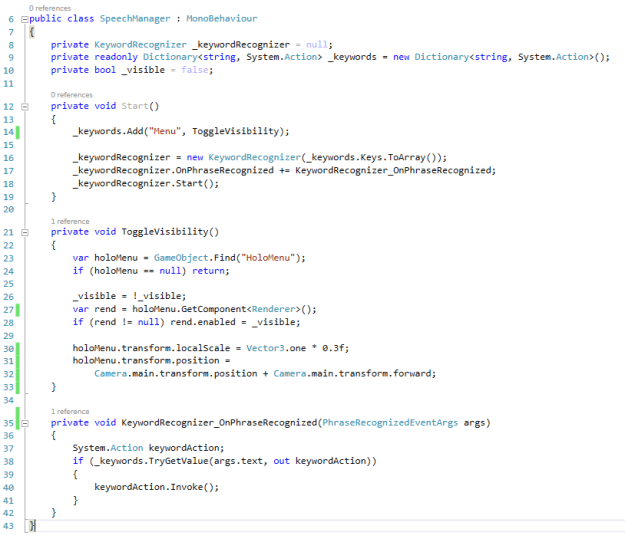
It’s very easy, in the Managers collection, we will add a new Script with the following code.
Clipboard02.png

The code is very simple, although a couple of commenrs will help

  • The voice command to show / hide the menu is “Menu”
  • Lines 26 to 28 is where the show or hidden the Group Menu action is placed
  • Lines 30 to 32 is where the menu at 30% is displayed of normal size and position it in front of the view of the camera of the Hololens

As someone has asked me, I leave the full example on GitHub to download here (link)

Greetings @ Toronto

El Bruno

References

41 responses to “#Hololens – Using voice commands to display a menu with #HoloToolkit”

  1. […] El Bruno, Using voice commands to display a menu with HoloToolkit […]

    Like

  2. […] El Bruno, Using voice commands to display a menu with HoloToolkit […]

    Like

  3. […] El Bruno, Using voice commands to display a menu with HoloToolkit […]

    Like

  4. […] El Bruno, Using voice commands to display a menu with HoloToolkit […]

    Like

  5. […] El Bruno, Using voice commands to display a menu with HoloToolkit […]

    Like

  6. […] El Bruno, Using voice commands to display a menu with HoloToolkit […]

    Like

  7. […] El Bruno, Using voice commands to display a menu with HoloToolkit […]

    Like

  8. […] El Bruno, Using voice commands to display a menu with HoloToolkit […]

    Like

  9. […] El Bruno, Using voice commands to display a menu with HoloToolkit […]

    Like

  10. […] El Bruno, Using voice commands to display a menu with HoloToolkit […]

    Like

  11. […] El Bruno, Using voice commands to display a menu with HoloToolkit […]

    Like

  12. […] El Bruno, Using voice commands to display a menu with HoloToolkit […]

    Like

  13. […] El Bruno, Using voice commands to display a menu with HoloToolkit […]

    Like

  14. […] Using voice commands to display a menu with HoloToolkit […]

    Like

  15. […] Using voice commands to display a menu with HoloToolkit […]

    Like

  16. […] Using voice commands to display a menu with HoloToolkit […]

    Like

  17. […] Using voice commands to display a menu with HoloToolkit […]

    Like

    1. Thanks Luis !! ^_^

      Like

    2. Hi I need your help with voice command project please ?

      Like

      1. sure, happy to help!

        Like

  18. […] Using voice commands to display a menu with HoloToolkit […]

    Like

  19. […] Using voice commands to display a menu with HoloToolkit […]

    Like

Leave a reply to #HoloLens – How create a 3D text always visible using #HoloToolkit | El Bruno Cancel reply

Discover more from El Bruno

Subscribe now to keep reading and get access to the full archive.

Continue reading