Hello!
Comes time to perform a backup of some of the sutff I’ve learned about Hololens and HoloToolkit. This one is related to a basic feature in any app
Present a menu and select an item. In Hololens using AirTap
The idea is to view a board with different options, and the option selected will be displayed in a top 3D text
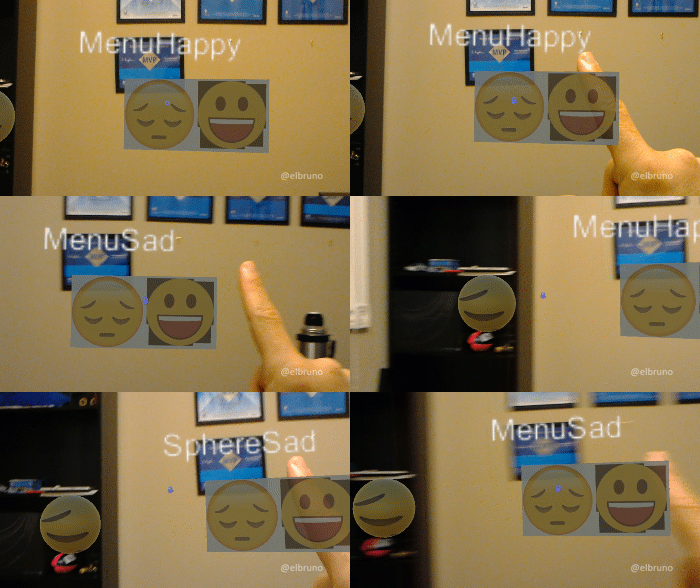
In previous posts I have already commented on how to create a Unity3D project and how to import the HoloToolkit. From here, the following steps would be
- Delete default assets: Main camera & Directional light
- Save Scene
- Adjust UWP projects settings to be Hololens capable
- Project Settings / Player
- Project Settings / Quality
- File / Build Settings
- Import HoloToolkit
- Add Assets
- Main Camera
- Spatial Mapping
- Cursor With Feedback
- Create Empty and Rename > Managers
- Add Components
- Gaze Managers
- Gaze Stabilizer
- Gesture Managers
- Hands Manager
- Add Assets
- Add Components
- Create Empty and Rename > HoloCollection
- Add Assets
- Add Cube, add SAD image to cube
- Add Cube, add HAPPY image to cube
- Add Sphere, add SAD image to sphere
- Add Sphere, add HAPPY image to sphere
- Add 3D Text, name “TextResult”
- Add Assets
The components hierarchy should be similar to the following
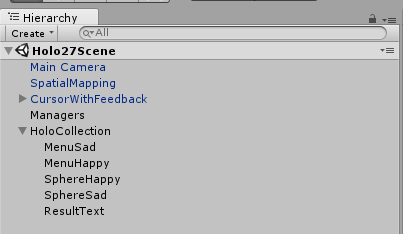
And now is the moment to create some interaction feature. So a single script called “EmojiSelector” will do the magic
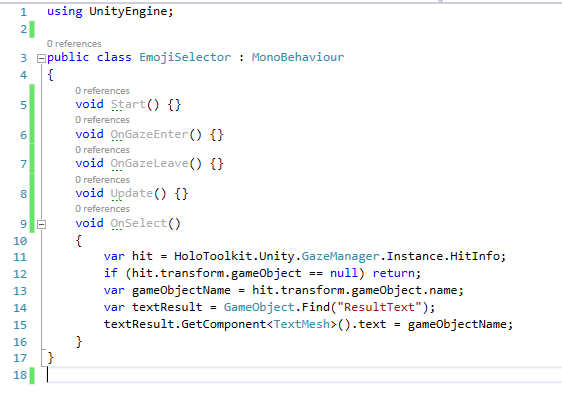
In this script I would add a couple of lines in the OnSelect operation. This operation is is called from the GestureManager when performing an AirTap on a selected item. The Script obtains the item selected from the GazeManager and if it is valid, displays the name in the Text called “ResultText” 3D.
Greetings @ Toronto
El Bruno
References
- GitHub, HoloToolkit
- GitHub, HoloToolkit Unity
- El Bruno, How to Import the HoloToolkit Unity
- El Bruno, How to place a Hologram using AirTap and HoloToolkit
 El Bruno
Leave a reply to #Hololens – Solución al problema con TapToPlace agregando validación de planos (hasta que #HoloToolkit sea compatible) – El Bruno Cancel reply