Ho !

Today I’ll share a quick post, because I’m on house moving day and there are too many things to move around.

After the last update on Flow, one of the cool features added into the designer  was the chance to add action execution conditions. These conditions will trigger the action based on 4 options

  • Is successful
  • Has failed
  • Is skipped
  • Has timeout

Using this feature, now our flows definition will now have a much better way to handle errors, exceptions, timeouts, and more.

The way to use this feature is very straight forward, once we add a new action we select the options button […] and select “Configure run after”

Clipboard02

Here we can the options we have to configure the action.

Clipboard04

And that’s it! The feature is cool, however there is still a small gap in the designer user interface for the flow:

There is no visual clue to identify which actions have some configuration in “Configure run after”

So, in a simple flow like the one in next picture, the 2 actions are very similar however the 2nd one have some special configuration for error handling :S.
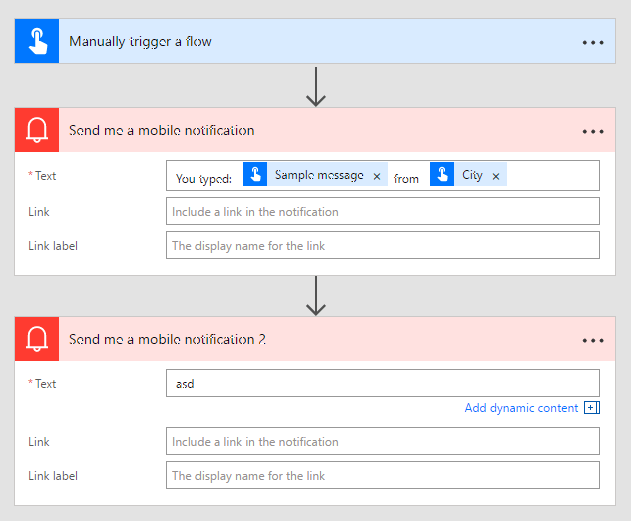
Clipboard06

In a near update, for sure we will have some visual notification about this!

Happy Coding

Greetings @ Mississauga (-2!)

El Bruno

References

30 responses to “#Flow – Handle exceptions, errors, timeouts and more in a #MicrosoftFlow definition”

  1. […] Handle exceptions, errors, timeouts and more in a Microsoft Flow definition […]

    Like

  2. […] Handle exceptions, errors, timeouts and more in a Microsoft Flow definition […]

    Like

  3. […] Handle exceptions, errors, timeouts and more in a Microsoft Flow definition […]

    Like

  4. […] Handle exceptions, errors, timeouts and more in a Microsoft Flow definition […]

    Like

  5. […] Handle exceptions, errors, timeouts and more in a Microsoft Flow definition […]

    Like

  6. […] Handle exceptions, errors, timeouts and more in a Microsoft Flow definition […]

    Like

  7. […] Handle exceptions, errors, timeouts and more in a Microsoft Flow definition […]

    Like

  8. […] Handle exceptions, errors, timeouts and more in a Microsoft Flow definition […]

    Like

  9. […] Handle exceptions, errors, timeouts and more in a Microsoft Flow definition […]

    Like

  10. […] Handle exceptions, errors, timeouts and more in a Microsoft Flow definition […]

    Like

  11. […] Handle exceptions, errors, timeouts and more in a Microsoft Flow definition […]

    Like

  12. […] Handle exceptions, errors, timeouts and more in a Microsoft Flow definition […]

    Like

  13. […] Handle exceptions, errors, timeouts and more in a Microsoft Flow definition […]

    Like

  14. […] Handle exceptions, errors, timeouts and more in a Microsoft Flow definition […]

    Like

  15. […] Handle exceptions, errors, timeouts and more in a Microsoft Flow definition […]

    Like

  16. […] Handle exceptions, errors, timeouts and more in a Microsoft Flow definition […]

    Like

  17. […] Handle exceptions, errors, timeouts and more in a Microsoft Flow definition […]

    Like

  18. […] Handle exceptions, errors, timeouts and more in a Microsoft Flow definition […]

    Like

  19. […] Handle exceptions, errors, timeouts and more in a Microsoft Flow definition […]

    Like

  20. […] Handle exceptions, errors, timeouts and more in a Microsoft Flow definition […]

    Like

  21. […] Handle exceptions, errors, timeouts and more in a Microsoft Flow definition […]

    Like

  22. […] Handle exceptions, errors, timeouts and more in a Microsoft Flow definition […]

    Like

  23. […] Handle exceptions, errors, timeouts and more in a Microsoft Flow definition […]

    Like

  24. […] Handle exceptions, errors, timeouts and more in a Microsoft Flow definition […]

    Like

  25. […] Handle exceptions, errors, timeouts and more in a Microsoft Flow definition […]

    Like

  26. […] Handle exceptions, errors, timeouts and more in a Microsoft Flow definition […]

    Like

  27. […] Handle exceptions, errors, timeouts and more in a Microsoft Flow definition […]

    Like

Leave a reply to #LogicApps – Working with Visual Studio 2017 and Logic Apps #VS2017 – El Bruno Cancel reply

Discover more from El Bruno

Subscribe now to keep reading and get access to the full archive.

Continue reading