Hello!

A very common scenario when we work with Microsoft Flow is to work with collections of elements. These may be rows in Excel, Sharepoint lists, or other collections. Usually, in these scenarios, we tried to do is to work individually with each one of the items in the collection.

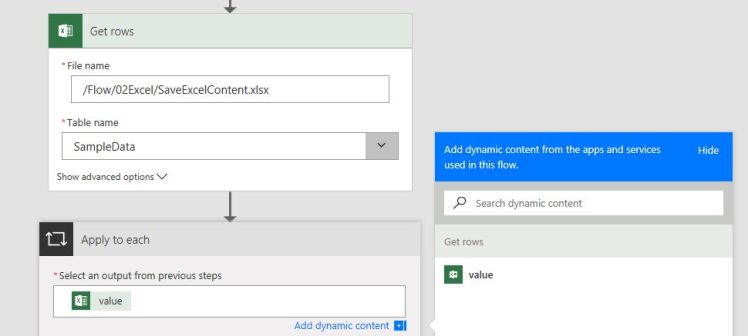
If we use an Excel as an example, we can see that we have the action “Get Rows”. This action opens an Excel file, reads a table and returns a pointer with the collection of rows in the Table. The next thing we have to do is select an action of type “Apply to Each” which will allow us to iterate through the elements of the collection.

In the next picture, we can see a couple of steps in a Flow definition. Start with open an Excel file, then select the output from the previous step named “Value”. “Value” represents each of the rows in Excel the table opened in the previous step.
clipboard07

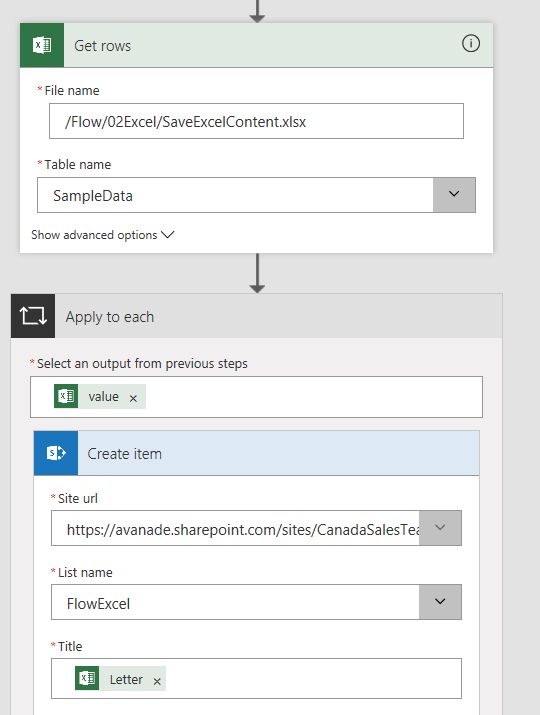
The next thing is to work with every “value”. For example, insert the contents of the Excel table into a Sharepoint list.

Note: Here we miss functionality as the of AutoMapper (link), which in the case of entities in the .net saves us a lot of work.
 

clipboard05

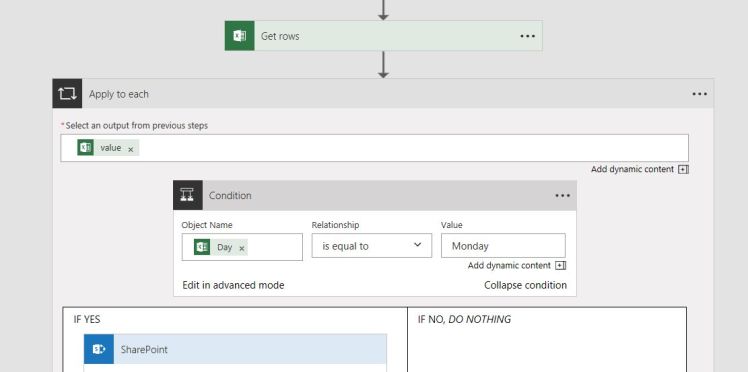
We can think of a different scenario, where we need to conduct any assessment for each row in Excel, for example, single recording rows that match a value “Monday” for the day at Excel column in Sharepoint.
clipboard09

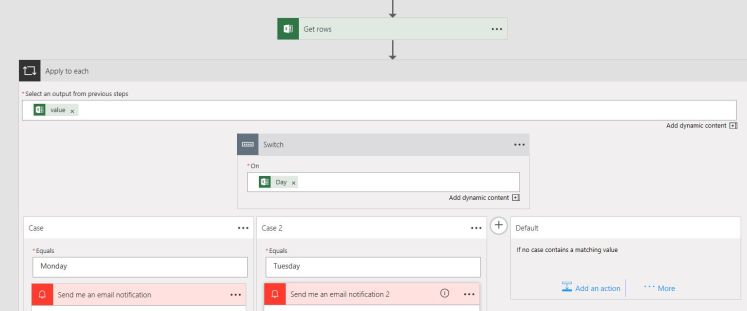
And, if an IF not enough also you can test your monitor resolution with a fantastic graphic SWITCH!
clipboard11

Greetings @ Toronto

El Bruno

References

39 responses to “#Flow – How To iterate through collections of elements (#Excel, #Sharepoint, and more…)”

  1. […] How To iterate through collections of elements (Excel, Sharepoint, Cognitive Services and more…) […]

    Like

  2. […] How To iterate through collections of elements (Excel, Sharepoint, Cognitive Services and more…) […]

    Like

  3. […] How To iterate through collections of elements (Excel, Sharepoint, Cognitive Services and more…) […]

    Like

  4. […] How To iterate through collections of elements (Excel, Sharepoint, Cognitive Services and more…) […]

    Like

  5. […] How To iterate through collections of elements (Excel, Sharepoint, Cognitive Services and more…) […]

    Like

  6. […] How To iterate through collections of elements (Excel, Sharepoint, Cognitive Services and more…) […]

    Like

  7. […] How To iterate through collections of elements (Excel, Sharepoint, Cognitive Services and more…) […]

    Like

  8. […] How To iterate through collections of elements (Excel, Sharepoint, Cognitive Services and more…) […]

    Like

  9. […] How To iterate through collections of elements (Excel, Sharepoint, Cognitive Services and more…) […]

    Like

  10. […] How To iterate through collections of elements (Excel, Sharepoint, Cognitive Services and more…) […]

    Like

  11. […] How To iterate through collections of elements (Excel, Sharepoint, Cognitive Services and more…) […]

    Like

  12. […] How To iterate through collections of elements (Excel, Sharepoint, Cognitive Services and more…) […]

    Like

  13. […] How To iterate through collections of elements (Excel, Sharepoint, Cognitive Services and more…) […]

    Like

  14. […] How To iterate through collections of elements (Excel, Sharepoint, Cognitive Services and more…) […]

    Like

  15. […] How To iterate through collections of elements (Excel, Sharepoint, Cognitive Services and more…) […]

    Like

  16. […] How To iterate through collections of elements (Excel, Sharepoint, Cognitive Services and more…) […]

    Like

  17. […] How To iterate through collections of elements (Excel, Sharepoint, Cognitive Services and more…) […]

    Like

  18. […] How To iterate through collections of elements (Excel, Sharepoint, Cognitive Services and more…) […]

    Like

  19. […] How To iterate through collections of elements (Excel, Sharepoint, Cognitive Services and more…) […]

    Like

  20. […] How To iterate through collections of elements (Excel, Sharepoint, Cognitive Services and more…) […]

    Like

  21. […] How To iterate through collections of elements (Excel, Sharepoint, Cognitive Services and more…) […]

    Like

  22. […] How To iterate through collections of elements (Excel, Sharepoint, Cognitive Services and more…) […]

    Like

  23. […] How To iterate through collections of elements (Excel, Sharepoint, Cognitive Services and more…) […]

    Like

  24. […] How To iterate through collections of elements (Excel, Sharepoint, Cognitive Services and more…) […]

    Like

  25. […] your Apps health in Azure using Application Insights and Microsoft Flow How To iterate through collections of elements (Excel, Sharepoint, Cognitive Services and more…)Trigger a Flow associated to an item in a #SharePoint […]

    Like

  26. […] your Apps health in Azure using Application Insights and Microsoft Flow How To iterate through collections of elements (Excel, Sharepoint, Cognitive Services and more…)Trigger a Flow associated to an item in a #SharePoint […]

    Like

  27. […] your Apps health in Azure using Application Insights and Microsoft Flow How To iterate through collections of elements (Excel, Sharepoint, Cognitive Services and more…)Trigger a Flow associated to an item in a #SharePoint […]

    Like

  28. […] your Apps health in Azure using Application Insights and Microsoft Flow How To iterate through collections of elements (Excel, Sharepoint, Cognitive Services and more…)Trigger a Flow associated to an item in a #SharePoint […]

    Like

  29. […] your Apps health in Azure using Application Insights and Microsoft Flow How To iterate through collections of elements (Excel, Sharepoint, Cognitive Services and more…)Trigger a Flow associated to an item in a #SharePoint […]

    Like

  30. […] your Apps health in Azure using Application Insights and Microsoft Flow How To iterate through collections of elements (Excel, Sharepoint, Cognitive Services and more…)Trigger a Flow associated to an item in a #SharePoint […]

    Like

  31. […] How To iterate through collections of elements (Excel, Sharepoint, Cognitive Services and more…) […]

    Like

  32. […] How To iterate through collections of elements (Excel, Sharepoint, Cognitive Services and more…) […]

    Like

  33. Hello,

    I have a smililar requirement where I have to read all the rows in the excel file (uploaded in SharePoint doc library). There is a date column and a complain id column. If the complain id column is blank, 24 hours after the date (mentioned in the date column) it will trigger a mail to the person’s mail Id mentioned in the another column.

    Looking forward to your resoponse.

    Thanks in Advanve.

    -Sahadev

    Like

    1. Hi Sahadev
      you can create a scheduled flow to check this
      regards
      -Bruno

      Like

  34. […] How To iterate through collections of elements (Excel, Sharepoint, Cognitive Services and more…) […]

    Like

  35. […] How To iterate through collections of elements (Excel, Sharepoint, Cognitive Services and more…) […]

    Like

  36. […] How To iterate through collections of elements (Excel, Sharepoint, Cognitive Services and more…) […]

    Like

  37. […] How To iterate through collections of elements (Excel, Sharepoint, Cognitive Services and more…) […]

    Like

Leave a reply to #Flow – Export and Import Flow definitions with advanced options – El Bruno Cancel reply

Discover more from El Bruno

Subscribe now to keep reading and get access to the full archive.

Continue reading