Hi!
Another new feature available in Microsoft Flow is the chance to work with expressions and fields. The features seems to be inherited from the big brother “Logic Apps”, and it’s a big step on the way we can define our Flows. To be honest, there are some special scenarios where you need to perform a simple comparison or use part of the value of a field and until the arrive of expressions, there were no way to do this.

The most common sample we can find in the Flow Blog is related to date manipulation. It’s very easy now to add a day, an hour or some minutes to a date and this is very useful when dates are part of the Flow definition. Another samples could be useful for some Excel power users, now we have the chance to use IIF() functions, or if you are a developer, JSon, Xml or XPath functions are also available for more deep scenarios.
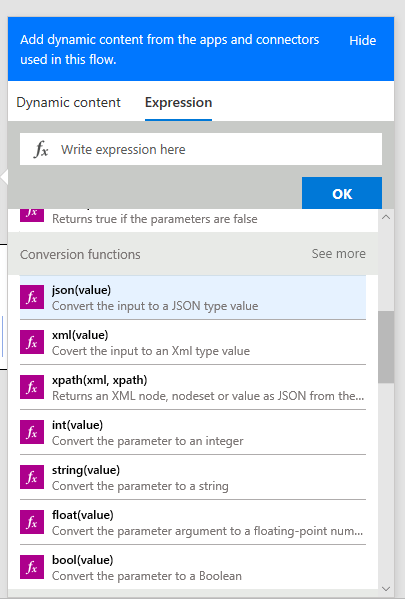
The full list of expressions / functions can be reach here (link), and we can have functions for the following categories
- String Functions
- Collections
- Logical Funcions
- Conversion Functions
- Math Functions
- Date and Time
- Workflow Functions
Happy Coding!
Greetings @ Burlington
El Bruno
References
- Microsoft Azure, Workflow Definition Language schema for Azure Logic Apps
El Bruno
- How to invoke a Flow from an external app using HTTP Request
- How to review a Flow process
- Push Notification Support
- Calling a Flow from a C# ConsoleApp
- Support for Team coauthoring and sharing
- Email Sentiment Analysis on a PowerBI dashboard, and Flow
- Schedule a Flow execution, recurrence supported!
- How To iterate through collections of elements (Excel, Sharepoint, Cognitive Services and more…)
- “Save as ” and interaction with physical buttons FLIC and BTTN
- New action definition to use Computer Vision APIs from Microsoft Cognitive Services
- Buttons Widgets in iOS and Android
- Handle exceptions, errors, timeouts and more in a Microsoft Flow definition
- Working with Variables in Microsoft Flow
- Advanced options to work with an HTTP Action in Microsoft Flow, Headers, Authentication and more
- How To emulate a Button for a Flow using a Browser
- Export and Import Flow definitions with advanced options
 El Bruno
Leave a reply to #Flow – Analizando imágenes en 3 pasos con Microsoft Flow y Computer Vision #CognitiveServices – El Bruno Cancel reply