Hello!

In addition to the Out-Of-The-Box triggers included in Flow, we also have the chance to invoke a flow using an HTTP POST call. There is a post on the Flow’s blog, “Calling Microsoft Flow from your application” (link), which explains this very weel. I’ll write some of the basic steps of a common scenario.

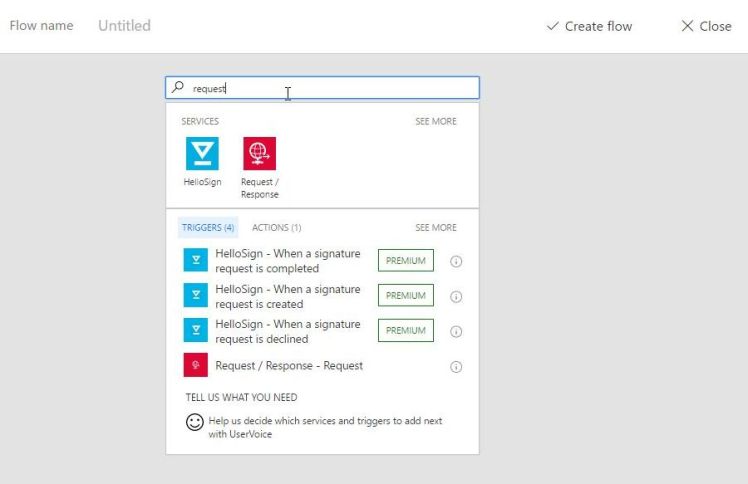
We need to start from a blank template, the first step we will add will be a trigger of type “Request / Response”.
clipboard01

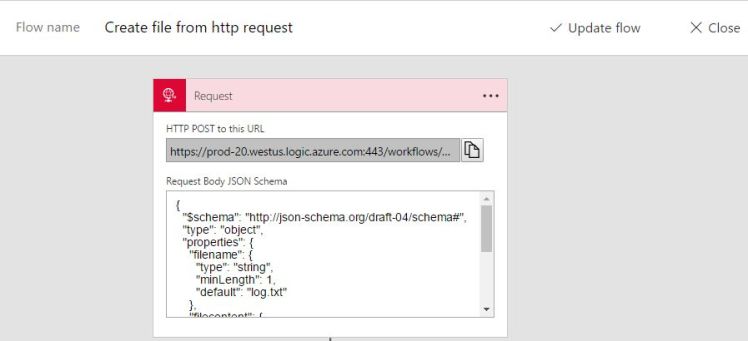
This type of trigger allows us to define a JSON schema with the fields for our call. Then we can use it in the following step of the Flow. Using jsonschema.net, I will create a simple example with 2 fields: filename and filecontent.

clipboard03

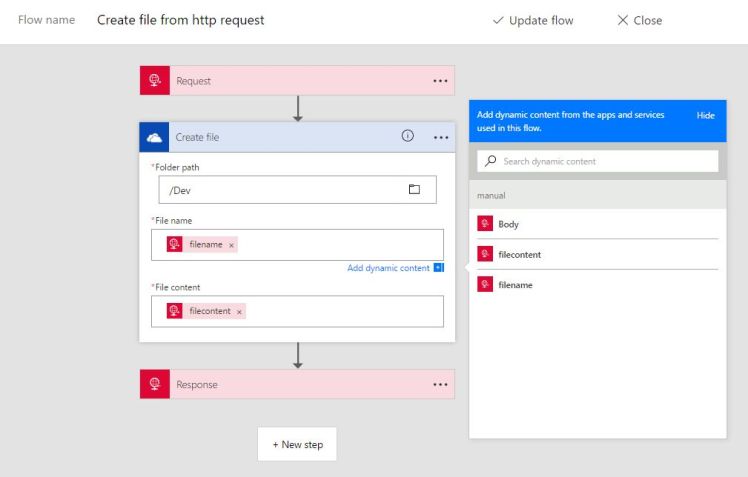
Then we copy the generated schema in the request definition. In the next step, I will create a new file in OneDrive with part of the content of the Request. As we can see in the image below, Flow parser analyzes the schema and presents us with the possibility of using the filename and filecontent fields.
Clipboard04.jpg

Finally, we add a Response action to complete the flow call. Here we also use the dynamic properties to select Headers and Body. If we want return a custom Body, the dynamic properties can be used to create it.

clipboard06

When we save the Flow definition, in the trigger Request we will find the URL we well use to make the calls. This is the time of copying this URL.
clipboard29

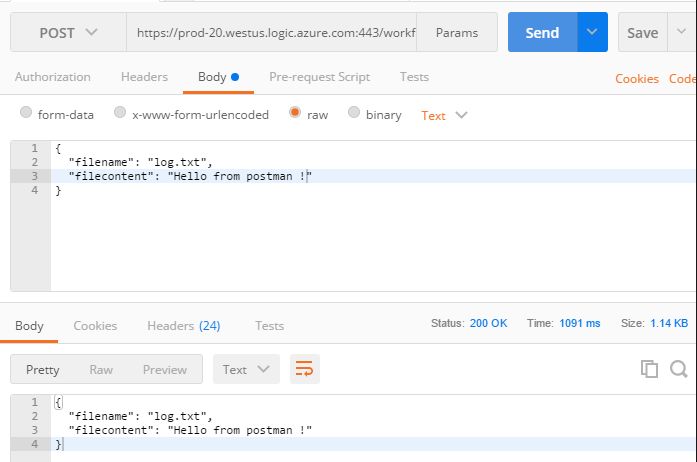
Finally, to emulate calls will use a classic app: Google, Postman Chrome App. Using the URL and the schema JSON make a request and we can see the result of it.
clipboard32

And, if we are to OneDrive, we can see the file created with the content that we have used in the request.

clipboard34

This is a very simple way to create and invoke flows!

Greetings @ Toronto

El Bruno

References

45 responses to “#Flow – How to invoke a Flow from an external app using HTTP Request”

  1. […] un trigger del tipo Http Request para poder invocar una definición de Flow desde apps externas (link). Hoy completaré el ejemplo con un poco de código C# para lanzar una instancia del […]

    Like

  2. […] how to use a Http Request as a trigger to be able to invoke a Flow definition from an external App (link). Today I´ll share an example with a bit of C# code to launch a […]

    Like

  3. […] How to invoke a Flow from an external app using HTTP Request […]

    Like

  4. […] How to invoke a Flow from an external app using HTTP Request […]

    Like

  5. […] How to invoke a Flow from an external app using HTTP Request […]

    Like

  6. […] How to invoke a Flow from an external app using HTTP Request […]

    Like

  7. […] How to invoke a Flow from an external app using HTTP Request […]

    Like

  8. […] How to invoke a Flow from an external app using HTTP Request […]

    Like

  9. […] How to invoke a Flow from an external app using HTTP Request […]

    Like

  10. […] How to invoke a Flow from an external app using HTTP Request […]

    Like

  11. […] How to invoke a Flow from an external app using HTTP Request […]

    Like

  12. […] How to invoke a Flow from an external app using HTTP Request […]

    Like

  13. […] How to invoke a Flow from an external app using HTTP Request […]

    Like

  14. […] How to invoke a Flow from an external app using HTTP Request […]

    Like

  15. […] How to invoke a Flow from an external app using HTTP Request […]

    Like

  16. […] How to invoke a Flow from an external app using HTTP Request […]

    Like

  17. […] How to invoke a Flow from an external app using HTTP Request […]

    Like

  18. […] How to invoke a Flow from an external app using HTTP Request […]

    Like

  19. […] How to invoke a Flow from an external app using HTTP Request […]

    Like

  20. […] How to invoke a Flow from an external app using HTTP Request […]

    Like

  21. […] How to invoke a Flow from an external app using HTTP Request […]

    Like

  22. […] How to invoke a Flow from an external app using HTTP Request […]

    Like

  23. […] How to invoke a Flow from an external app using HTTP Request […]

    Like

  24. […] How to invoke a Flow from an external app using HTTP Request […]

    Like

  25. […] How to invoke a Flow from an external app using HTTP Request […]

    Like

  26. […] How to invoke a Flow from an external app using HTTP Request […]

    Like

  27. […] How to invoke a Flow from an external app using HTTP Request […]

    Like

  28. […] How to invoke a Flow from an external app using HTTP Request […]

    Like

  29. […] How to invoke a Flow from an external App using HTTP Request […]

    Like

  30. […] How to invoke a Flow from an external App using HTTP Request […]

    Like

  31. Hi Bruno,

    Is it possible to create excel file with this method ?

    Thank you in advance
    Regards,

    Like

    1. Yes, there are a couple of actions in MS Flow to work with Excel.
      Regards
      -Bruno

      Like

Leave a reply to #Flow – Manage errors, exceptions, timeouts and more on a Flow definition – El Bruno Cancel reply

Discover more from El Bruno

Subscribe now to keep reading and get access to the full archive.

Continue reading