Hi !
This is a special post. It’s the 1st one I write completely in my MacBook, so I’m sure that Javier (@jsuarezruiz), Yeray (@JosueYeray), Braulio (@braulio_sl), Luis, Sara, Roberto and other mac users will be proud of me 😀
So, I build and run my Custom Vision Marvel project in Docker for Mac. Smooth build and also a fast one!
docker build -t elbruno/cvmarvel:3.0 .

Then get the image id and run the image

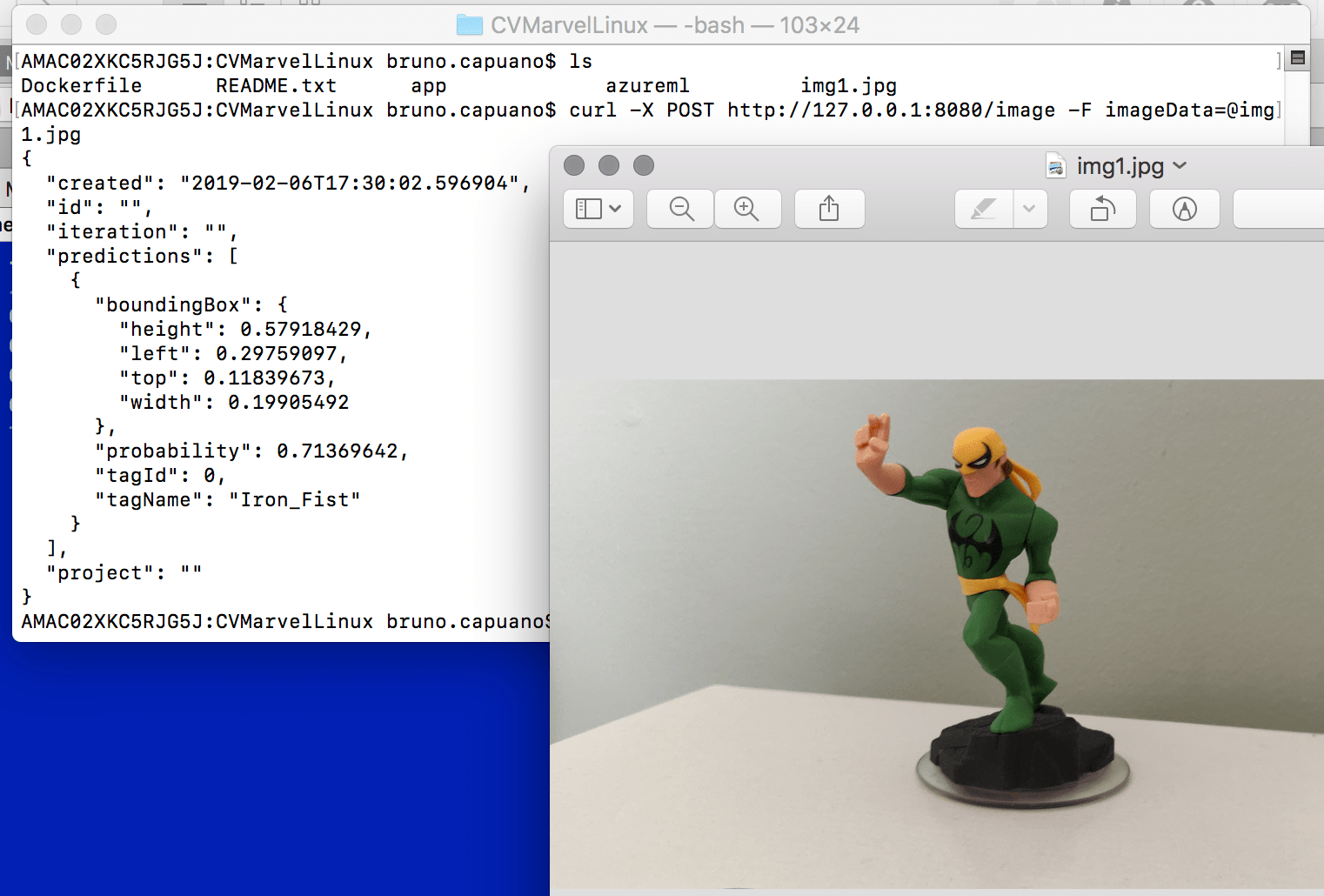
Final step is to play around with curl in bash to post the image (the file name with @ prefix took me some bing searches). Iron Fist detected !
curl -X POST http://127.0.0.1:8080/image -F imageData=@img1.jpg
Ok, the environment is working, so it’s time to create a .NetCore Console App to test this using amazing C# code. I have all my code in Azure Dev Ops, so I sync my repo and added a new project in my current solution

Some C# lines in my console app and I was able to analyze a local picture using the Custom Vision Model in a container
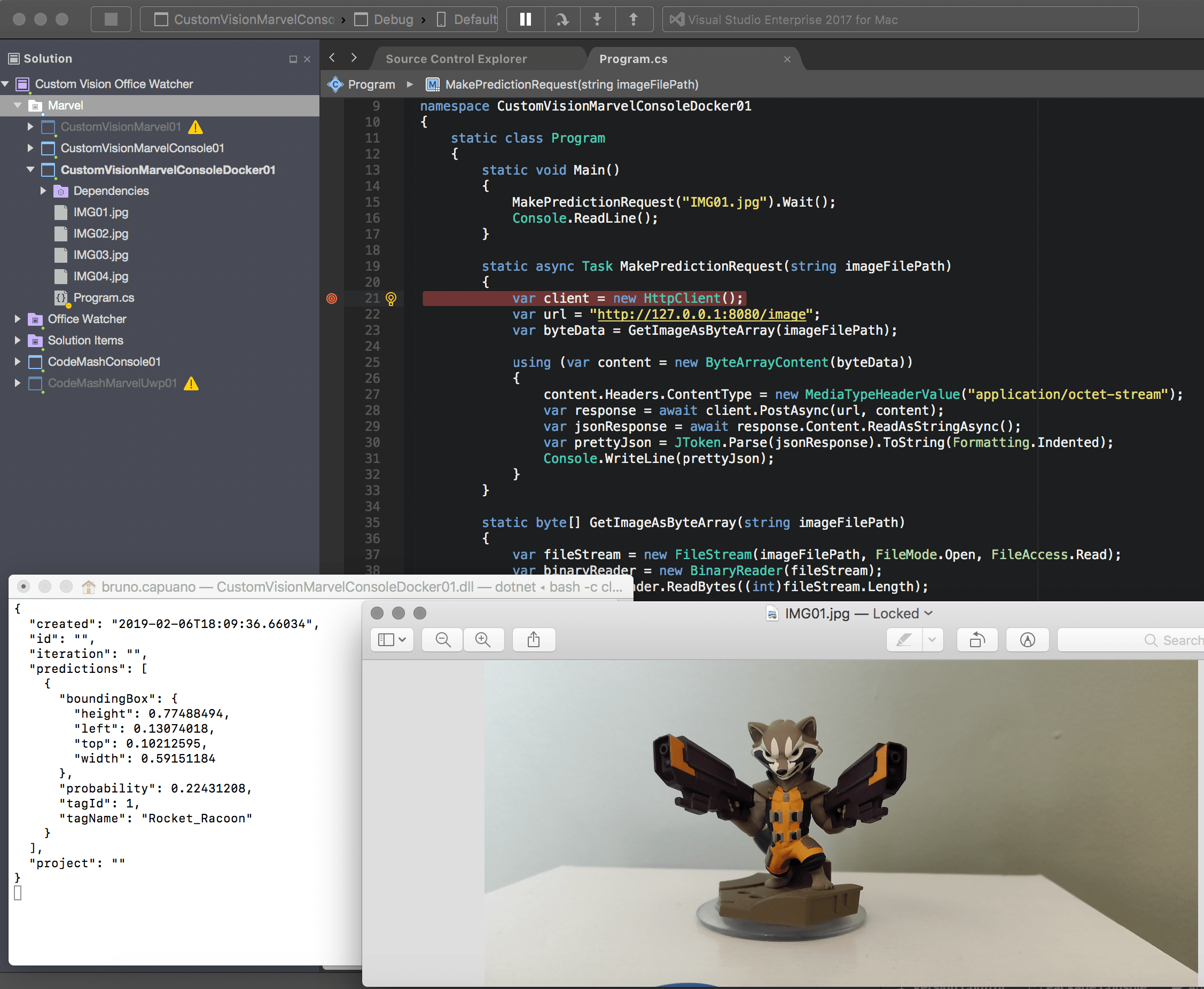
The source code is very simple
This file contains hidden or bidirectional Unicode text that may be interpreted or compiled differently than what appears below. To review, open the file in an editor that reveals hidden Unicode characters.
Learn more about bidirectional Unicode characters
| using System; | |
| using System.IO; | |
| using System.Net.Http; | |
| using System.Net.Http.Headers; | |
| using System.Threading.Tasks; | |
| using Newtonsoft.Json; | |
| using Newtonsoft.Json.Linq; | |
| namespace CustomVisionMarvelConsoleDocker01 | |
| { | |
| static class Program | |
| { | |
| static void Main() | |
| { | |
| MakePredictionRequest("IMG01.jpg").Wait(); | |
| Console.ReadLine(); | |
| } | |
| static async Task MakePredictionRequest(string imageFilePath) | |
| { | |
| var client = new HttpClient(); | |
| var url = "http://127.0.0.1:8080/image"; | |
| var byteData = GetImageAsByteArray(imageFilePath); | |
| using (var content = new ByteArrayContent(byteData)) | |
| { | |
| content.Headers.ContentType = new MediaTypeHeaderValue("application/octet-stream"); | |
| var response = await client.PostAsync(url, content); | |
| var jsonResponse = await response.Content.ReadAsStringAsync(); | |
| var prettyJson = JToken.Parse(jsonResponse).ToString(Formatting.Indented); | |
| Console.WriteLine(prettyJson); | |
| } | |
| } | |
| static byte[] GetImageAsByteArray(string imageFilePath) | |
| { | |
| var fileStream = new FileStream(imageFilePath, FileMode.Open, FileAccess.Read); | |
| var binaryReader = new BinaryReader(fileStream); | |
| return binaryReader.ReadBytes((int)fileStream.Length); | |
| } | |
| } | |
| } |
Happy coding!
Greetings @ Toronto
El Bruno
References
My Posts
- Object recognition with Custom Vision and ONNX in Windows applications using WinML (1)
- Object recognition with Custom Vision and ONNX in Windows applications using WinML (2)
- Object recognition with Custom Vision and ONNX in Windows applications using Windows ML, drawing frames (3)
- Object recognition with Custom Vision and ONNX in Windows applications using Windows ML, calculate FPS (4)
- Can’t install Docker on Windows 10 Home, need Pro or Enterprise (5)
- Running a Custom Vision project in a local Docker Container (6)
Windows 10 and YOLOV2 for Object Detection Series
- Introduction to YoloV2 for object detection
- Create a basic Windows10 App and use YoloV2 in the camera for object detection
- Transform YoloV2 output analysis to C# classes and display them in frames
- Resize YoloV2 output to support multiple formats and process and display frames per second
- How to convert Tiny-YoloV3 model in CoreML format to ONNX and use it in a Windows 10 App
- Updated demo using Tiny YOLO V2 1.2, Windows 10 and YOLOV2 for Object Detection Series
- Alternatives to Yolo for object detection in ONNX format
 El Bruno
Leave a reply to #Docker – Tiempos de respuesta promedio utilizando #CustomVision.ai en un contenedor con Docker en #RaspberryPi u en PC – El Bruno Cancel reply