Hi !
Today’s post is a simple one that I’ll use for sure in the future:
How to make an HTTP Post Request using Postman to analyze an image using a Custom Vision project hosted in a docker container.
In my previous posts I share the necessary steps to export a CustomVision.ai project and run the project in docker. I also show how to send images for analysis from a .NetCore Console App.
Today I’ll use another popular tool to perform the Http call to the docker container: Postman. This is one of the most popular tools in the web development world, and for sure is a good one if even myself knows how to use it!
So, once we have our session in Postman the container URL and POST are very straightforward. We are going to send an image, so we need to add a header with the Content-Type as image/jpg.

The image will be sent as binary content in the body. With 2 clicks we can select the file to use for testing.
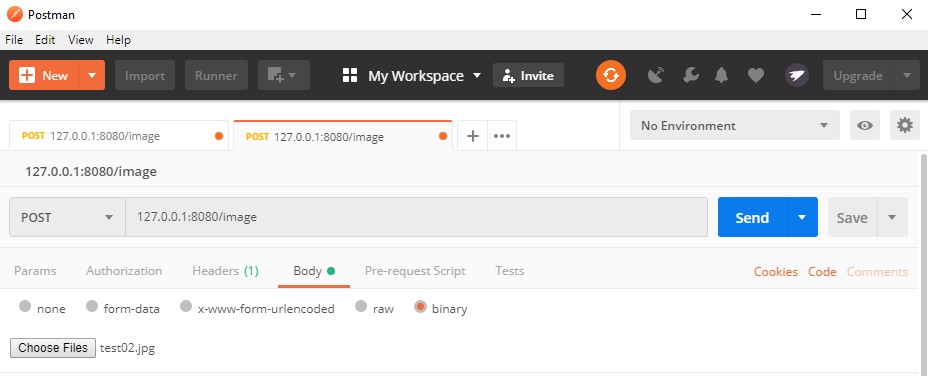
And finally, the result is an amazing JSON that we can analyze and see how our model performs
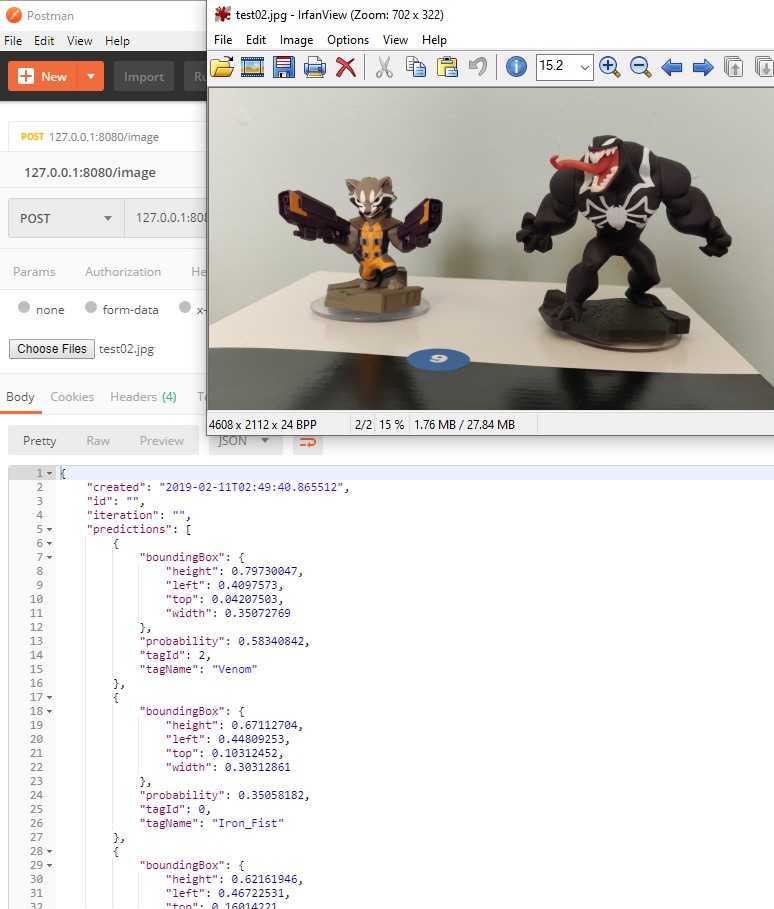
And as a bonus, once we have a test defined in PostMan, we can easily export the test as code in different programming languages like C#, Java, Go or Python.

Here is a sample of the generated python code
This file contains hidden or bidirectional Unicode text that may be interpreted or compiled differently than what appears below. To review, open the file in an editor that reveals hidden Unicode characters.
Learn more about bidirectional Unicode characters
| import http.client | |
| conn = http.client.HTTPConnection("127,0,0,1") | |
| headers = { | |
| 'Content-Type': "image/jpg", | |
| 'cache-control': "no-cache", | |
| 'Postman-Token': "847d04a8-0d05-4637-a056-7dbbdf10009b" | |
| } | |
| conn.request("POST", "image", headers=headers) | |
| res = conn.getresponse() | |
| data = res.read() | |
| print(data.decode("utf-8")) |
Happy coding!
Greetings @ Toronto
El Bruno
References
My Posts
- Object recognition with Custom Vision and ONNX in Windows applications using WinML (1)
- Object recognition with Custom Vision and ONNX in Windows applications using WinML (2)
- Object recognition with Custom Vision and ONNX in Windows applications using Windows ML, drawing frames (3)
- Object recognition with Custom Vision and ONNX in Windows applications using Windows ML, calculate FPS (4)
- Can’t install Docker on Windows 10 Home, need Pro or Enterprise (5)
- Running a Custom Vision project in a local Docker Container (6)
- Analyzing images in a Console App using a Custom Vision project in a Docker Container (7)
Windows 10 and YOLOV2 for Object Detection Series
- Introduction to YoloV2 for object detection
- Create a basic Windows10 App and use YoloV2 in the camera for object detection
- Transform YoloV2 output analysis to C# classes and display them in frames
- Resize YoloV2 output to support multiple formats and process and display frames per second
- How to convert Tiny-YoloV3 model in CoreML format to ONNX and use it in a Windows 10 App
- Updated demo using Tiny YOLO V2 1.2, Windows 10 and YOLOV2 for Object Detection Series
- Alternatives to Yolo for object detection in ONNX format


 El Bruno
Leave a reply to #Event – Resources used during the #GlobalAINight @metrotorontoUG – El Bruno Cancel reply