Hi!
Today while we were recording a a podcast on ML.Net, one question arose about how the data is processed in Machine Learning .Net. Well, let’s go back to my previous example that believes in the past post and let’s see step by step this.
In short, these are the steps to train a model and make a prediction:
- We created a Machine Learning Pipeline
- We load in memory a data file that we will use to train our model
- We work on the columns, defining Labels and Features
- We train the modelUsing the model we make a prediction about a new data set
As well, to know a little what happens in each of these steps let’s see the following debugging points in Visual Studio 2017.
Once we have created the Pipeline and loaded the initial data file, we can see that it has a series of columns and rows. In this case, the definition of the columns is obtained from the class [AgeRangeData] which is the type that we define for the data load
.

In the rows, we can see that we have the values separated by a [|], with the data of the original CSV.
In the next step, we define that the Label work column will be treated as a dictionary. This step converts all the values of this column into numeric and then work with them.
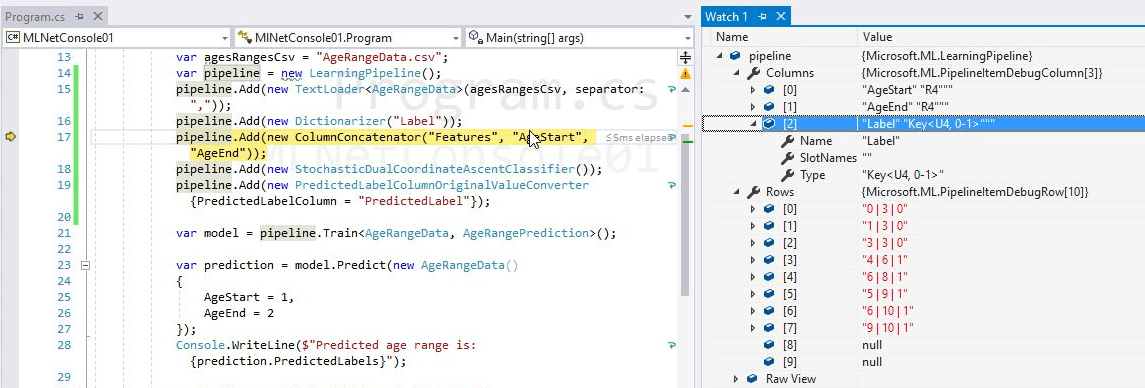
Line, 17, in this step the Features are defined. In this case, it is an aggregation of the [AgeStart] and [AgeEnd] columns. In the following image we can see how the Pipeline, adds these values at the end of each row and is also added as a new column.
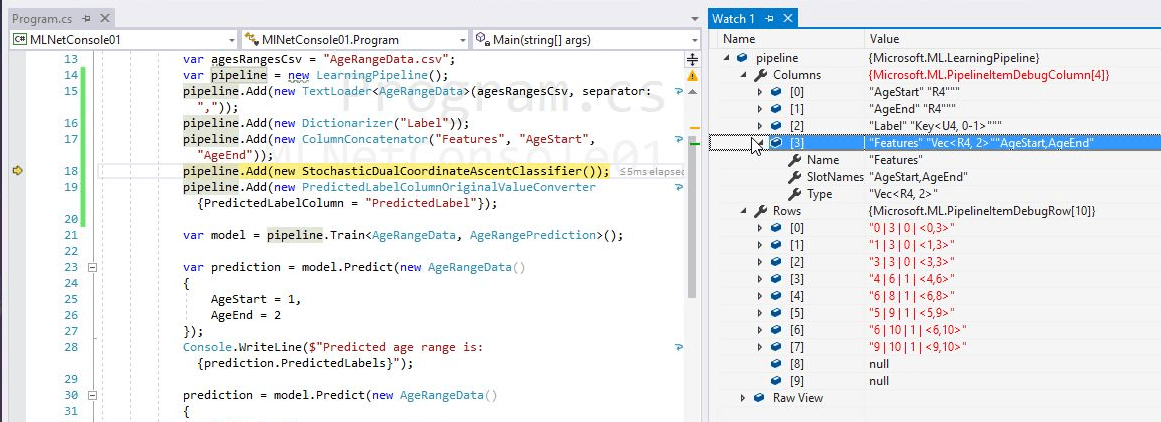
At this point we have all the data ready to choose a learning algorithm and train our model.
In subsequent posts I will comment on other scenarios in which we can use ML.Net.
Happy Coding!
Greetings @ Toronto
El Bruno
References
My Posts
 El Bruno
Leave a reply to #MLNET – What’s new in version 0.2.0 – El Bruno Cancel reply