
Hi!
I already write about some cool features embedded in Office to help us to be more productive. Some of them are AI based, and others are so simple and useful, like this one, that they deserve a post.
This is a classic one: we are trying to avoid big attachment in emails, if you are still attaching files to your emails, please STOP. Instead of attaching files, we store these files in OneDrive or Sharepoint, and we share the link.
One extra step here, is validate the permissions for the file or folder. You don’t want to share a file, and forget to grant permissions to the desired audience.
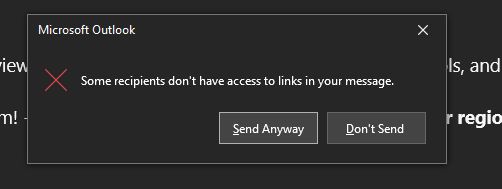
That’s why, now Outlook will check the links that you embed in your email body and the recipients of your email and show the following message if some recipients don’t have access to links in the message.
Super cool !
Happy coding!
Greetings
El Bruno
More posts in my blog ElBruno.com.
More info in https://beacons.ai/elbruno
Office and AI
- PowerPoint realtime subtitles / captions also available in MacOS
- Another cool AI feature in PowerPoint: realtime subtitles / captions
- Ideas Tool for Microsoft Excel powered by AI
- Live subtitles in Microsoft Teams, oh yeah! Another great AI live sample
- Acronyms pane in Word, another amazing example of AI embedded in our day to day tools – Powered by Microsoft Graph!
- Clippy is back in Office for Windows and Mac (powered by AI)
- Designer Ideas, an amazing example of the power of AI inside PowerPoint
- Another cool Outlook Feature: review links and email participants before send an email
- New Microsoft Word editor helps support Inclusive Language

 El Bruno
Leave a comment