⚠️ This blog post was created with the help of AI tools. Yes, I used a bit of magic from language models to organize my thoughts and automate the boring parts, but the geeky fun and the 🤖 in C# are 100% mine.
TL;DR
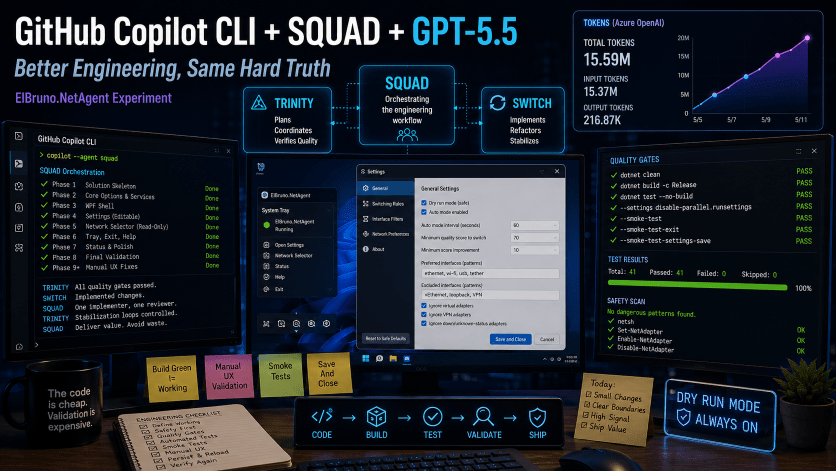
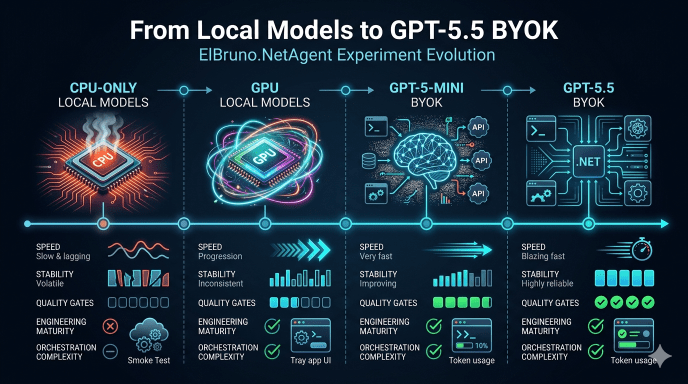
This was the final ElBruno.NetAgent experiment: GitHub Copilot CLI + SQUAD using Azure OpenAI GPT-5.5 BYOK against the same app-building challenge I previously tried with CPU-only local models, GPU local models, and GPT-5-mini.
The good news: GPT-5.5 was clearly better at staying inside phase boundaries, following safety rules, reducing broad stabilization loops, and working with strict quality gates. Once I switched to economy-mode prompts, the flow became much more disciplined: usually one implementation agent, one reviewer, short loops, and no wild repo-wide rewrites.
The not-so-funny news: better models do not remove the need for engineering discipline. Build green, tests green, and smoke tests green still missed a real manual UX bug: the Settings UI looked like it saved Auto Mode, but the persisted config did not actually keep the value. The fix was not “more tests”; it was the right test: one that exercised the real WPF user path, not only the ViewModel.
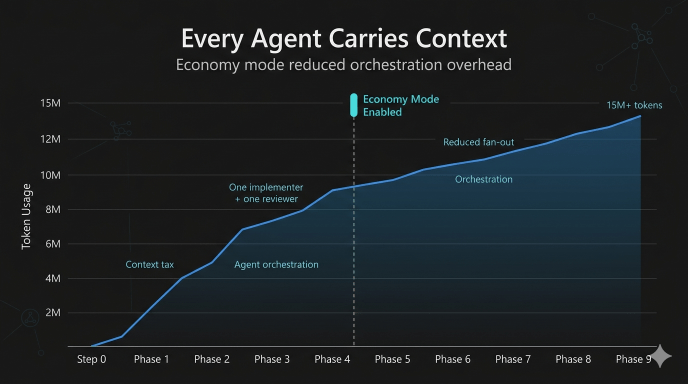
Also: GPT-5.5 BYOK is powerful, but not cheap. By the time the app reached final automated validation, the run was already around 15M+ tokens and roughly $30+ in Azure OpenAI usage. SQUAD is useful, but every agent has a context tax.
The biggest lesson: the code is still cheap. The validation strategy is the expensive part.
The Setup
Main repo:
Previous experiments:
- CPU-only local model: https://elbruno.com/2026/05/03/running-github-copilot-cli-offline-with-local-models-a-cpu-only-reality-check/
- GPU local model: https://elbruno.com/2026/05/06/running-github-copilot-cli-offline-with-local-models-gpu-edition/
- GPT-5-mini BYOK: https://elbruno.com/2026/05/11/github-copilot-cli-gpt-5-mini-byok-the-code-was-cheap-the-quality-gates-were-expensive/
This time the goal was simple:
Run the same ElBruno.NetAgent app-building experiment using GitHub Copilot CLI + SQUAD + Azure OpenAI GPT-5.5 BYOK and compare stabilization loops against GPT-5-mini.
The stack:
- GitHub Copilot CLI
- SQUAD orchestration
- Azure OpenAI GPT-5.5 BYOK
- .NET + WPF
- Windows tray app
- Strict quality gates
- Manual UX validation
Step 0: Define “Working” Before Writing Code
One of the biggest lessons from the GPT-5-mini run was that “build green” was nowhere near enough.
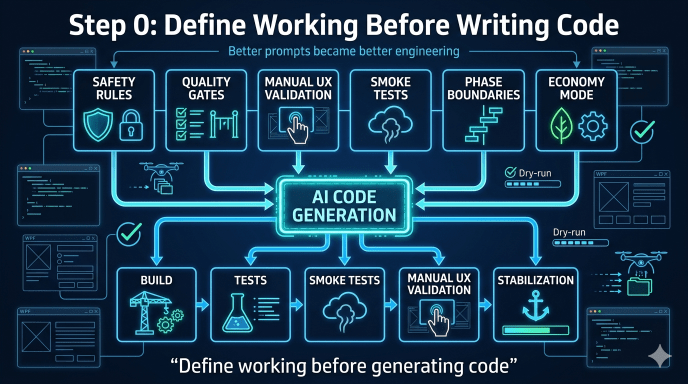
So before writing any product code, the experiment started with a dedicated Step 0 phase:
- Normalize SQUAD routing to GPT-5.5
- Define team rules
- Define safety guardrails
- Define quality gates
- Define manual UX validation
- Prevent uncontrolled multi-agent fan-out
This turned out to be one of the smartest decisions in the whole experiment.
The model was better, but the stronger engineering structure mattered even more.
The Phase-Based Build
Instead of asking the model to “build the app,” the project was split into very strict phases:
| Phase | Goal |
|---|---|
| Phase 1 | Minimal .NET solution skeleton |
| Phase 2 | Core options, services, DI, safe defaults |
| Phase 3 | WPF shell and smoke-testable windows |
| Phase 4 | Editable Settings behavior |
| Phase 5 | Read-only Network Selector and dry-run logic |
| Phase 6 | Tray shell, Help/About, clean exit |
| Phase 7 | Status view and product polish |
| Phase 8 | Final automated validation |
| Phase 9 | Manual UX bug fixing |
This worked much better than broad “vibe coding.”
GPT-5.5 was noticeably better at respecting:
- phase boundaries
- “do not implement” instructions
- safety rules
- dry-run requirements
- deterministic testing constraints
Economy Mode Was the Real Unlock
Early SQUAD runs were expensive and noisy.
Multiple agents reading large repo context repeatedly created a huge token tax.
The biggest improvement came after switching to what I started calling “economy mode”:
- one implementation agent
- one reviewer
- no Scribe unless needed
- no doc rewrites
- no template rewrites
- read only files needed for the phase
- small targeted edits
- stop after the phase
This dramatically reduced chaos and stabilization loops.
Ironically, the better the model became, the more important project-management-style prompting became.
The Cost Checkpoint
By the time the app reached final automated validation:
- ~15.5M tokens consumed
- 400+ requests
- ~$30+ estimated Azure OpenAI cost
Most of the usage was input/context tokens, not output tokens.
That’s an important lesson:
SQUAD adds value, but every agent carries context overhead.
GPT-5.5 BYOK is powerful, but it is definitely not “free vibe coding.”
The Quality Gates Worked… Until They Didn’t
The automated gate looked solid:
dotnet clean .\ElBruno.NetAgent.slndotnet build .\ElBruno.NetAgent.sln -c Releasedotnet test .\ElBruno.NetAgent.sln -c Release --no-build --settings disable-parallel.runsettingsdotnet run --project src\ElBruno.NetAgent -- --smoke-testdotnet run --project src\ElBruno.NetAgent -- --smoke-test-exitdotnet run --project src\ElBruno.NetAgent -- --smoke-test-settings-save
And honestly, GPT-5.5 handled this surprisingly well.
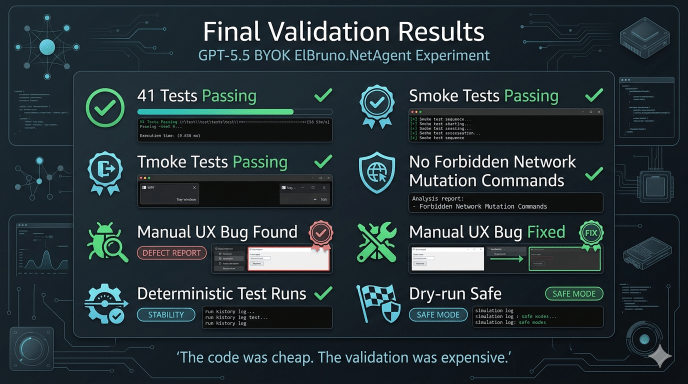
The project reached:
- 39+ passing tests
- fast deterministic runs
- smoke-test validation
- WPF window construction validation
- tray exit validation
- forbidden-command safety scans
But then manual UX validation found a real bug.
The Manual UX Bug That Mattered
Manual testing showed:
- tray menu looked OK
- Help worked
- Exit worked
- Settings UI looked rough
- Save did not persist Auto Mode
At first this was confusing because:
- tests were green
- smoke tests were green
- SettingsViewModel tests passed
The problem was deeper: the tests validated the ViewModel, but not the real user path.
The real failure path was:
UI checkbox→ Save and Close button→ persisted config file→ reload→ UI state
The fix was not “more tests.”
The fix was:
- testing the actual WPF interaction path
- validating persisted config values
- validating reload behavior
- validating the same SaveAndCloseAsync() path used by the real button
That was probably the most important lesson of the entire experiment.
The right test is the one that fails for the same reason your user fails.
What GPT-5.5 Did Better Than GPT-5-mini
GPT-5.5 was clearly better at:
- phase discipline
- respecting safety boundaries
- avoiding repo-wide chaos
- using abstractions/fakes
- isolating WPF/tray behavior
- deterministic testing patterns
- targeted fixes
- reviewer coordination
The tray + exit phase was especially interesting.
GPT-5-mini had previously struggled around:
- NotifyIcon behavior
- WPF dispatcher behavior
- tray shutdown
- lingering processes
GPT-5.5 handled this much more cleanly once the prompts explicitly enforced:
- fake adapters
- no native tray tests
- no real dispatcher loops
- deterministic test behavior
But stronger models still did not remove the need for:
- manual UX testing
- safety reviews
- persistence validation
- engineering checkpoints
What I Would Do Differently Next Time
A few practical lessons:
- Start with economy mode immediately
- Use one implementer + one reviewer by default
- Treat UI-path tests as mandatory
- Validate persisted config files directly
- Manual UX validation should happen earlier
- Smoke tests should validate real user flows
- Track token usage per phase
- Keep phases narrow and explicit
Most importantly:
Define what “working” means before generating code.
Final Thoughts
This experiment ended in a much better place than the GPT-5-mini run.
The stabilization loops were smaller. The orchestration was cleaner. The engineering flow was more controlled.
But the biggest lesson did not change.
The hard part was never generating code.
The hard part was:
- defining quality
- validating behavior
- testing real user flows
- controlling orchestration
- knowing when “green” was lying
GPT-5.5 made the engineering loop better.
It did not eliminate the need for engineering discipline.
And that is probably the most important AI-assisted development lesson I’ve learned so far:
Today, the code is cheap.
The decisions, validation, and engineering discipline are still expensive.
Happy coding!
Greetings
El Bruno
More posts in my blog ElBruno.com.
More info in https://beacons.ai/elbruno
 El Bruno
Leave a comment