⚠️ This blog post was created with the help of AI tools. Yes, I used a bit of magic from language models to organize my thoughts and automate the boring parts, but the geeky fun and the 🤖 in C# are 100% mine.
TL;DR
After my first CPU-only experiment with GitHub Copilot CLI and local models, I wanted to try the same idea again, but this time with a GPU-powered setup.
The first experiment proved that running GitHub Copilot CLI offline with local models was technically possible.
This second experiment showed something more interesting:
With the right model, GPU acceleration, small bounded phases, and strict human checkpoints, local agentic coding can become practical enough to move a real .NET project forward.
The setup:
GitHub Copilot CLI
LM Studio
Qwen3.6 35B A3B
GPU acceleration
.NET 10
PowerShell
GitHub CLI
GitHub Actions
The project:
ElBruno.NetAgent
A Windows-first .NET network utility, built with dry-run safety first.
Repository:
https://github.com/brunoghcpft-oss/ElBruno.NetAgent
Previous CPU-only post:
The short version:
Cloud models would have been much faster.
Local mode took more than a day.
But the local workflow actually worked.
And the lessons were worth it.
From CPU-only reality check to GPU-assisted local agents
In the first experiment, I tested GitHub Copilot CLI offline using local models on a CPU-only environment.
That test was useful, but also humbling.
The model could reason, but it was slow. Broad prompts were painful. Asking something like:
How does this repository work?
was not a good idea. The model had too much to process, tool calls became expensive, and long-running attempts could easily end in timeouts or partial answers.
So the first big lesson was simple:
Offline local agentic coding is possible, but CPU-only is a reality check.
This time I wanted to answer a different question:
What changes when we add GPU acceleration?
Not in a synthetic benchmark. Not in a “hello world” repo. But in a real .NET project with tests, CI, packaging, docs, safety constraints, and GitHub Actions.
The setup
The local provider was LM Studio, exposing an OpenAI-compatible endpoint.
The model was:
qwen/qwen3.6-35b-a3b
LM Studio was configured with a large context window:
Context length: 262,144 tokens
GPU offload enabled
Unified KV cache enabled
Model kept in memory
For this GPU experiment, I used a Microsoft Dev Box with an NVIDIA Tesla T4 GPU with 16 GB of VRAM, an AMD EPYC 7V12 64-core processor, and 110 GB of RAM. This was not a high-end consumer GPU workstation, but it was enough to make the local Copilot CLI + LM Studio + Qwen workflow practical. Compared with the CPU-only experiment, the difference was very noticeable, even though powerful cloud models would still be significantly faster.
Copilot CLI was configured to use the local LM Studio endpoint:
cd C:\src\ElBruno.NetAgent$env:COPILOT_OFFLINE = "true"$env:COPILOT_PROVIDER_TYPE = "openai"$env:COPILOT_PROVIDER_BASE_URL = "http://localhost:1234/v1"$env:COPILOT_MODEL = "qwen/qwen3.6-35b-a3b"
Depending on the task, I adjusted the context and output limits.
For diagnostic tasks with logs:
$env:COPILOT_PROVIDER_MAX_PROMPT_TOKENS = "32768"$env:COPILOT_PROVIDER_MAX_OUTPUT_TOKENS = "1536"
For large documentation or release-readiness tasks:
$env:COPILOT_PROVIDER_MAX_PROMPT_TOKENS = "131072"$env:COPILOT_PROVIDER_MAX_OUTPUT_TOKENS = "4096"
For full repo audit or very large synthesis:
$env:COPILOT_PROVIDER_MAX_PROMPT_TOKENS = "196608"$env:COPILOT_PROVIDER_MAX_OUTPUT_TOKENS = "4096"
Or, when really needed:
$env:COPILOT_PROVIDER_MAX_PROMPT_TOKENS = "262144"$env:COPILOT_PROVIDER_MAX_OUTPUT_TOKENS = "4096"
But I quickly learned not to use maximum context by default.
More context is not always better.
More context can also mean:
slower responses
more token burn
more chance of runaway generation
more opportunity for the model to overthink
more tool-call noise
The short rule became:
Small context for precision. Large context for synthesis. Max context only when the task truly needs it.
Launching Copilot CLI offline
For most implementation phases, I launched Copilot CLI like this:
copilot --no-remote --disable-builtin-mcps --stream on --max-autopilot-continues 6
When file edits were needed, I enabled full tool permissions inside Copilot CLI:
/allow-all on
And verified with:
/allow-all show
This mattered a lot.
Without /allow-all on, Copilot CLI could read files and run read-only commands, but file-edit tools were blocked with errors like:
Permission denied and could not request permission from user
After enabling /allow-all on, Copilot CLI was able to apply targeted changes.
That became another useful rule:
Diagnosis mode:
- no yolo
- smaller context
- read files
- read logs
- analyze
- stop
Implementation mode:
- /allow-all on
- constrained prompt
- explicitly listed files
- low max-autopilot-continues
- validate
- stop
The project: ElBruno.NetAgent
The project used for the experiment was ElBruno.NetAgent:
https://github.com/brunoghcpft-oss/ElBruno.NetAgent
The goal of the app is to become a Windows-first network utility that can monitor network interfaces, evaluate connection quality, and eventually help with network-switching decisions.
The important part: during this experiment, the app stayed dry-run only.
No real network mutation. No actual interface metric changes. No live switching. No NuGet publishing.
This was intentional. Since I was letting Copilot CLI and a local model modify code, scripts, tests, docs, and CI, safety constraints were non-negotiable.
The app had to stay in this mode:
Dry-run only
Live mode blocked by default
Unsafe config rejected
Audit logs for simulated actions
No real network mutation
What the local model actually helped build
This was not a single prompt experiment.
It was a sequence of bounded phases.
Some of the validated phases included:
Phase 6: Network controller dry-run foundation
Phase 7: Audit log for simulated controller actions
Phase 8: Tray UI status + audit log viewer
Phase 9: Packaging validation
Phase 10: Safety guardrails
Phase 11: NuGet package icon with t2i
Phase 12: Local package smoke test
Phase 13: CI packaging validation
Phase 14: CI test isolation fix
By the end, the project had:
.NET 10 project structure
WPF tray shell
configuration service
network inventory foundation
network quality monitor
decision engine
dry-run network controller
audit log service
UI status surface
NuGet metadata
package icon
local package smoke test
GitHub Actions CI validation
safety guardrails
125 passing tests
That is the part that made this experiment interesting.
The local model was not just generating sample code. It was participating in a real workflow.
Model choice mattered
This experiment also reminded me that “local model” is not a single category.
I originally started experimenting with Gemma 4, but eventually switched to Qwen3.6 35B A3B.
In this setup, Qwen behaved better.
It felt more disciplined for bounded tasks. It handled tool-assisted workflows better. It was also faster in the specific LM Studio + GPU configuration I was using.
That does not mean Qwen is universally better than Gemma.
It means that for this specific setup:
GitHub Copilot CLI
LM Studio
large-context local model
.NET repo
PowerShell tools
GitHub CLI
bounded coding tasks
Qwen was the model that made the workflow practical.
This is an important point: local agentic coding is not just about having “a local model.”
The specific model matters. The runtime matters. The prompt matters. The tool orchestration matters.
Cloud would have been faster. That was not the point.
Let’s be honest.
A powerful cloud model could probably have completed most of this much faster.
My guess: with a strong cloud model, good repo context, and the same human guidance, many of these phases could probably be completed in one or two hours.
The local GPU workflow took more than a day.
There were restarts. There were prompt adjustments. There were permission issues. There were GitHub CLI authentication steps. There were runaway generations. There were context-tuning experiments. There were CI failures. There were moments where I had to stop the agent and take back control.
So no, this was not faster than using a powerful cloud model.
But speed was not the only variable I wanted to test.
I wanted to understand:
Can Copilot CLI work with a local OpenAI-compatible provider?
Can a local model use tools well enough to move a real repo forward?
Can it diagnose GitHub Actions failures from logs?
Can it respect dry-run safety constraints?
Can it generate packaging assets?
Can it validate build, test, pack, and smoke-test flows?
How much human steering is required?
Where does the local workflow break?
The answer was:
Yes, it can work. But it needs constraints, checkpoints, and patience.
Local models are not yet the fastest path for this workflow.
But they are becoming a realistic path for controlled, private, offline-capable experimentation.
The token burn is real
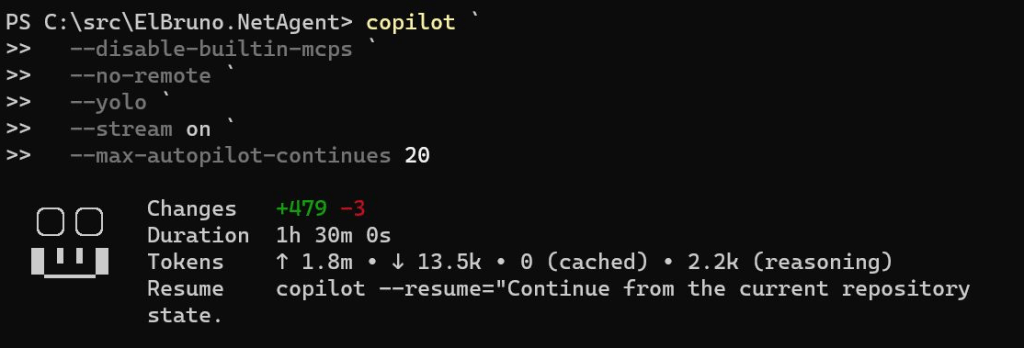
One of the most useful screenshots from the experiment showed a real Copilot CLI run with something like:
Duration: 1h 30m
Input tokens: ~1.8M
Output tokens: ~13.5K
Reasoning tokens: ~2.2K
This is a very important part of the story.
Local does not mean free.
It means the cost moves somewhere else:
your GPU
your CPU
your memory
your time
your electricity
your patience
your prompt discipline
Or, in a more honest way:
The model does not charge per token, but your GPU, your laptop, and your coffee do have limits.
This changed how I structured the work.
I stopped thinking in terms of “one big prompt.”
Instead, I used phases.
Bounded phases were the real unlock
The most important lesson was not “use a GPU.”
The most important lesson was:
Small, bounded phases work. Huge open-ended prompts fail.
Good prompts looked like this:
Implement only this phase.
Modify only these files.
Do not use agents.
Do not use read_agent.
Do not use SQL.
Do not publish.
Do not mutate network state.
Run this exact validation command.
Stop after the summary.
Bad prompts looked like this:
Analyze the whole repo and improve everything.
Make it production ready.
Fix all warnings.
Validate everything.
Continue until done.
The local model could handle focused tasks much better than open-ended ones. A good implementation prompt looked like this:
Apply this exact minimal fix.
Do not diagnose.
Do not use agents.
Do not use read_agent.
Do not use SQL.
Do not use todo tracking.
Do not edit CI YAML.
Do not modify any files except:
- src\ElBruno.NetAgent\Services\Configuration\ConfigurationService.cs
- tests\ElBruno.NetAgent.Tests\SafetyGuardrailTests.cs
If any write/edit tool fails with “Permission denied and could not request permission from user”, stop immediately. Do not try alternate write methods.
Required change 1:
In ConfigurationService.cs, add an optional constructor parameter:
string? configDirectoryOverride = nullDefault behavior must remain unchanged.
If configDirectoryOverride is null, continue using:
Environment.GetFolderPath(Environment.SpecialFolder.LocalApplicationData)
combined with ElBruno.NetAgent.If configDirectoryOverride is provided, use that directory as the configuration directory.
Required change 2:
In SafetyGuardrailTests.cs, update only the test:
SafetyChain_DefaultConfig_AllowsNoLiveExecutionMake this test use a unique temp directory:
Path.Combine(Path.GetTempPath(), “ElBruno.NetAgent.Test-” + Guid.NewGuid().ToString(“N”))Create the directory before using it.
Pass it to the ConfigurationService constructor.
Clean it up in finally if practical.Validation:
Run only:
dotnet test .\tests\ElBruno.NetAgent.Tests\ElBruno.NetAgent.Tests.csproj –configuration Release –verbosity minimalAfter validation, summarize:
- exact files changed
- test result
- whether I should commit and push
Stop after summary.
Tool-assisted diagnosis worked better than full autopilot
One of the best parts of the experiment happened when GitHub Actions failed.
Local validation passed:
dotnet build: passed
dotnet test: 125/125 passed
dotnet pack: passed
local package smoke test: passed
But GitHub Actions failed in CI.
Instead of asking Copilot CLI to “fix CI,” I gave it a diagnostic-only prompt:
Goal:
Diagnose a failing GitHub Actions workflow using minimal tool-assisted analysis.Use tools only to gather the minimum data:
- Read the local workflow:
Get-Content ..github\workflows\ci.yml- Read the test project file:
Get-Content .\tests\ElBruno.NetAgent.Tests\ElBruno.NetAgent.Tests.csproj- Read the app project file:
Get-Content .\src\ElBruno.NetAgent\ElBruno.NetAgent.csproj- Fetch the failed GitHub Actions job log:
gh run view 25378546671 –job 74420179140 –log-failedAfter gathering data, return:
- exact failing evidence from the CI log
- likely root cause
- smallest YAML-only fix, if any
- exact YAML lines to change
- whether I should validate locally or push directly
Do not edit files.
Stop after the analysis.
This worked.
Copilot CLI used the GitHub CLI log and found the real failure:
System.IO.IOException:The process cannot access the fileC:\Users\runneradmin\AppData\Local\ElBruno.NetAgent\config.jsonbecause it is being used by another process.
The failing test was:
SafetyGuardrailTests.SafetyChain_DefaultConfig_AllowsNoLiveExecution
The important part: Copilot correctly concluded that this was not a YAML problem.
It was a test isolation issue.
The test was using the real user config path under %LOCALAPPDATA%, and in CI that file could be locked by another test/process.
The fix was to use a unique temporary config directory for that test.
The CI fix
The production behavior needed to stay unchanged.
So the fix was small:
- Add an optional config directory override to
ConfigurationService. - Keep the default path as
%LOCALAPPDATA%\ElBruno.NetAgent. - In the failing test, pass a unique temp directory.
- Clean it up after the test.
Conceptually:
public ConfigurationService( ILogger<ConfigurationService> logger, string? configDirectoryOverride = null){ _logger = logger; var baseDirectory = configDirectoryOverride ?? Path.Combine( Environment.GetFolderPath(Environment.SpecialFolder.LocalApplicationData), "ElBruno.NetAgent"); _configurationDirectory = baseDirectory; _configurationPath = Path.Combine(_configurationDirectory, "config.json");}
And in the test:
var tempDirectory = Path.Combine( Path.GetTempPath(), "ElBruno.NetAgent.Test-" + Guid.NewGuid().ToString("N"));Directory.CreateDirectory(tempDirectory);try{ var configService = new ConfigurationService(_configLogger, tempDirectory); var options = configService.LoadConfiguration(); // assertions...}finally{ if (Directory.Exists(tempDirectory)) { Directory.Delete(tempDirectory, recursive: true); }}
After this fix:
Local test passed
GitHub Actions passed
CI packaging validation succeeded
That was a very nice moment in the experiment.
The local model diagnosed a real CI failure using real logs, then helped apply a minimal fix.
Permissions mattered more than expected
Another lesson: tool permissions are part of the system.
At one point, Copilot CLI could read files but could not write them.
The logs showed repeated failures like:
Permission denied and could not request permission from user
It tried:
edit tool
PowerShell write
Python write
Copy-Item
regex replace
backup file
That was a useful failure.
It showed that the model understood the fix, but the Copilot CLI tool environment could not write files.
After enabling:
/allow-all on
Copilot CLI could edit files successfully.
But there was a tradeoff.
With full permissions enabled, I had to watch the run more carefully.
The practical rule became:
If you see “Continuing autonomously” after the summary, stop it.
If you see read_agent, stop it.
If you see SQL/todo tracking, stop it.
If it touches files outside the allowed list, stop it.
If it tries to publish, stop it.
This is not “fire and forget.”
This is human-guided automation.
Packaging, icon generation, and t2i
The experiment also included preparing the NuGet package.
No publishing yet. Only validation.
The package included:
Package metadata
README.md
NuGet icon
local .nupkg generation
static package smoke test
CI packaging validation
For the package icon, I used the local t2i skill and the ElBruno.Text2Image.Cli package:
https://www.nuget.org/packages/ElBruno.Text2Image.Cli
The image generation prompt was something like:
Modern square app icon for “ElBruno.NetAgent”, a Windows-first network tray utility. Minimal semi-flat vector style. Central symbol combining Wi-Fi arcs, a small network switch/router, and a subtle shield/checkmark representing safe dry-run mode. Clean dark blue and cyan palette, high contrast, rounded square background, no text, no letters, no tiny details, readable at small NuGet package icon size.
The generated asset was wired into the project file as the NuGet package icon.
The local package smoke test checked:
package exists
README.md exists in package
icon exists in package
.nuspec contains icon metadata
packaged DLL exists
dry-run references exist
The smoke test was intentionally static.
It did not launch the app. It did not mutate network state. It did not require admin permissions.
CI packaging validation
The GitHub Actions workflow was created to validate packaging without publishing.
It validates:
restore
build
test
pack
local package smoke test
artifact upload
No secrets. No NuGet publishing. No app execution that mutates network state.
A simplified version:
name: CI - Packaging Validation (No Publish)on: push: branches: - main pull_request: workflow_dispatch:jobs: packaging: name: CI Packaging Validation runs-on: windows-latest steps: - name: Checkout uses: actions/checkout@v4 - name: Setup .NET 10 uses: actions/setup-dotnet@v4 with: dotnet-version: '10.0.x' - name: Restore run: dotnet restore .\ElBruno.NetAgent.sln - name: Build run: dotnet build .\ElBruno.NetAgent.sln --configuration Release --no-restore - name: Test run: dotnet test .\ElBruno.NetAgent.sln --configuration Release --no-build --verbosity minimal - name: Pack run: dotnet pack .\src\ElBruno.NetAgent\ElBruno.NetAgent.csproj --configuration Release --no-build --output .\artifacts - name: Smoke test local package shell: pwsh run: .\scripts\smoke-test-local-package.ps1 -PackagePath .\artifacts\ElBruno.NetAgent.0.1.0.nupkg - name: Upload package artifact uses: actions/upload-artifact@v4 with: name: ElBruno.NetAgent-nupkg path: artifacts/*.nupkg
This gave the repo a safe release-readiness gate without publishing anything.
Safety guardrails were non-negotiable
Because this project is about network behavior, safety had to be part of the experiment from the beginning.
The model was repeatedly instructed:
Do not execute real network changes.
Keep controller behavior dry-run only.
Do not publish to NuGet.
Do not add live network mutation.
Do not change safety behavior.
The app added guardrails such as:
DryRunMode = true by default
LiveModeAllowed = false by default
unsafe config rejected
audit logs mark dry-run actions
live mode blocked
network mutation not implemented
The tests also checked these behaviors.
That was important because local agentic coding is powerful, but the app domain matters.
If the app can affect a machine’s network behavior, dry-run safety is not optional.
Prompt samples that worked well
1. Diagnostic prompt for GitHub Actions
We are continuing the ElBruno.NetAgent project.
Goal:
Diagnose a failing GitHub Actions workflow using minimal tool-assisted analysis.Repo:
C:\src\ElBruno.NetAgentFailed GitHub Actions job:
https://github.com/brunoghcpft-oss/ElBruno.NetAgent/actions/runs//job/Important:
- gh auth is configured.
- Do not edit files.
- Do not run build/test/pack.
- Do not use SQUAD.
- Do not use task agents.
- Do not use read_agent.
- Do not use SQL or todo tracking.
- Do not continue autonomously after the analysis.
- Do not propose fixes without citing exact evidence from the CI log.
- Use at most 4 shell commands.
- Stop after the analysis.
Run only these commands:
- Get-Content ..github\workflows\ci.yml
- Get-Content .\tests\ElBruno.NetAgent.Tests\ElBruno.NetAgent.Tests.csproj
- Get-Content .\src\ElBruno.NetAgent\ElBruno.NetAgent.csproj
- gh run view –job –log-failed
Return only:
- exact failing evidence from the CI log
- likely root cause
- smallest YAML-only fix, if any
- exact YAML lines to change
- whether I should validate locally or push directly
Then stop. Do not edit anything.
2. Minimal implementation prompt
Apply this exact minimal fix.
Do not diagnose.
Do not use agents.
Do not use read_agent.
Do not use SQL.
Do not use todo tracking.
Do not edit CI YAML.
Do not modify any files except:
- src\ElBruno.NetAgent\Services\Configuration\ConfigurationService.cs
- tests\ElBruno.NetAgent.Tests\SafetyGuardrailTests.cs
If any write/edit tool fails with “Permission denied and could not request permission from user”, stop immediately. Do not try alternate write methods.
Required change:
Add a test-only configuration directory override while preserving production default behavior.Validation:
Run only:
dotnet test .\tests\ElBruno.NetAgent.Tests\ElBruno.NetAgent.Tests.csproj –configuration Release –verbosity minimalAfter validation, summarize:
- exact files changed
- test result
- whether I should commit and push
Stop after summary.
3. Release readiness prompt
We are continuing the ElBruno.NetAgent project.
Current repo:
C:\src\ElBruno.NetAgentCurrent status:
- Build passes.
- Tests pass.
- Pack passes.
- Local package smoke test passes.
- CI packaging validation passes.
- No NuGet publishing has been performed.
- The app remains dry-run only.
- Live mode is blocked by default.
- No real network mutation must be executed.
Important constraints:
- Do not use SQUAD.
- Do not use task agents.
- Do not use read_agent.
- Do not use SQL or todo tracking.
- Do not publish to NuGet.
- Do not execute the app in a way that mutates network state.
- Do not change dry-run safety behavior.
- Do not add live network mutation.
- Keep the phase bounded.
Implement Release Candidate Readiness, No Publish.
Requirements:
- Review release readiness docs.
- Add or update docs\RELEASE_CHECKLIST.md.
- Confirm package metadata.
- Confirm safety warnings are documented.
- Confirm publishing remains manual.
- Do not add NuGet publishing workflow.
Validation:
Run only:
dotnet build .\ElBruno.NetAgent.sln –configuration Release –no-restore
dotnet test .\ElBruno.NetAgent.sln –configuration Release –no-build –verbosity minimal
dotnet pack .\src\ElBruno.NetAgent\ElBruno.NetAgent.csproj –configuration Release –no-build –output .\artifacts
powershell -NoProfile -ExecutionPolicy Bypass -File .\scripts\smoke-test-local-package.ps1 -PackagePath .\artifacts\ElBruno.NetAgent.0.1.0.nupkgAfter validation, summarize:
- files changed
- build result
- test result
- pack result
- smoke test result
- whether this is ready for manual release review
Stop after summary.
What did not work perfectly
This is the part that makes the experiment honest.
Several things did not work smoothly.
Runaway generation
Sometimes LM Studio kept generating tokens without returning a useful answer.
The fix was usually:
lower output token limit
reduce context
restart Copilot CLI
restart LM Studio server if needed
make the prompt smaller
add a clear stop condition
read_agent despite instructions
Even when the prompt said:
Do not use read_agent.
Copilot CLI sometimes attempted it anyway.
When that happened, I stopped the run.
SQL/todo tracking attempts
Copilot CLI sometimes tried to use SQL/todo tracking even when I explicitly said not to.
This often failed because the tool call was malformed, and it burned time and tokens.
Tool permission issues
Before /allow-all on, write tools were blocked.
After /allow-all on, writing worked, but I had to watch the run closely.
Long validation loops
When I asked Copilot to validate everything, it sometimes got stuck in long shell/output loops.
A better pattern was:
Copilot edits.
Copilot runs one targeted validation.
Human runs full validation manually.
Bigger context sometimes made things worse
Large context helped for docs and synthesis.
But for CI diagnosis, smaller context was better.
Final result
By the end of this experiment, the project reached a solid validation state:
Build: passed
Tests: 125/125 passed
Pack: passed
Smoke test: passed
CI: passed
NuGet publish: not performed
Network mutation: not performed
Dry-run: preserved
The GitHub Actions workflow validates:
restore
build
test
pack
local package smoke test
artifact upload
The app remains safe:
dry-run by default
live mode blocked
no real network mutation
What I learned
The GPU did not make the local model magical.
But it did change the workflow from:
This is technically possible.
to:
This can be useful if you control the scope.
The winning formula was:
GitHub Copilot CLI
- LM Studio
- Qwen local
- GPU
- small phases
- strict prompts
- build/test validation
- human checkpoints
The dangerous formula was:
huge prompt
- huge context
- full autonomy
- unclear stop condition
- long validation loops
The best use case was not full autonomous coding.
The best use case was:
tool-assisted development
bounded implementation
targeted diagnosis
human-controlled validation
My final take
If I needed to ship this as fast as possible, I would use a powerful cloud model.
No debate.
A cloud model would likely be faster, more stable, and easier to orchestrate.
But that was not the point of this experiment.
The point was to understand whether a local model could participate in a real developer workflow through GitHub Copilot CLI.
And the answer is:
Yes, but with constraints.
Local models are not yet the easiest path.
They are not always the fastest path.
But they are becoming good enough for serious experimentation, especially when you care about control, offline capability, privacy, and understanding how agentic coding behaves under real constraints.
The human remains the control plane.
And honestly, that is probably a good thing.
Cloud models are still faster and more convenient.
Local models are becoming good enough to be dangerous — in the best possible way.
Resources
Here are the main resources, tools, and references mentioned in this experiment.
- ElBruno.NetAgent repository
https://github.com/brunoghcpft-oss/ElBruno.NetAgent - Previous CPU-only experiment
https://elbruno.com/2026/05/03/running-github-copilot-cli-offline-with-local-models-a-cpu-only-reality-check/ - GitHub Copilot CLI documentation
https://docs.github.com/en/copilot/how-tos/copilot-cli - Using GitHub Copilot CLI
https://docs.github.com/copilot/how-tos/use-copilot-agents/use-copilot-cli - GitHub Copilot CLI product page
https://github.com/features/copilot/cli - LM Studio
https://lmstudio.ai/ - LM Studio GitHub organization
https://github.com/lmstudio-ai - Qwen3.6-35B-A3B model on Hugging Face
https://huggingface.co/Qwen/Qwen3.6-35B-A3B - LM Studio community GGUF for Qwen3.6-35B-A3B
https://huggingface.co/lmstudio-community/Qwen3.6-35B-A3B-GGUF - Qwen3.6-35B-A3B announcement
https://qwen.ai/blog?id=qwen3.6-35b-a3b - Qwen3.6 GitHub repository
https://github.com/QwenLM/Qwen3.6 - .NET downloads
https://dotnet.microsoft.com/en-us/download - GitHub CLI
https://cli.github.com/ - GitHub Actions documentation
https://docs.github.com/en/actions - NuGet package: ElBruno.Text2Image.Cli
https://www.nuget.org/packages/ElBruno.Text2Image.Cli - NuGet documentation
https://learn.microsoft.com/en-us/nuget/ - xUnit.net
https://xunit.net/
Happy coding!
Greetings
El Bruno
More posts in my blog ElBruno.com.
More info in https://beacons.ai/elbruno


Leave a Reply