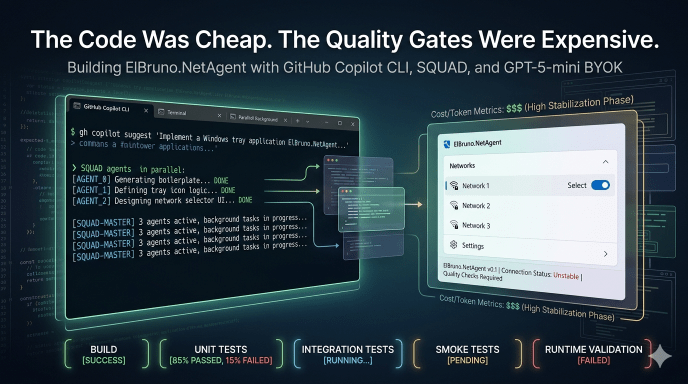
⚠️ This blog post was created with the help of AI tools. Yes, I used a bit of magic from language models to organize my thoughts and automate the boring parts, but the geeky fun and the 🤖 in C# are 100% mine.
TL;DR
This is part 3 of my GitHub Copilot CLI + BYOK experiment series.
After testing local models on CPU and GPU, I moved the same experiment to Azure OpenAI using GPT-5-mini through BYOK. Same repo, same goal, same safety constraints — but this time with a cloud model that made SQUAD practical again.
And that was the first big win.
With local models, the workflow was possible but fragile. With GPT-5-mini, GitHub Copilot CLI could coordinate SQUAD agents, run background tasks, create commits, fix issues, and move the app forward in a way that finally felt like real agent orchestration.
The result: ElBruno.NetAgent became a working Windows tray app for safe, dry-run network selection assistance.
But the real lesson was not “GPT-5-mini can generate code.”
The real lesson was this:
The code was cheap. The quality gates were expensive.
Build green was not enough. Tests green was not enough. Even smoke-test green was not enough at first.
We had to keep expanding the definition of “working” until it included runtime startup, dependency injection, WPF/XAML loading, tray lifecycle, fast deterministic tests, editable settings, save without freezing, and manual UX validation.
The whole GPT-5-mini story
The experiment so far
This is part 3 of the experiment series.
In the previous posts, I tested GitHub Copilot CLI with local models:
- CPU-only local model experiment: https://elbruno.com/2026/05/03/running-github-copilot-cli-offline-with-local-models-a-cpu-only-reality-check/
- GPU local model experiment: https://elbruno.com/2026/05/06/running-github-copilot-cli-offline-with-local-models-gpu-edition/
The repo for this experiment is here:
https://github.com/elbruno/ElBruno.NetAgent
And the GPT-5-mini work happened in this PR:
https://github.com/elbruno/ElBruno.NetAgent/pull/3
The full series is about testing what can and cannot be done with GitHub Copilot CLI, SQUAD, and BYOK across different model setups:
- local models on CPU
- local models on GPU
- cloud model with GPT-5-mini
- cloud model with GPT-5.5
The final GPT-5.5 experiment is next. But before jumping there, this GPT-5-mini run deserves its own write-up, because it showed something very interesting.
The model was good enough to generate a lot of code.
But the hard part was not generating code.
The hard part was defining what “working” actually means.
The setup
The goal was to start from a clean repo and build a real app, not just a toy sample.
The app is ElBruno.NetAgent: a Windows tray app that helps with safe, dry-run network selection assistance.
The important phrase here is dry-run.
This app must not change Windows network settings. It must not enable or disable adapters. It must not run netsh, Set-NetAdapter, Enable-NetAdapter, Disable-NetAdapter, or anything similar.
The safety defaults were clear from the beginning:
DryRunMode=trueAutoModeEnabled=false- no real network mutation
- no admin/elevation requirement
- no secrets
- no NuGet publish unless explicitly requested
For the GitHub Copilot CLI setup, the important part was using Azure OpenAI through BYOK and selecting GPT-5-mini.
Example shape of the setup:
$env:COPILOT_PROVIDER_TYPE="azure"
$env:COPILOT_PROVIDER_BASE_URL="https://<resource>.openai.azure.com/openai/deployments/<deployment>"
$env:COPILOT_PROVIDER_API_KEY="<key>"
$env:COPILOT_PROVIDER_WIRE_API="responses"
$env:COPILOT_MODEL="gpt-5-mini"

$env:COPILOT_PROVIDER_MAX_PROMPT_TOKENS="32768"
$env:COPILOT_PROVIDER_MAX_OUTPUT_TOKENS="1536"

copilot --agent squad --max-autopilot-continues 6
No keys in the repo, no secrets in the post, obviously.
The branch used for this run was:
gpt5miniGeneratedApp
The first big difference: SQUAD worked
This was the first major difference compared with the local model experiments.
With local models, SQUAD was either not practical, too slow, or fragile. The flow needed very small prompts, tight phases, and a lot of human checkpointing.
With GPT-5-mini BYOK, background agents started working.
That changed the whole experience.
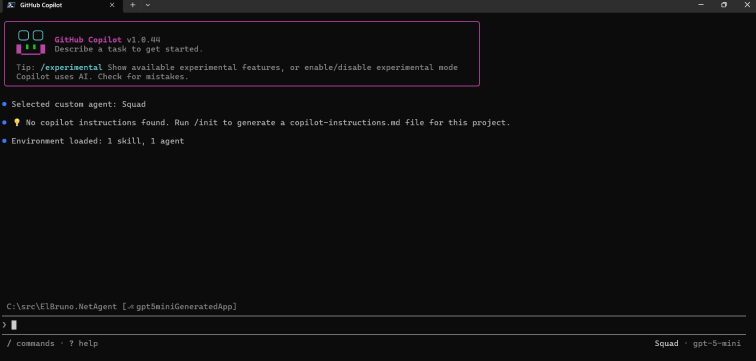
The first screenshot shows GitHub Copilot CLI ready with the SQUAD agent and GPT-5-mini selected.
Then SQUAD started spawning background agents.
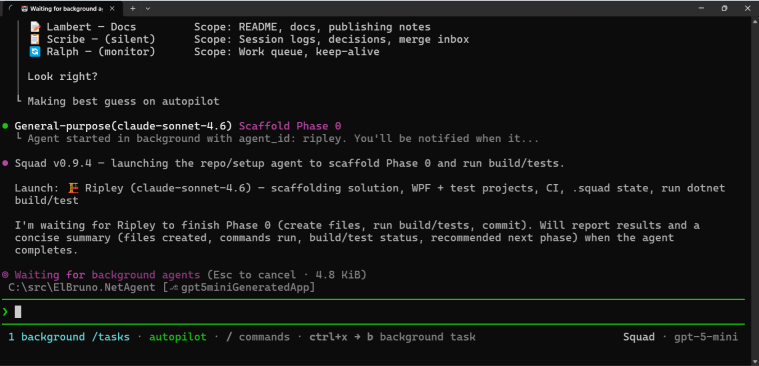
This is where the experiment started to feel different.
With local models, I was mostly trying to keep the workflow alive.
With GPT-5-mini, I could ask SQUAD to coordinate work, run agents in the background, and move from phase to phase.
It finally felt like agent orchestration instead of prompt babysitting.
What the app became
At the end of the GPT-5-mini run, ElBruno.NetAgent became a working Windows tray app.
The app can:
- start from
dotnet run --project src/ElBruno.NetAgent - show a tray icon
- open a Status window
- open a Network Selector window
- open an editable Settings window
- preview the best network switch in dry-run mode
- expose a Help/About area with the GitHub repo link
- save settings without freezing
- exit cleanly and return the PowerShell prompt
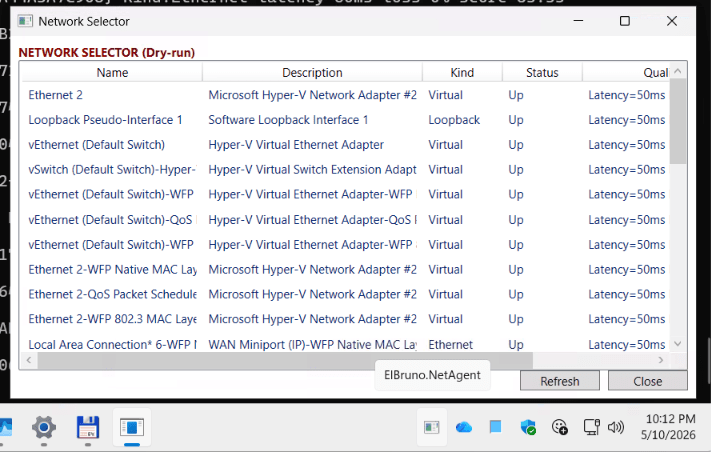
The Network Selector shows detected interfaces, their kind, status, and quality information. It is still intentionally safe: no real adapter changes are performed.
That is important.
The app is not a “change my network settings automatically” app. It is a safe assistant that can inspect, score, recommend, and dry-run.
Where things broke
This is where the experiment became really valuable.
GPT-5-mini + SQUAD generated a lot of useful code, but the app did not become “working” in a single pass.
Every time we improved the quality gate, we found a new kind of bug.
Here are the most important ones.
| What looked green | What was actually broken |
|---|---|
| Build passed | The app failed at startup because of a DI registration issue |
| Tests passed | Runtime service resolution still failed |
| Smoke-test passed | Settings crashed with a XAML parse error |
| App launched | Exit logged shutdown messages but the process stayed alive |
| Settings opened | Settings was read-only |
| Settings became editable | Save froze the app |
| Tests were added for tray behavior | Tests hung for more than 25 minutes |
That table is basically the whole lesson.
Build green was not enough.
Tests green was not enough.
Even the first smoke-test was not enough.
Every time we made the definition of “working” more realistic, we found the next missing piece.
The DI problem
One of the first runtime issues was dependency injection.
The app built. Tests passed. But dotnet run failed because a service required NetAgentOptions, and the DI container did not know how to resolve it.
This was the first big reminder:
A build tells you the code compiles.
It does not tell you the app can start.
So the quality gate had to include a runtime startup validation.
That led to adding a smoke-test mode:
dotnet run --project src\ElBruno.NetAgent -- --smoke-test
At first, the smoke-test resolved core services and validated config.
Later, it had to do more.
The XAML problem
After fixing startup, the app launched and the tray menu opened.
Great, right?
Not yet.
Clicking Open Settings caused a runtime XAML parse exception.
The cause was a stray raw string inside a WPF UI container. Build passed. Tests passed. The first smoke-test passed. But the Settings window crashed when actually constructed by the app.
So the smoke-test evolved again.
It started validating that these windows could be constructed without being shown:
SettingsWindowStatusWindowNetworkSelectorWindow
That was another useful lesson:
A smoke-test that only resolves services is not enough for a desktop app.
It should catch XAML load errors too.
The Exit problem
Another fun one: the app would log that it was shutting down, but the process did not exit.
The logs looked promising:
Exit clicked.
Application is shutting down...
TrayIconService stopping.
But the PowerShell prompt did not return.
That meant something was still alive: a dispatcher, a tray resource, a hosted service, a foreground thread, or some combination of all the usual desktop app suspects.
The Exit path had to become explicit:
- hide/disable the tray icon
- dispose the tray icon adapter
- dispose context menu resources
- close WPF windows
- request WPF Application shutdown on the UI dispatcher
- stop hosted services
- make sure no foreground thread keeps the process alive
Eventually, Exit worked and the app returned to PowerShell.
This became another gate:
dotnet run --project src\ElBruno.NetAgent -- --smoke-test-exit
The test hang problem
This was probably the most painful stabilization loop.
At one point, the test suite was still running after more than 25 minutes.
That is not a slow test.
That is a test hang.
The root cause was classic desktop-app testing pain: tests were touching native System.Windows.Forms.NotifyIcon, WPF Dispatcher behavior, and tray interactions as if they were normal unit tests.
They were not.
The fix was architectural:
- introduce
INotifyIconAdapter - use
TestNotifyIconAdapterin unit tests - stop testing native NotifyIcon behavior in normal unit tests
- mark real tray/WPF interaction tests as skipped/manual integration tests
- use
disable-parallel.runsettings - keep the full unit test suite fast
After that, the test suite went back to a few seconds.
The new rule became:
A quality gate is not valid unless tests finish quickly.
And another one:
If your tests need a real tray icon, they are probably not unit tests anymore.
The Settings problem
Once the app launched, Settings opened, and Exit worked, I found another issue.
Settings was read-only.
It showed useful information:
- Dry Run Mode
- Auto Mode Enabled
- Config File Path
- App Data Folder
But it did not allow editing the actual safe switching rules.
So Settings had to become a real configuration view.
The final Settings behavior included editable safe options like:
- DryRunMode
- AutoModeEnabled
- auto mode interval seconds
- minimum quality score required to switch
- minimum score improvement required
- preferred interface names or patterns
- excluded interface names or patterns
- excluded interface kinds like Virtual, Loopback, VPN, Unknown
- prefer USB tethering
- allow Wi-Fi
- allow Ethernet
- ignore virtual adapters
- ignore loopback adapters
- ignore VPN adapters
- ignore down or unknown-status adapters
- Save
- Reload
- Reset to Safe Defaults
Still no real network mutation.
Still dry-run first.
Still safe by default.
The Save freeze problem
Then came the final boss.
Settings was editable. The Save button existed. The values could be changed.
Then I clicked Save.
The app froze.
Build was green. Tests were green. Smoke-test was green. The Settings UI opened. Everything looked fine.
But a real user click exposed the bug.
The root cause was a classic UI-thread blocking issue.
RelayCommand.Execute was synchronously waiting on async code using GetAwaiter().GetResult().
That blocked the WPF UI thread during Save.
The fix was small but important:
- stop blocking the UI thread
- let Save run asynchronously
- add a smoke helper for Settings Save
The new validation became:
dotnet run --project src\ElBruno.NetAgent -- --smoke-test-settings-save
That smoke-test verifies that Settings Save returns quickly and does not freeze.
This is exactly the kind of bug you only catch when you validate real app behavior, not just generated code.
How the quality gate evolved
At the beginning, the quality gate was simple.
dotnet build
dotnet test
That was not enough.
Then it became:
dotnet build -c Release
dotnet test -c Release --no-build
Still not enough.
Then we added runtime validation:
dotnet run --project src\ElBruno.NetAgent -- --smoke-test
Then we learned that dotnet test --no-build can lie after a failed build because it may run stale binaries.
So stabilization needed:
dotnet clean
dotnet build -c Release
dotnet test -c Release --no-build --settings disable-parallel.runsettings
Then we added targeted runtime checks:
dotnet run --project src\ElBruno.NetAgent -- --smoke-test
dotnet run --project src\ElBruno.NetAgent -- --smoke-test-exit
dotnet run --project src\ElBruno.NetAgent -- --smoke-test-settings-save
And finally, manual validation was mandatory:
- launch the app
- open the tray menu
- open Status
- open Network Selector
- open Settings
- edit settings
- save settings
- confirm the UI does not freeze
- close and reopen Settings
- confirm values persisted
- reset to safe defaults
- preview best switch in dry-run mode
- open Help/About
- confirm the repo URL is shown
- Exit
- confirm PowerShell prompt returns
This is the real quality gate.
Not because I like long checklists.
Because every missing item in that list caught a real bug.
The cost
Microsoft Foundry Monitor showed the following final-ish snapshot for this GPT-5-mini BYOK experiment:
- Total requests: 4.16K
- Total token count: 104.27M
- Input tokens: 103.05M
- Output tokens: 1.22M
- Estimated total cost: $6.81
The dashboard estimate changed a little between refreshes, so I am treating this as a monitor estimate, not a final billing invoice.
But the order of magnitude is clear.
For roughly 104M tokens and about $6–$7 estimated cost, GPT-5-mini + SQUAD generated and stabilized a working Windows tray app.
That is kind of wild.
But here is the important part:
The Azure bill was not the blocker.
The hard part was teaching the agents what “working software” actually means.
What worked well
The biggest win was that GPT-5-mini made SQUAD practical again.
With the local models, the workflow needed very constrained prompts and constant babysitting. With GPT-5-mini BYOK, background agents could run, split work, report back, commit changes, and recover from some failures.
Other wins:
- scaffolding moved quickly
- DI issues were fixable with targeted prompts
- tests could be added and improved incrementally
- docs and CI were updated along the way
- the model handled refactors like
INotifyIconAdapter - smoke-test modes became part of the app
- the app reached a real working state
This was not perfect autonomy.
But it was much closer to a real agent workflow than the local model runs.
What did not work well
The model still needed strong human checkpoints.
Some examples:
- It trusted build/test success too much.
- It sometimes committed before the final validation was really clean.
- It created tests that were technically reasonable but bad for desktop app stability.
- It mixed feature work and stabilization work when the prompt was too broad.
- It needed repeated reminders to stop feature expansion and fix one bug only.
- It sometimes solved the current failure but missed the product behavior.
The biggest pattern was this:
When the task was too broad, the agents drifted.
When the task was narrow, they were useful.
That is a big lesson for the GPT-5.5 experiment.
The lessons learned
Here are the biggest lessons I am taking from this run.
1. SQUAD became practical with cloud BYOK
This was the biggest difference compared with local models.
Local CPU was possible but painful.
Local GPU was much better but still fragile.
GPT-5-mini BYOK made agent orchestration feel realistic.
2. Build green is not enough
The app compiled before it worked.
A lot.
3. Tests green is not enough
Tests can miss runtime DI, XAML, tray lifecycle, and real UI behavior.
Also, dotnet test --no-build can give false confidence after a failed build.
4. Smoke-tests must evolve
The smoke-test started as service resolution.
Then it had to include UI construction.
Then it needed exit validation.
Then Settings Save validation.
Every new smoke-test came from a real bug.
5. Desktop apps need manual UX validation
This is not optional.
A tray app can pass build, tests, and smoke-test, and still fail when a human clicks Save.
6. Native tray tests are not unit tests
Testing NotifyIcon, WPF Dispatcher, and real tray behavior in normal unit tests caused long hangs.
Adapters and fakes are not “nice to have.”
They are required.
7. The stabilization phase matters
The app generation phase was impressive.
The stabilization phase was where the real engineering happened.
8. The code was cheap. The decisions were expensive.
This is the core lesson.
The model can generate code quickly.
But deciding what to validate, where to put guardrails, what tests count, what safety means, and when the app is actually working — that is where the value is.
What this means for GPT-5.5
The next test will use GPT-5.5.
But the goal is not simply:
Can GPT-5.5 write more code?
That is not interesting enough.
The real question is:
Can GPT-5.5 reduce the stabilization loops?
For the GPT-5.5 experiment, I will start with all the lessons from this run baked in from minute zero:
- normalize SQUAD model routing first
- define product behavior first
- define safety guardrails first
- define quality gates first
- require
--smoke-test - require
--smoke-test-exit - require
--smoke-test-settings-save - use
disable-parallel.runsettings - avoid native NotifyIcon/WPF Dispatcher in unit tests
- keep tray/WPF tests as manual integration tests
- require manual UX validation before calling the app done
That should make the comparison much more interesting.
If GPT-5.5 is stronger, I do not only want to see better code.
I want to see fewer rescue loops.
Fewer runtime DI issues.
Fewer XAML mistakes.
Fewer test architecture problems.
Fewer human corrections.
That is the real test.
Final thoughts
This experiment convinced me of something important.
AI can generate a lot of code very quickly.
But working software is not the same as generated code.
Working software means startup validation, DI checks, XAML loading, fast deterministic tests, safe defaults, manual UX validation, and boring things like “Save does not freeze the app.”
That boring stuff matters.
Actually, that boring stuff is the work.
So yes, GPT-5-mini + SQUAD built the app.
But the quality gates made it usable.
The code was cheap.
The decisions were expensive.
Next stop: same experiment, same repo, same rules — but with GPT-5.5.
Happy coding!
Greetings
El Bruno
More posts in my blog ElBruno.com.
More info in https://beacons.ai/elbruno


Leave a comment