Hello
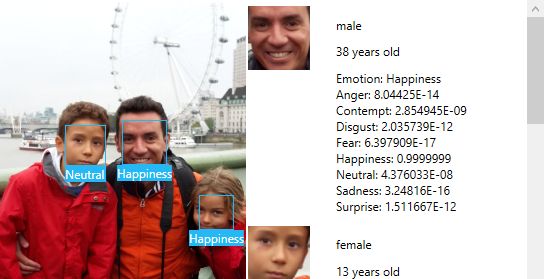
Today we will see a little implementation and the detail provided by Project Oxford if we want to work with Emotion APIs. Firstly a gif with an example of recognition of age, gender and emotions in a WPF app.

We see a photo with some faces recognized: 64 MVPs (nice set of people) and then a bit of Han Solo and another one with Martina on the beach.
If you look at the code a little we will see that in the FaceAPI class, I have created an operation for the detection of emotions. This operation uses the stream of the selected image, and also an array with the location of the faces that were previously found in the process of face detection.
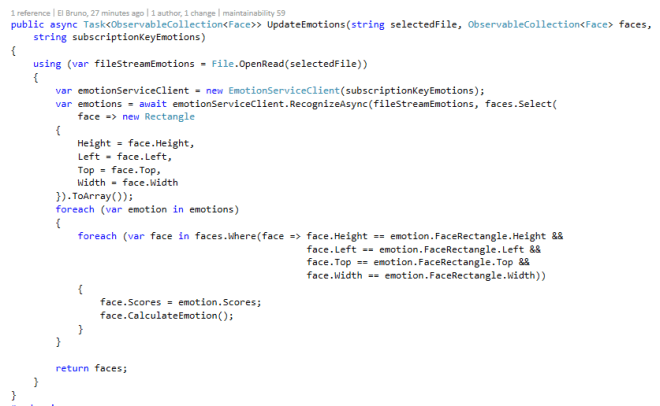
Once the detection of emotions is complete, I update this information in the collection with the detected faces. For now, I do this looking for the same rectangles in both collections, perhaps I should improve this routine.
In addition, in the case that represents a face, I’ve created a property showing the excitement with the highest value.

This value is that then show in the app along with the face frame.
.
The source code is available on GitHub https://github.com/elbruno/ProjectOxford
Greetings @ Madrid
El Bruno
References
- Project Oxford Emotion APIs
- My Azure ML Emotion APIs series
- My Azure ML Face APIs series
 El Bruno
Leave a reply to #AZURE – #VisionAPI, add a frame for each detected text #OCR | El Bruno Cancel reply