⚠️ This blog post was created with the help of AI tools. Yes, I used a bit of magic from language models to organize my thoughts and automate the boring parts, but the geeky fun and the 🤖 in C# are 100% mine.
Hi!
Sometimes I ask an AI model a very small question:
Should this request go to billing or support?
And the model replies with a paragraph. Then another paragraph. Then a very polite explanation of why billing departments exist.
Nice conversation.
Not exactly what my application needed.
For classification, routing and evaluation, I often want a different shape of answer: a label, a score, or the probability of a proposition. Something I can use from C# without asking a chat model to please, pretty please, return only JSON.
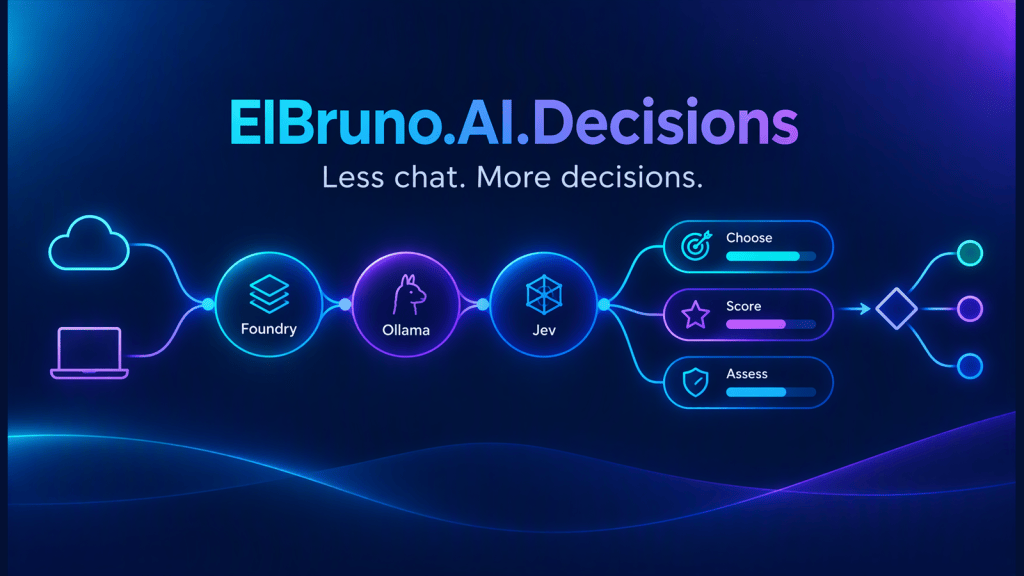
That is the idea behind ElBruno.AI.Decisions.
Less chat. More decisions.
The libraries are on NuGet, and the code is on GitHub.
What is a decision model?
A chat model is useful when you need generated text. A decision model is designed for workloads such as classification and evaluation, returning structured decision results.
In this SDK, the shared API has three operations:
| Operation | Question | Result |
|---|---|---|
ChooseAsync | Which team should handle this ticket? | One label, the probability distribution, and confidence |
ScoreAsync | How complete is this answer? | A fractional score against ordered rubric levels |
AssessAsync | Is this request about a payment problem? | A proposition probability between 0 and 1 |
No hidden conversion from a probability into a business decision. If your application needs a threshold or a human-review queue, you define it.
That last part matters.
The model can help choose a route. It should not quietly become your business policy.
Four packages, one shared API
The project started around Jev. With Microsoft-Decision-1 available in Foundry and native decision support in Ollama, the original name became too narrow.
So the repository is now ElBruno.AI.Decisions, with four packages:
| Package | What it does |
|---|---|
| ElBruno.AI.Decisions | Provider-neutral IDecisionClient, result types and chat-routing integration |
| ElBruno.AI.Decisions.Foundry | Microsoft-Decision-1 through Microsoft’s SystemOne endpoint |
| ElBruno.AI.Decisions.Ollama | Native local System One decision models |
| ElBruno.AI.Decisions.Jev | Native TypeSafe AI Jev SDK and a shared-API adapter |
Install a provider package and NuGet brings in the core abstractions automatically.
The examples below target .NET 10 and version 0.6.2. This is a community SDK, not an official Microsoft, Ollama or TypeSafe AI SDK.
Quickstart 1: Microsoft-Decision-1 in Foundry
First, deploy Microsoft-Decision-1 in your Foundry project.
Important detail: this model is from Microsoft, not OpenAI. The invocation endpoint is:
https://<resource>.services.ai.azure.com/providers/microsoft/v1/systemone
Not /chat/completions. Not /mai/v1/decisions.
Use your deployment name in the Model setting. That name may be different from the catalog name Microsoft-Decision-1.
Create a console app and install the package:
dotnet new console --framework net10.0 --name FoundryDecisionsDemocd FoundryDecisionsDemodotnet add package ElBruno.AI.Decisions.Foundry --version 0.6.2
For this quickstart, use API-key authentication through an environment variable. Replace the resource and deployment placeholders in Program.cs:
using ElBruno.AI.Decisions.Foundry;using var client = new FoundryDecisionClient(new FoundryDecisionOptions{ Endpoint = new Uri("https://<resource>.services.ai.azure.com"), Model = "<deployment-name>", ApiKey = Environment.GetEnvironmentVariable("FOUNDRY_API_KEY") ?? throw new InvalidOperationException("Set FOUNDRY_API_KEY.")});var teams = new Dictionary<string, string?>{ ["billing"] = "Invoices and payments", ["support"] = "Technical problems"};var result = await client.ChooseAsync( "Please correct my invoice.", "Which team should handle this request?", teams);Console.WriteLine($"Team: {result.Choice}");Console.WriteLine($"Label probability: {result.Probabilities[result.Choice]:P1}");Console.WriteLine($"Confidence: {result.Confidence:P1}");
Set FOUNDRY_API_KEY in your shell using your secret-management workflow, then run dotnet run. Do not put the key in source control.
Passing the resource root automatically appends the SystemOne path. You can also pass the complete invocation URL.
Without an API key, the client uses AzureCliCredential after az login. The live smoke test used API-key authentication; CLI authentication has not been smoke-tested.
An illustrative provider response looks like this:
{ "answers": { "decision": { "type": "choice", "choice": "billing", "probabilities": { "billing": 0.99, "support": 0.01 }, "confidence": 0.95 } }}
Which gives output like:
Team: billingLabel probability: 99.0%Confidence: 95.0%
Formatting follows your current culture. Values depend on the model and input.
Notice that the selected-label probability and confidence are different numbers. Keep them separate.
Full runnable sample: FoundryDecision.
Quickstart 2: local decisions with Ollama
Now the local version.
You need Ollama v0.35.0 or later, a running local server, and an actual System One decision model.
Not every model installed in Ollama is a decision model. A chat model does not become one because we ask nicely.
For example:
ollama pull nimbledotnet new console --framework net10.0 --name OllamaDecisionsDemocd OllamaDecisionsDemodotnet add package ElBruno.AI.Decisions.Ollama --version 0.6.2
With Ollama running, replace Program.cs:
using ElBruno.AI.Decisions.Ollama;using var client = new OllamaDecisionClient(new OllamaDecisionOptions{ Endpoint = new Uri("http://localhost:11434/"), Model = "nimble"});var teams = new Dictionary<string, string?>{ ["billing"] = "Invoices and payments", ["support"] = "Technical problems"};var result = await client.ChooseAsync( "Please correct my invoice.", "Which team should handle this request?", teams);Console.WriteLine($"Team: {result.Choice}");Console.WriteLine($"Label probability: {result.Probabilities[result.Choice]:P1}");Console.WriteLine($"Confidence: {result.Confidence:P1}");
Run dotnet run. No API key is required for the local endpoint.
The SDK calls:
http://localhost:11434/v1/systemone
It sends native state and named questions. No chat prompt, no letter mapping, no first-token logprob workaround.
Here is an illustrative response, not the result of a live local-model test:
{ "model": "nimble", "answers": { "decision": { "type": "choice", "choice": "billing", "probabilities": { "billing": 0.9, "support": 0.1 }, "confidence": 0.531 } }, "usage": { "input_tokens": 174, "output_tokens": 1 }}
Example output:
Team: billingLabel probability: 90.0%Confidence: 53.1%
Ollama confidence measures distribution concentration:
1 - H(p) / ln(N)
It is not calibrated correctness and it is not the probability of the selected label.
Full runnable sample: OllamaLocal.
Same client, different questions
The Foundry and Ollama clients both implement IDecisionClient. With either client from the examples above, scoring and assessment use the same methods:
var score = await client.ScoreAsync( "Restart the app, check the logs, and include the error message.", "How actionable is this support answer?", new[] { "No useful action", "Some guidance, but important details are missing", "Clear steps with useful diagnostic information" });Console.WriteLine($"Expected rubric level: {score.Score:F2}");var assessment = await client.AssessAsync( "My card was charged twice for the same order.", "This request concerns a payment problem.");Console.WriteLine($"Payment problem probability: {assessment.Probability:P1}");
Score uses an ordered rubric, lowest level first. With these three levels, the result is a fractional, zero-based position between 0 and 2. It is not automatically normalized to 0-1, and it is not rounded to an integer.
Assess returns a proposition probability. If the application needs a cutoff, make that policy explicit and validate it on representative data.
Quickstart 3: native Jev questions
The Jev package also exposes its native typed API, useful when you need structured state, named questions and provider-specific metadata.
dotnet new console --framework net10.0 --name JevDecisionsDemocd JevDecisionsDemodotnet add package ElBruno.AI.Decisions.Jev --version 0.6.2
Set JEV_API_KEY through your secret-management workflow and replace Program.cs:
using ElBruno.AI.Decisions.Jev;using var client = new JevClient(new JevClientOptions{ ApiKey = Environment.GetEnvironmentVariable("JEV_API_KEY") ?? throw new InvalidOperationException("Set JEV_API_KEY."), DefaultModel = JevModels.Version1_13_0});var question = new JevQuestionKey<JevNoulAnswer>("relevant");var request = new JevDecisionRequest( "A .NET developer asks about dependency injection.") .WithQuestion( question, new JevNoulQuestion("Is this about .NET development?"));var response = await client.EvaluateAsync(request);Console.WriteLine($"Relevance: {response.GetAnswer(question).Probability:P1}");
Run dotnet run with a valid service credential and access to the configured model. This quickstart demonstrates the SDK contract; live Jev compatibility remains unverified.
For shared-API routing and the rest of the Jev examples, start with the repository samples.
Where would I use this?
A few practical starting points:
- Route a support request to billing or technical support.
- Classify GitHub issues into a fixed set of labels.
- Score an answer against an explicit completeness rubric.
- Assess whether a retrieved document is relevant to a question.
- Choose which tool or workflow should handle a request.
The useful pattern is not “replace every chat model.”
It is use the right output shape for the task.
If you need a paragraph, use a chat model. If you need a decision distribution, start with a decision model.
Important: early access is still early access
Version 0.6.2 is published on NuGet, with a separate README for each package. That is not a production-readiness certificate.
Here is the current status:
| Area | Status |
|---|---|
| Foundry Choice, Score and Assess | Live API-key smoke test completed on October 9, 2026 |
| Foundry CLI authentication | Implemented, not live smoke-tested |
| Local Ollama decision-model compatibility | Unverified; covered by offline protocol checks and synthetic samples |
| Live Jev compatibility | Unverified |
| Shared Foundry/Ollama surface | One text question per call; no image or batch API exposed |
The shared Score API supports 2-10 rubric levels. Ollama text requests are bounded at 64 KiB. Model-specific choice limits still apply.
Confidence is not a safety guarantee. A clean probability distribution is not proof that the model understood your business.
Measure on your own data. Keep a human-review path where appropriate. And do not turn an illustrative example into a benchmark slide.
Try the samples without credentials
The repository samples include an explicit offline mode:
git clone https://github.com/elbruno/ElBruno.AI.Decisions.gitcd ElBruno.AI.Decisionsdotnet run --project samples\12-FoundryDecision -- --offlinedotnet run --project samples\11-OllamaLocal -- --offline
These use synthetic responses. Great for exploring the API, not for measuring real model quality.
For real deployments, use the configuration and user-secrets guide.
Links
- Repository, source and samples
- NuGet core package
- Foundry package
- Ollama package
- Jev package
- Microsoft-Decision-1 introduction
- Microsoft’s Foundry endpoint example
- Ollama decision guide
- Ollama System One API
- TypeSafe AI documentation
Wrap-up
I like this direction because it makes a common application need explicit: sometimes we need AI to decide, not to talk.
Foundry when I want a hosted Microsoft model. Ollama when I want a local decision model. Jev when I want its native typed workflow.
One shared API where it makes sense, provider-specific features where they matter.
Less chat. More decisions. And hopefully, fewer paragraphs explaining why my invoice belongs to billing.
Happy coding!
El Bruno


Leave a Reply