⚠️ This blog post was created with the help of AI tools. Yes, I used a bit of magic from language models to organize my thoughts and automate the boring parts, but the geeky fun and the 🤖 in C# are 100% mine.
Draft for future publication and promotion. The DataIngestion adapter is available as
0.9.3-preview.1. The Markdown and ZIP examples use the current repository source, without assuming those features are already available in a stable release.
Hi!
Converting a PDF to Markdown is great. But when you are preparing documents for an AI pipeline, the next question is: what do I do with that Markdown afterward?
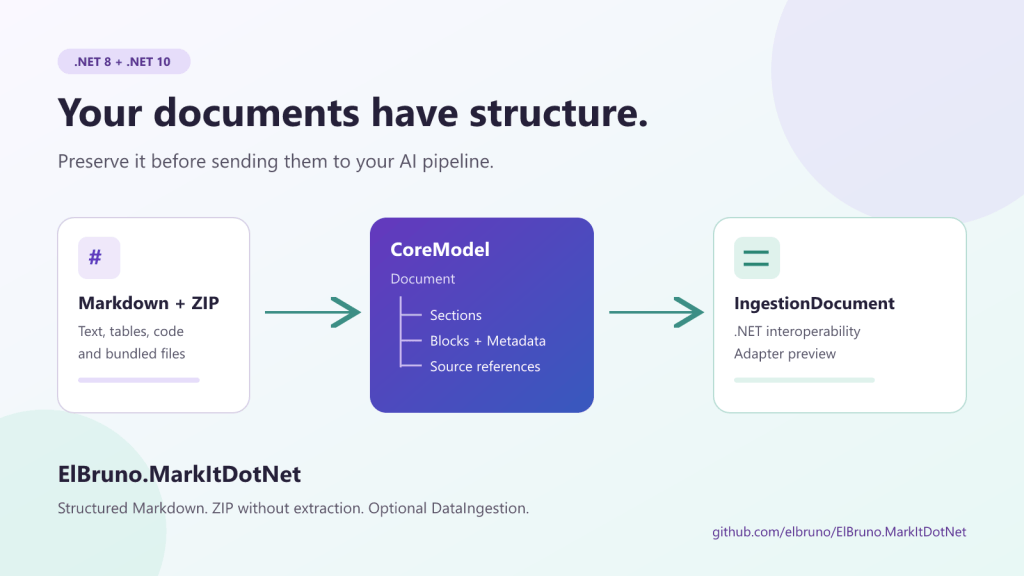
A document is more than a string. It has titles, sections, tables, lists, code examples, and references to its source. Flatten everything too early, and you lose information that could help you decide how to split it, enrich it, or display a citation.
I added three pieces to ElBruno.MarkItDotNet to support that next step: structured Markdown import with Markdig, a ZIP connector that does not extract files to disk, and an optional adapter for Microsoft.Extensions.DataIngestion.
The goal is not to implement an entire AI pipeline in one library. It is to connect its stages well.
First: What Is Available and How to Try It
The ElBruno.MarkItDotNet.DataIngestion adapter targets .NET 8 and .NET 10. Its Microsoft dependency is in preview and stays isolated from CoreModel.
To try the published adapter in a new application:
dotnet new console -n AdapterDemo -f net10.0Set-Location AdapterDemodotnet add package ElBruno.MarkItDotNet.DataIngestion --version 0.9.3-preview.1
This command uses the .NET 10 SDK. The adapter also includes a .NET 8 target. CoreModel comes in as a dependency of the adapter. You do not need to install Microsoft’s full pipeline package to call ToIngestionDocument().
To try all three pieces together, the repository includes a runnable demo that uses project references:
git clone https://github.com/elbruno/ElBruno.MarkItDotNet.gitSet-Location ElBruno.MarkItDotNetdotnet run --project src\samples\MarkdownIngestionDemo\MarkdownIngestionDemo.csproj --framework net8.0
The demo creates its own test ZIP containing Markdown, JSON, and text, processes the entries, and deletes the temporary archive when it finishes. It does not need AI services, API keys, or private documents.
1. A Minimal Adapter Example Using Only NuGet
Let’s start small: build a document and adapt it.
This complete program can replace Program.cs in AdapterDemo:
using ElBruno.MarkItDotNet.CoreModel;using ElBruno.MarkItDotNet.DataIngestion;var model = new Document{ Id = "release-notes", Metadata = new DocumentMetadata { Title = "Release notes", SourceFormat = "generated" }, Sections = [ new DocumentSection { Id = "changes", Heading = new HeadingBlock { Id = "changes-heading", Text = "Changes", Level = 2 }, Blocks = [ new ParagraphBlock { Id = "intro", Text = "Documents now have structure." } ] } ]};var ingestion = model.ToIngestionDocument();Console.WriteLine($"Identifier: {ingestion.Identifier}");foreach (var element in ingestion.EnumerateContent()){ Console.WriteLine($"{element.GetType().Name}: {element.GetMarkdown()}");}
The result keeps the document identifier. The title becomes a level 1 header, while the section heading and paragraph become native Microsoft ingestion elements.
There is no hidden LLM call here. No embeddings or automatic indexing. This is a change of representation so that other components can consume the document.
2. Markdown Becomes More Than a String
In the repository demo, this Markdown is our input:
Deployment guide ConfigurationUse environment variables for configuration.| Setting | Value || --- | --- || Mode | Preview | Checklist x Build the application [ ] Review the deploymentcsharpConsole.WriteLine("Ready!"); Review before deploying.
The new import API is intentionally small:
using ElBruno.MarkItDotNet.Markdown;var model = MarkdownDocumentParser.Parse(markdown, "docs/deployment.md");Console.WriteLine($"Title: {model.Metadata.Title}");Console.WriteLine($"Format: {model.Metadata.SourceFormat}");Console.WriteLine($"Document ID: {model.Id}");
Markdig parses CommonMark and its advanced extensions. The parser maps the result to Document, DocumentSection, and CoreModel blocks.
An initial H1 becomes the document title. Other headings form the section hierarchy. Paragraphs, tables, lists, code, and block quotes have their own representations; unsupported block content is retained as raw Markdown.
The existing Markdown converter keeps its behavior: structured import is optional, not a mandatory replacement for Markdown pass-through.
Walk Sections Without Losing Their Hierarchy
Reading only model.Sections is not enough: sections can contain subsections. This helper walks both:
using ElBruno.MarkItDotNet.CoreModel;static void PrintSections( IReadOnlyList<DocumentSection> sections, int depth = 0){ foreach (var section in sections) { var indent = new string(' ', depth * 2); Console.WriteLine($"{indent}Section: {section.Heading?.Text ?? "(root)"}"); foreach (var block in section.Blocks) { Console.WriteLine($"{indent} {block.GetType().Name}, ID: {block.Id}"); } PrintSections(section.SubSections, depth + 1); }}// Inside your program:// PrintSections(model.Sections);
The example input produces ParagraphBlock, TableBlock, ListBlock, CodeBlock, and QuoteBlock instances.
Inspect a Checklist
In our example document, Checklist is a top-level section:
var checklist = model.Sections.Single( section => section.Heading?.Text == "Checklist");var tasks = checklist.Blocks.OfType<ListBlock>().Single();foreach (var item in tasks.Items){ Console.WriteLine($"{item.Text}: checked={item.IsChecked}");}
IsChecked is nullable: true and false represent task items; null identifies an ordinary list item.
3. Save the Structure and Render Markdown Again
Serializing the model to JSON is a useful way to inspect its full structure:
using System.Text.Json;var json = JsonSerializer.Serialize( model, new JsonSerializerOptions { WriteIndented = true });Console.WriteLine(json);
Blocks use polymorphic discriminators such as $type. The JSON shows which content is a paragraph, a table, or a code block, along with its IDs and source references.
We can also render Markdown again:
using ElBruno.MarkItDotNet.CoreModel;var rendered = MarkdownRenderer.Render(model);Console.WriteLine(rendered);
There is an important distinction: OriginalMarkdown retains the syntax of the block, including bold text, links, or code fences. The renderer prioritizes that value when it is present.
This is not a promise of byte-for-byte reproduction of the entire file: spacing between blocks, line endings, and the title may be normalized. Editing Text also does not automatically invalidate OriginalMarkdown.
If I want to replace a parsed paragraph, I make that decision explicit:
var paragraph = model.Sections .SelectMany(section => section.Blocks) .OfType<ParagraphBlock>() .First();var edited = paragraph with{ Text = "Use managed configuration for production.", OriginalMarkdown = null};Console.WriteLine(edited.Text);
with creates a new block. To render the updated document, you must include that block in a new section or document. The original block does not change.
4. ZIP as a Document Source, Not a Temporary Folder
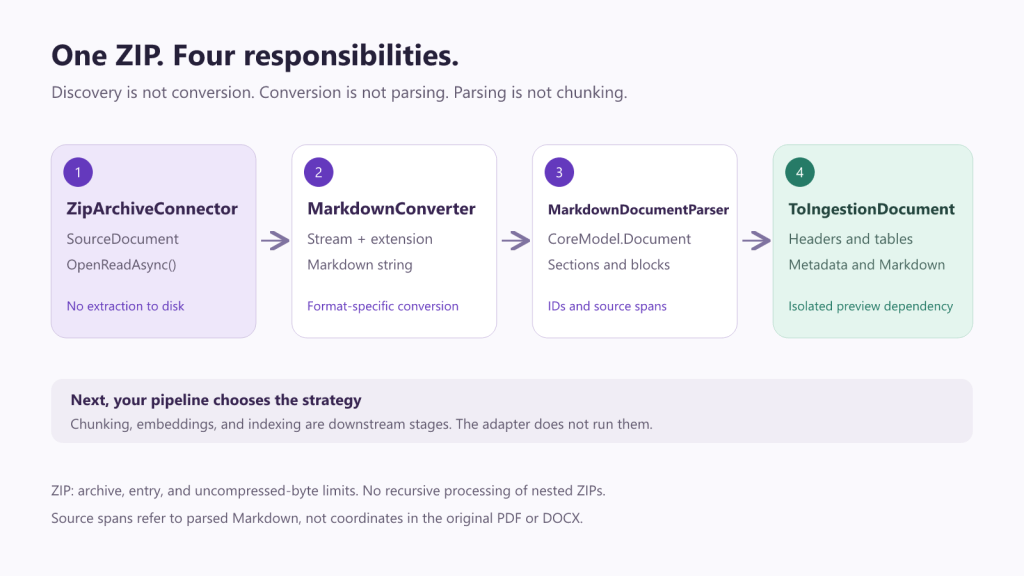
A ZIP often arrives as a documentation bundle: guides, notes, JSON files, or reports. The connector exposes its files as SourceDocument instances through IDocumentSource.
using ElBruno.MarkItDotNet.Connectors;using Microsoft.Extensions.Logging.Abstractions;var source = new ZipArchiveConnector( new ZipArchiveConnectorOptions { ArchivePath = "documents.zip", MaxArchiveSizeBytes = 10 * 1024 * 1024, MaxEntrySizeBytes = 2 * 1024 * 1024, MaxTotalUncompressedBytes = 20 * 1024 * 1024, MaxEntries = 100 }, NullLogger<ZipArchiveConnector>.Instance);using var timeout = new CancellationTokenSource(TimeSpan.FromSeconds(30));await foreach (var document in source.GetDocumentsAsync(timeout.Token)){ Console.WriteLine(document.Name); Console.WriteLine(document.Source); Console.WriteLine(document.Metadata[SourceMetadataKeys.ArchiveEntryPath]); await using var content = await document.OpenReadAsync(timeout.Token); // Consume the stream here, before leaving this iteration.}
Enumeration discovers the files. OpenReadAsync() opens their content on demand. The returned stream keeps the ZIP archive open until the stream is disposed.
Directory entries are not returned as documents. Entry names serve as references and are not turned into extraction paths.
For applications that use dependency injection:
using ElBruno.MarkItDotNet.Connectors;using Microsoft.Extensions.DependencyInjection;var services = new ServiceCollection();services.AddZipArchiveConnector(options =>{ options.ArchivePath = "documents.zip"; options.MaxEntries = 100; options.MaxEntrySizeBytes = 2 * 1024 * 1024;});using var provider = services.BuildServiceProvider();var source = provider.GetRequiredService<IDocumentSource>();
This DI example also requires Microsoft.Extensions.DependencyInjection, the concrete container. The connectors package provides registration extensions and abstractions, not that container.
Limits Matter
| Option | Default | What It Controls |
|---|---|---|
MaxArchiveSizeBytes | 100 MiB | Compressed archive size during discovery |
MaxEntrySizeBytes | 25 MiB | Declared entry size and the cap applied during reads |
MaxTotalUncompressedBytes | 250 MiB | Sum of declared sizes of eligible entries |
MaxEntries | 10,000 | Entry count, including directories |
Entries exceeding the per-entry limit are skipped with a warning. If the archive size, entry count, or eligible total exceeds its limit, the connector rejects the operation.
Reads have an additional per-entry cap. The total limit is not a shared counter across concurrent or repeated reads; it is a discovery-time check based on declared sizes.
This should not be presented as universal protection against malicious ZIP archives. There is no recursive extraction of nested ZIPs, decompression CPU budget, or configurable compression-ratio limit. In production, I would still use concurrency limits, isolation, and application-specific policies for untrusted files.
5. ZIP, Conversion, Parsing, and Adaptation: The Complete Flow
The four stages can be connected without writing intermediate files:
using ElBruno.MarkItDotNet;using ElBruno.MarkItDotNet.DataIngestion;using ElBruno.MarkItDotNet.Markdown;var converter = new MarkdownConverter();var allowedExtensions = new HashSet<string>(StringComparer.OrdinalIgnoreCase){ ".md", ".txt", ".json"};await foreach (var document in source.GetDocumentsAsync(timeout.Token)){ var extension = Path.GetExtension(document.Name); if (!allowedExtensions.Contains(extension)) { Console.WriteLine($"Skipped unsupported document: {document.Name}"); continue; } await using var content = await document.OpenReadAsync(timeout.Token); var convertedMarkdown = await converter.ConvertAsync( content, extension, timeout.Token); var structured = MarkdownDocumentParser.Parse( convertedMarkdown, document.Source); var ingestionDocument = structured.ToIngestionDocument(); Console.WriteLine( $"{document.Name}: {ingestionDocument.EnumerateContent().Count()} elements");}
This snippet reuses source and timeout from the earlier example. The complete program is in the demo.
The allowlist is an application decision. We can extend it to formats supported by registered converters, but a ZIP does not magically make every file inside it compatible.
There is also a traceability detail: sourcePath includes the ZIP archive and entry, but the parser’s offsets refer to the converted Markdown, not equivalent positions in the original PDF or DOCX.
One more distinction: no intermediate files does not mean constant memory usage. The converter produces a string and the parser builds a tree; the ZIP connector avoids extracting every entry to disk.
6. Native Tables, Not Just Text with Pipes
The adapter maps a table to IngestionDocumentTable with a cell matrix:
using Microsoft.Extensions.DataIngestion;var ingestion = model.ToIngestionDocument();var table = ingestion.EnumerateContent() .OfType<IngestionDocumentTable>() .Single();Console.WriteLine($"Rows: {table.Cells.GetLength(0)}");Console.WriteLine($"Columns: {table.Cells.GetLength(1)}");Console.WriteLine($"Header: {table.Cells[0, 0]?.Text}");Console.WriteLine($"Value: {table.Cells[1, 1]?.Text}");
For our input, the first row contains Setting and Value; the second contains Mode and Preview.
This makes the structure available to downstream components that need to handle tables differently from paragraphs.
7. IDs and Source References Travel Too
The adapter’s metadata uses the markitdotnet. prefix:
var root = ingestion.Sections.Single();Console.WriteLine(root.Metadata["markitdotnet.documentId"]);Console.WriteLine(root.Metadata["markitdotnet.sourceFormat"]);foreach (var element in ingestion.EnumerateContent()){ if (element.Metadata.TryGetValue("markitdotnet.blockId", out var blockId)) { Console.WriteLine($"Block: {blockId}"); } if (element.Metadata.TryGetValue("markitdotnet.sourceOffset", out var offset)) { Console.WriteLine($"Markdown offset: {offset}"); } if (element.Metadata.TryGetValue("markitdotnet.sourcePath", out var path)) { Console.WriteLine($"Source: {path}"); }}
Document metadata is stored on the root section. Block references are stored on the corresponding element; PageNumber is also copied when present.
The parser generates a deterministic ID for the same content and source path. That does not mean the ID stays the same after editing the file, moving it, or changing the converted Markdown.
Lists, block quotes, and code blocks do not all have dedicated native equivalents in this adapter: they are represented as paragraphs with Markdown and block-type metadata. The internal hierarchy of a list or quote is not mapped to a hierarchy of Microsoft ingestion elements.
Why an Optional Package?
Because not every consumer needs the same thing.
If I want to convert a file to Markdown, I keep using the main package. If I want to inspect Markdown structure, I use the optional parser. If I want to integrate CoreModel with Microsoft components, I add DataIngestion.
The adapter references Microsoft.Extensions.DataIngestion.Abstractions. It does not parse Markdown again with Microsoft’s reader or force the base library to depend on a preview API.
That gives us a clear boundary of responsibility: MarkItDotNet prepares and represents documents; your application decides how to use them.
Try It and Follow the Project
The complete example for this article is in MarkdownIngestionDemo. You can run it on .NET 8 or .NET 10 by changing --framework.
The Markdown import guide, ZIP connector guide, and adapter guide cover each API separately.
Find the source and packages here:
- ElBruno.MarkItDotNet repository.
- DataIngestion adapter 0.9.3-preview.1 on NuGet.
- Microsoft.Extensions.DataIngestion.
If you are preparing documents for AI with C#, give the demo a try. Sometimes the most useful next step is not another model call: it is preserving more of the structure your documents already have.
Cheers!
Bruno
Materials for Future Promotion
Short title: Markdown + ZIP + DataIngestion: Structured Documents with C#.
Excerpt: ElBruno.MarkItDotNet adds structured Markdown import, ZIP reading without extraction, and an optional adapter for Microsoft.Extensions.DataIngestion. A runnable C# demo connects all three pieces.
Social post: A document is more than a string. With ElBruno.MarkItDotNet, you can preserve sections, tables, and source references, read ZIP entries without extracting them to disk, and adapt CoreModel to IngestionDocument. The adapter is in preview, and the repo includes a complete demo. Code: https://github.com/elbruno/ElBruno.MarkItDotNet
Images: Original hero and pipeline diagram in PNG, with editable SVG sources in images/. When publishing outside GitHub, upload both images and replace this draft’s relative paths with the blog’s image URLs.
Editorial note: This article was prepared with AI assistance; examples were checked against the repository APIs. Verify the published Markdown and Connectors versions before replacing the source-based setup with NuGet installation instructions.
Happy coding!
Greetings
El Bruno
More posts in my blog ElBruno.com.
More info in https://beacons.ai/elbruno


Leave a Reply