Hi !
Today is a great day for some developers. I was expecting some more advanced materials regarding Hololens and, lucky for us the Hololens Dev Center has updated and added tons of information.
The main topics are nice reading materials for next weeks:
Understanding HoloLens
Hologram
Hardware details
HoloLens shell overview
App views on HoloLens
Using mixed reality capture
Working with accessories
Developing for HoloLens
Development overview
App model
Install the tools
Using Visual Studio
Using the HoloLens emulator
Using the Windows device portal
Performance recommendations
Testing
FAQ
Building 2D apps
Building 2D apps
Current limitations for apps using APIs from the shell
Building holographic apps with Unity
Unity development overview
Recommended settings for Unity
Performance recommendations for Unity
Exporting and building a Unity Visual Studio solution
Best practices for working with Unity and Visual Studio
Adding holographic capabilities to middleware
DirectX development overview
Creating a holographic DirectX project
Rendering in DirectX
Designing holograms
Designing for mixed reality
Types of holographic apps
Gaze indicator
Gaze targeting
Gesture design
Voice design
Spatial sound design
Spatial mapping design
Color design
Updating your existing universal app for HoloLens
And the documentation includes some cool materials for each topic. In example
Understanding Hololens
Nice videos to explain Holograms
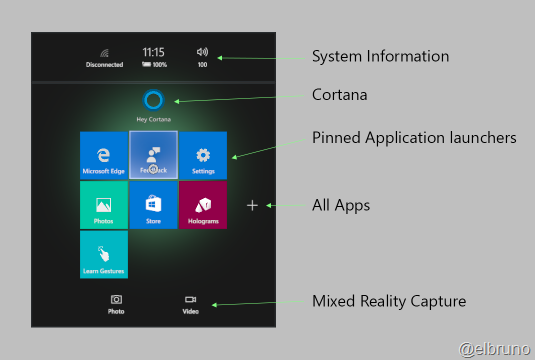
Detailed information about the Hologram Shell. Yes, there is a shell as main entry point for the Hololens users (Cortana is there too)
Some information about Hololens accesories. And you know, Hololens support BlueTooth Low Energy 4.0 all the work during past years will get some rewards. The next sentence makes me cry (emotional cry of course)
As long as the peripheral supports either the Bluetooth HID or GATT profiles, it will be able to pair with HoloLens. Microsoft HoloLens Clicker is the only Bluetooth peripheral that is supported by the shell for scroll and select gestures. Other Bluetooth HID and GATT devices will require a companion application on Microsoft HoloLens.
Developing Apps for Hololens
Developer information about gazes, gestures, voice, spatial mapping and spatial sound.
Information for each topic is available at
The required development tools are
In the Using Visual Studio section, we can find some interesting topics like
- The development process support USB and WIFI development for the device
- Projects must be x86

- This is Windows 10 development, so the pairing for a dev device must be performed
The Hololens Emulator for sure will get some posts in the near future. So far we know
- It will be available for download for free in March 30th
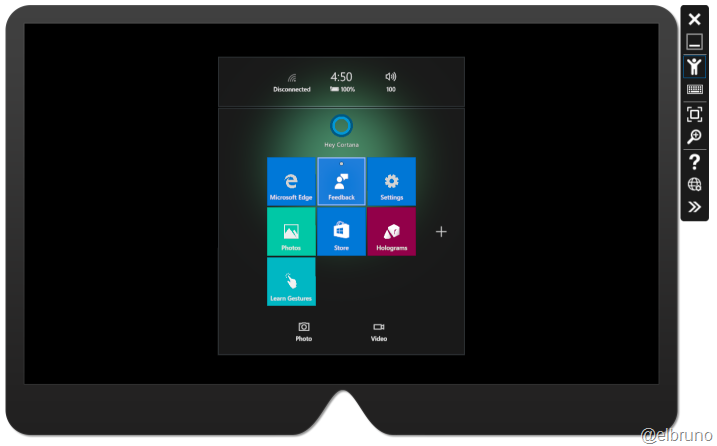
- The basic emulator support the following actions
- Walk forward, back, left, and right – Use the W,A,S, and D keys on your keyboard, or the left stick on an Xbox controller.
- Look up, down, left, and right – Click and drag the mouse, use the arrow keys on your keyboard, or the right stick on an Xbox controller.
- Air tap gesture – Right-click the mouse, press the Enter key on your keyboard, or use the A button on an Xbox controller.
- Bloom gesture – Press the Windows key or F2 key on your keyboard, or press the B button on an Xbox controller.
- Hand movement for scrolling – Hold the Alt key, hold the right mouse button, and drag the mouse up / down, or in an Xbox controller hold the right trigger and A button down and move the right stick up and down.
- It will look like something like this
And finally the main namespaces to start to play around are
So, the Developer Center has much more information, however I think I need to wait until March 30th to really start to get familiar with more detailed information.
Greetings @ Toronto
-El Bruno
References
- MSDN Hololens Dev Center
- MSDN Holographic Documentation
- MSDN Holograpic Hologram
- MSDN Hololens Shell Overview
- MSDN Hololens Accesories
- MSDN Hololens Development OVerview
- MSDN HoloLens emulator
- MSDN Using Visual Studio to develop Hololens apps
- MSDN Using the Hololens emulator
- MSDN Developing for Hololens FAQ
 El Bruno
Leave a reply to #Hololens – You can also create #2D apps !!! | El Bruno Cancel reply