Hello
In yesterday’s post I wrote on how to create thumbnails using Vision API in Project Oxford. While there are several options in the .Net community to create thumbnails, this stands for creating the miniature bearing in mind the main content of the original image.
For this, this process uses VisionAPI capabilities to detect “the main areas” in the image, and using this as source it create the required thumbnail. This is important when the image we ask does not respect the original format. For example to move from an image with 4:3 aspect ratio to a 16:9 format.

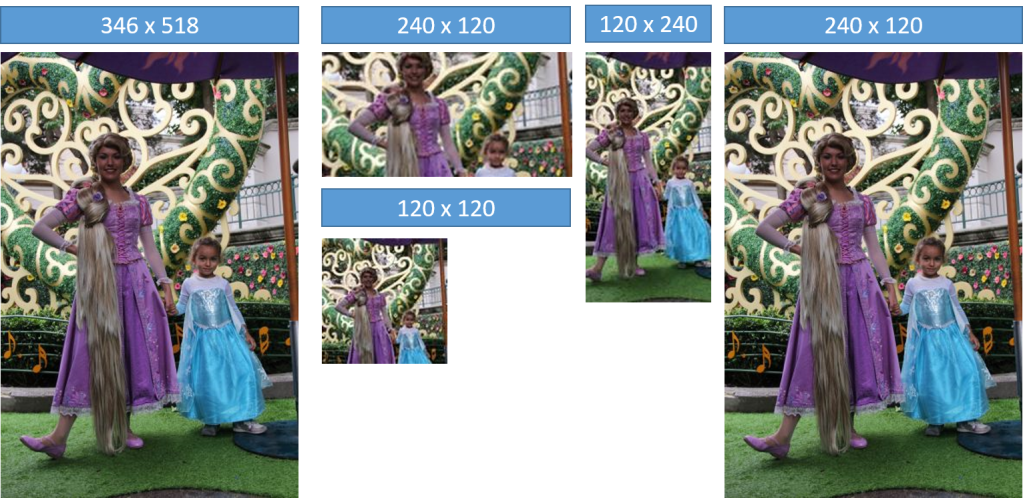
In the yesterday’s sample, I used as original image a picture of Rapunzel and Martina at Disney in Portrait mode with a size of 346 x 518 pixels. Then I generated several miniatures with the following sizes
- 120 x 120
- 240 x 120
- 120 x 240
- 240 x 120
The 120 x 240 thumbnail is a nice example on how to change from Portrait to Landscape, SmartCropping capacity has remained as the main area of the image the faces of the people.
The following example uses a photo in Landscape mode of size 3264 by 1836 pixels as the original image.

The generated thumbnails are
- 120 x 120
- 240 x 120
- 360 x 120
- 120 x 240
- 240 x 120
- 360 x 120
And in them you can see as to when requesting a Portrait format, has decided to keep the focus on the central face and the 2015 Rugby World Cup.
The source code is avilable in GitHub https://github.com/elbruno/ProjectOxford
Greetings @ Madrid !
El Bruno
References
- Project Oxford
- My Azure ML Vision APIs series
- My Azure ML Emotion APIs series
- My Azure ML Face APIs series
 El Bruno
Leave a comment