Hola!
Today I start from back to forward. First a video where we can see
- A deployed custom Tile in a Band, with
- A label
- A barcode
- 2 buttons
- A Windows Universal Application on Windows 10 which
- Connects to the Band
- Capture the clicks of a user on the buttons
- Displays the button pressed in the app
In the previous post I wrote on how to create this Custom Tile. In the post, I also wrote about the importance of the identifiers for the Tile and the Tile controls. In this example, these values are a GUID for a Tile and a series of constants for the Tile UI elements.

The simplest events of interaction of a user with the Band that we can capture are
- Open or close a Tile
- Press a button
The class [TileManager] is the one who publish events for these scenarios. In the following code example, we can see the subscription to 2 events. Also, when a Tile is Opened the status bar is updated with a custom message.

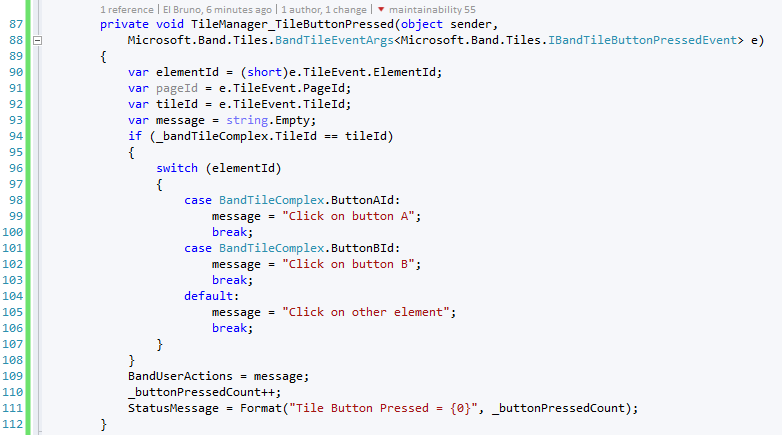
The capture of the mouse clicks on buttons is similar. Although it is important to note that we perform a “filter” of the captured actions to see if this action is from our tile (line 94). Then as we can identify the button by its identifier and work on it.
In the following code example, I update a message in the UI of the app with the specific button pressed..
And now you can see the video again and you will surely have lot more sense.
GitHub source code: https://github.com/elbruno/Blog/tree/master/MSBand/App1
Saludos @ Madrid
/El Bruno
References
- Microsoft Band Get Started
- Microsoft Band SDK
- Microsoft Band Tiles
- Microsoft Band Experience Design Guidelines
- El Bruno, How to connect a Microsoft Band to a Windows 10 device
- El Bruno, How to connect to a Band and access sensor information in a Windows 10 app using Visual Studio 2015
- El Bruno, List, add and delete Tiles using an #Windows10 app and Visual Studio 2015
- El Bruno, About Tiles format, and how to create complex ones
 El Bruno
Leave a comment