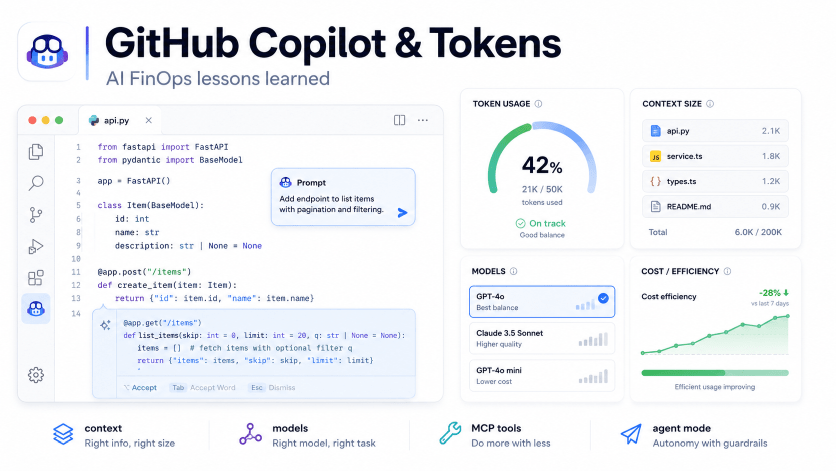
⚠️ This blog post was created with the help of AI tools. Yes, I used a bit of magic from language models to organize my thoughts and automate the boring parts, but the geeky fun and the 🤖 in C# are 100% mine.
Hi!
For a long time, many of us used GitHub Copilot as if it were unlimited magic: autocomplete, chat, agent mode, code review, increasingly powerful models, massive context, and long-running sessions that sometimes felt like a pair-programming marathon.
And it worked. Well, mostly.
Now, with usage-based billing and AI Credits, many developers are seeing something that used to be mostly invisible: every AI interaction has a cost. And that cost is not only about “asking a question.” It depends on the model, the context, input tokens, output tokens, cached tokens, tools, files, logs, MCP servers, and how long we let an agent keep working.
GitHub explains this in the Copilot billing documentation: interactions consume input, output, and cached tokens; each model has its own pricing; and the total is converted into AI Credits. The same documentation also explains an important detail: code completions and Next Edit Suggestions are not charged as AI Credits in paid plans.
Source: https://docs.github.com/en/copilot/reference/copilot-billing/models-and-pricing
The natural reaction is to panic.
The useful reaction is to optimize.
Just like we optimize compute, storage, bandwidth, or GitHub Actions minutes, now we also need to optimize how we use tokens.
And yes, this applies to those of us using Copilot every day for .NET, AI, Azure, scripts, demos, documentation, refactors, and those beautiful moments when we tell the agent “just fix this test” and come back 20 minutes later to find a doctoral thesis in progress.
The real problem is not the prompt. It is the context
When we talk about tokens, we often think only about the text we type.
But in AI-assisted development tools, the expensive part is often everything that travels around the prompt:
- chat history
- open files
- files attached as context
- workspace search results
- diffs
- terminal output
- build errors
- long logs
- tool calls
- MCP server responses
- custom instructions
- agent memory
- content the model decides to inspect while completing the task
A one-line question can be cheap.
A one-line question inside a conversation with 80 messages, 12 files, 3 logs, 5 tools, and an MCP server connected to half the universe… not so much.
The first optimization is mental: more context does not always mean a better answer.
Sometimes more context only means more tokens, more noise, and more chances for the model to get distracted.
1. Use autocomplete and Next Edit Suggestions before opening chat
Not everything needs a conversation.
For small tasks, Copilot directly in the editor is often the most efficient option:
- completing a line
- finishing a simple function
- generating boilerplate
- suggesting the next obvious change
- completing a repeated pattern
- adjusting names
- writing a simple condition
- generating a property, DTO, or mapping
If you can solve it with Tab, do not open a chat.
This is not just convenience. It is strategy. According to GitHub documentation, code completions and Next Edit Suggestions are not billed as AI Credits in paid plans.
Source: https://docs.github.com/en/copilot/reference/copilot-billing/models-and-pricing
Simple rule:
- Use autocomplete for micro-tasks.
- Use inline edit for local changes.
- Use chat for questions that require reasoning.
- Use agent mode for well-scoped multi-file tasks.
- Use cloud agents when you really want to delegate a workflow, not when you only need to change three lines.
The most expensive model in the world should not be helping you write public string Name { get; set; }.
That is what Tab is for. And coffee.
2. Choose the right model for the task
Not every model has the same cost or the same purpose.
The VS Code documentation recommends using lighter models for quick edits, boilerplate, and direct questions, and reserving reasoning models for complex refactors, architecture decisions, and multi-step debugging.
Source: https://code.visualstudio.com/docs/copilot/guides/optimize-usage
A practical pattern:
| Task type | Recommended model |
|---|---|
| Simple question | Lightweight model or Auto |
| Boilerplate | Lightweight model |
| Code explanation | Lightweight or medium model |
| Simple tests | Lightweight or medium model |
| Complex debugging | Reasoning model |
| Architecture | Reasoning or frontier model |
| Large refactor | Powerful model, but with limited scope |
| Initial documentation | Lightweight or local model |
GitHub also documents Auto Model Selection, which can choose a model based on task complexity, availability, and policies. The documentation also notes that Auto can improve efficiency by reserving more expensive models for tasks that actually need them.
Source: https://docs.github.com/en/copilot/concepts/auto-model-selection
My recommendation for most developers:
- use Auto as the default
- manually switch to a more powerful model only when you have a clear reason
- switch back to Auto or a cheaper model when the complex task is done
Do not drive a truck to buy bread.
And do not use the most expensive model to ask how to center a div. Although, to be fair, sometimes centering a div does deserve an architecture review.
3. Start new chats when you change tasks
This is one of the simplest and most ignored optimizations.
The VS Code documentation is clear: when a conversation grows, it accumulates context from previous messages, tool outputs, and file contents. If you switch to an unrelated task inside the same session, the model still processes irrelevant history.
Source: https://code.visualstudio.com/docs/copilot/guides/optimize-usage
Bad pattern:
Chat 1:- Debug tests- Then architecture- Then generate README- Then review Dockerfile- Then explain an Azure error- Then ask for a tweet
Better pattern:
Chat 1: Debug testsChat 2: Architecture designChat 3: READMEChat 4: DockerfileChat 5: Azure deployment issue
New task, new chat.
Yes, it sounds simple.
Yes, it works.
And yes, it also helps your human brain, which sometimes has a smaller context window than the model.
4. Use /compact and /fork when it makes sense
When a conversation has useful context but starts getting too large, you do not always need to throw it away.
You can compact it or fork it.
VS Code documents new sessions, forking, and compaction as ways to manage context and reduce unnecessary tokens.
Source: https://code.visualstudio.com/docs/copilot/guides/optimize-usage
Good practices:
- use
/compactwhen the conversation has useful information but too much history - use
/forkwhen you want to explore an alternative without polluting the main conversation - start a new chat if the new task is unrelated
- summarize the current state before continuing a long task
Useful prompt:
Summarize the current state, decisions made, files changed, and next steps. Keep it short and actionable.
Then copy that summary into a new conversation and continue with clean context.
Less noise. Fewer tokens. Better focus.
5. Do not ask it to analyze the whole repo if you only need three files
This is the classic one.
Expensive prompt:
Analyze this entire repository and tell me what is wrong.
Better prompt:
Analyze only these files:- src/MyApp.Api/Program.cs- src/MyApp.Core/Services/OrderService.cs- tests/MyApp.Tests/OrderServiceTests.csGoal: find why this test is failing.Do not edit files yet. First explain the likely cause.
The difference is huge.
The first prompt invites the model to explore, read, search, open files, infer architecture, and consume context.
The second prompt defines:
- files
- goal
- limits
- working mode
- expected output
In AI coding, scope is part of the prompt.
Small scope, better result.
Infinite scope, surprise in the bill.
6. Separate planning, implementation, and validation
One of the most common mistakes with agent mode is asking for everything at once:
Analyze the issue, design the fix, implement it, run tests, fix errors, update docs, and create a summary.
That sounds productive.
But it can also trigger loops, tool calls, unnecessary changes, and high token consumption.
A better approach is to use phases.
Phase 1: plan
Create a short implementation plan. Do not modify files yet.Focus only on the failing test and the minimal code path required to fix it.
Phase 2: scoped implementation
Implement step 1 only. Modify only the files listed in the plan.
Phase 3: validation
Run the relevant tests only. If they fail, explain the failure before changing code again.
Phase 4: cleanup
Now clean up the implementation without changing behavior. Keep the diff small.
The VS Code documentation also recommends planning before implementation to reduce rework and back-and-forth.
Source: https://code.visualstudio.com/docs/copilot/guides/optimize-usage
Sometimes the best prompt is not “do everything.”
It is “think first, touch little, validate quickly.”
7. Be careful with logs: do not paste a novel if you only need the error
Logs are one of the silent token killers.
Typical example:
Here is my build log
[paste 2,000 lines]
And the real error was in the last 20 lines.
Better:
Here are the last 40 lines of the failing build log. Focus on the first real error, not the cascading errors.
Or even:
This is the error:CS0246: The type or namespace name 'X' could not be found.Relevant files:- Program.cs- MyService.csWhat is the likely fix?
Good practices:
- paste only the first relevant error
- avoid full logs if errors are repeated
- remove timestamps if they do not add value
- remove duplicated stack traces
- summarize what you already tried
- include exact commands, not the whole terminal history
Copilot can help a lot with logs.
But it does not need to read your CI/CD diary.
8. Review your custom instructions
Custom instructions are fantastic.
They can also become a token backpack if nobody maintains them.
A good .github/copilot-instructions.md file is:
- short
- specific
- current
- based on real repository rules
- clear about build/test commands
- clear about important conventions
A bad one is:
- too long
- duplicated
- contradictory
- based on old architecture
- full of rules nobody follows
- full of generic instructions that apply to every repo on the planet
Example of useful instructions:
# Copilot instructions- Use C# 13 and .NET 10 conventions.- Keep changes minimal and focused.- Do not introduce new dependencies without explaining why.- Run `dotnet build -c Release` after code changes.- Run relevant tests only unless asked for the full suite.- Prefer Aspire service defaults when adding services.- Do not modify generated files.
You do not need to write a national constitution for Copilot to understand your repo.
You need short rules that reduce repeated decisions.
9. Review the MCP servers and tools you have enabled
This is one of the areas where many developers may be consuming context without realizing it.
MCP is powerful because it lets agents connect to tools, resources, prompts, and external systems. But every server and every available tool can also affect context, tool selection, and the way the agent works.
The VS Code documentation explains that MCP servers can expose tools, resources, prompts, and apps. It also allows developers to enable, disable, install, configure, and manage MCP servers from VS Code.
Source: https://code.visualstudio.com/docs/copilot/customization/mcp-servers
Practical recommendations:
- do not keep every MCP server enabled all the time
- enable only what you need for the current workspace
- disable experimental MCP servers when you are not using them
- review duplicated or overly generic tools
- review tool descriptions: if they are too long or confusing, they may hurt tool selection
- avoid MCP servers that return huge responses by default
- limit resources that add too much context
- check whether a server is bringing more information than needed
- review MCP logs when something behaves strangely
Example:
If you are working on a local .NET API, maybe you do not need all of these enabled at the same time:
- browser automation
- extended filesystem
- cloud docs search
- GitHub
- Jira
- Slack
- database explorer
- Kubernetes
- Playwright
- internal wiki
Every extra tool can be useful.
But it can also expand the agent’s decision space.
And when an agent has too many tools, sometimes the problem is not lack of capability. It is too many temptations.
My personal rule:
MCP servers should be workspace-specific, not personality traits.
Enable what you need. Turn off what you do not.
10. Use traditional tools for traditional work
Not everything needs AI.
For many tasks, traditional tools are better, faster, and cheaper:
- formatter for formatting
- linter for style
- compiler for type errors
- tests for validation
- static analyzers for known rules
- dependency scanners for known vulnerabilities
- scripts for repeatable tasks
Copilot is excellent for reasoning, explaining, proposing, connecting ideas, and accelerating implementation.
But if you use a frontier model to discover a missing using, something went sideways.
Good pattern:
Run the build. Give Copilot only the first relevant compiler error. Ask for the minimal fix.
Bad pattern:
Ask Copilot to inspect the entire repository and find why the build might fail.
First, let deterministic tools do their job.
Then use AI where it adds value.
11. Local models: they do not replace Copilot, but they can complement it very well
We are going to see more PCs with interesting local AI capabilities: stronger GPUs, NPUs, compact workstations, and machines designed to run models locally. NVIDIA, for example, positions RTX Spark as compact PCs and laptops with NVIDIA AI and RTX graphics capabilities.
Source: https://www.nvidia.com/en-us/products/rtx-spark/
This raises an interesting question:
Does everything need to go to the cloud?
Not necessarily.
There are tasks where a local model may be enough:
- summarizing logs
- generating documentation drafts
- explaining small code snippets
- creating scaffolding
- generating initial tests
- transforming text
- preparing prompts
- analyzing snippets
- creating session summaries
- reviewing basic style
And there are tasks where cloud/frontier models still make a lot of sense:
- complex multi-file debugging
- deep reasoning
- large migrations
- high-risk refactors
- architecture
- long agentic workflows
- direct integration with GitHub, PRs, issues, and CI
The idea is not “local vs cloud.”
The idea is local for simple work, cloud for work that really needs cloud.
This post is not about advanced BYOK, routing, or gateway architectures. That deserves its own post.
But as a baseline idea: if you can solve repetitive tasks with local models, you can reserve Copilot and powerful models for the tasks where they really shine.
12. Code review: use it where it adds the most value
Copilot code review can be very useful, but it also has a cost.
GitHub documentation explains that Copilot code review is billed in two ways: token consumption through AI Credits and GitHub Actions minutes for the agentic review infrastructure.
Source: https://docs.github.com/en/copilot/reference/copilot-billing/models-and-pricing
Recommendations:
- do not enable high-effort automatic review for every PR without measuring it
- use linters and analyzers for mechanical rules
- reserve Copilot review for meaningful PRs
- define when to use standard vs higher effort
- avoid full AI review if you only changed documentation
- review usage by repository/team if you are in an organization
Copilot review can be excellent.
But you do not need an AI reviewer philosophically inspecting a three-line README change.
13. Define usage profiles for your team
In enterprise teams, the worst-case scenario is letting everyone use any model, in any mode, for any task, with no guidance.
You do not need to block everything.
You need to educate people and provide clear profiles.
Daily coding profile
- Auto Model Selection
- autocomplete and Next Edit Suggestions first
- short chat sessions
- limited context
- lightweight models for simple questions
Debugging profile
- minimal logs
- first relevant error
- specific files
- plan before changes
- relevant tests, not always the full suite
Refactor profile
- plan first
- scope by folder or feature
- changes in phases
- more powerful model only during the hard part
- frequent validation
Documentation profile
- lightweight or local model
- specific files
- limited output
- no agent mode unless needed
Agent mode profile
- clear issue
- clear stop condition
- defined scope
- defined validation commands
- do not let it run unsupervised if the goal is ambiguous
This is not about saying “do not use Copilot.”
It is about saying “use the right mode for the right job.”
14. Quick checklist for developers
Before sending the next prompt, ask yourself:
- Can I solve this with autocomplete?
- Do I need chat, or is inline edit enough?
- Do I need agent mode, or just an explanation?
- Am I using Auto, or am I using a model that is too expensive for the task?
- Does this conversation already have too much history?
- Should I start a new chat?
- Can I pass only two or three files?
- Can I paste only the relevant error?
- Can I ask for a plan first?
- Do I have MCP servers enabled that I do not need?
- Are my custom instructions too long?
- Can a linter/test/build answer this before AI?
- Could this task go to a local model?
If the answer is “yes” to several of these, you can probably save tokens without losing productivity.
15. Checklist for teams
For organizations, I would start here:
- review usage by user, team, and repository
- understand which models are used the most
- review how much usage comes from agent mode
- review Copilot code review usage
- define internal model selection guidelines
- promote Auto as the default
- teach small, scoped prompts
- clean up custom instructions by repository
- review recommended and allowed MCP servers
- create usage profiles by task type
- measure before and after changes
- do not block AI out of fear
- govern it like any other cloud resource
Because this looks a lot like cloud cost optimization.
First, everyone celebrated how easy it was to create resources.
Then the bill arrived.
Then we learned FinOps.
Now we need something similar for AI-assisted development.
Conclusion
The new GitHub Copilot usage model does not mean we need to stop using AI to code.
It means we can no longer treat every interaction as free, infinite, and invisible.
The good news is that many optimizations are simple:
- use autocomplete before chat
- choose the model intentionally
- start new chats
- reduce context
- limit logs
- separate planning and implementation
- review MCP servers
- clean up custom instructions
- use traditional tools when they fit
- reserve powerful models for powerful problems
- consider local models for simple tasks
The goal is not to use less Copilot.
The goal is to use fewer tokens and get better results.
Happy coding!
Greetings
El Bruno
More posts in my blog ElBruno.com.
More info in https://beacons.ai/elbruno


Leave a Reply