
Hi !
After sharing a couple of sessions using the Drone and working with the drone camera, a couple of people contacted me with issues while they try to install OpenCV and/or TensorFlow, to be used with Python.
There are plenty of tutorials about this, so I will share a very easy one.
1st step is to install Anaconda (see references). Once Anaconda is installed, let’s launch the Anaconda PowerShell Prompt to install dependencies.
The 2 main commands to install the desired packages are
# install TensorFlow
pip install tensorflow --user

# install OpenCV
pip install opencv-python
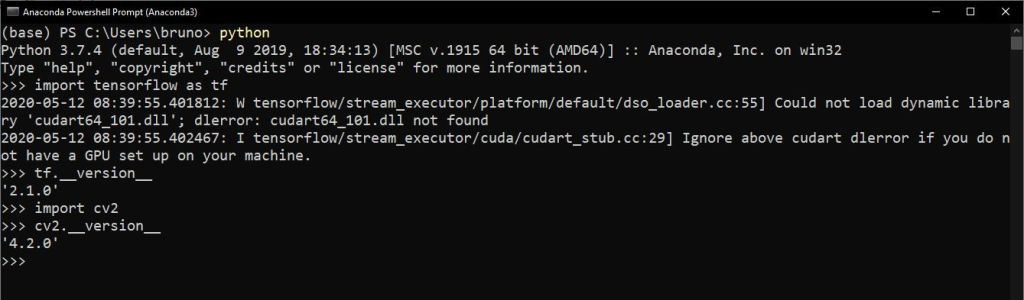
And that’s it! All the packages should be installed. An easy way to test if both packages are installed is to launch python and
# check tensorflow, and display tensorflow version
import tensorflow as tf
tf.__version__

# check OpenCV, and display OpenCV version
import cv2
cv2.__version__
The output should be similar to this one
Happy coding!
Greetings
El Bruno
More posts in my blog ElBruno.com.
More info in https://beacons.ai/elbruno
References
- Anaconda, https://www.anaconda.com/products/individual
- Tensorflow, https://www.tensorflow.org/
- OpenCV, https://opencv.org/
 El Bruno
Leave a comment