
Hi!
A while ago, I wrote about the awesome [Mouse without Borders] application. This app is extremely useful, and it’s becoming very handy in scenarios like the Avanade Toronto Innovation Center.
In our Innovation Center, we have plenty of different machines, and it wasn’t a good moment when I realize that this is how the App Settings looks in a Windows 10 machine with some DPI customization.

I don’t have a lot of Windows Presentation Experience, however I know that we can solve this via some configuration / manifest changes for the App. I look up for the application folder [C:\Program Files (x86)\Microsoft Garage\Mouse without Borders], and I opened the [MouseWithoutBorders.exe.manifest] file with Visual Studio Code.
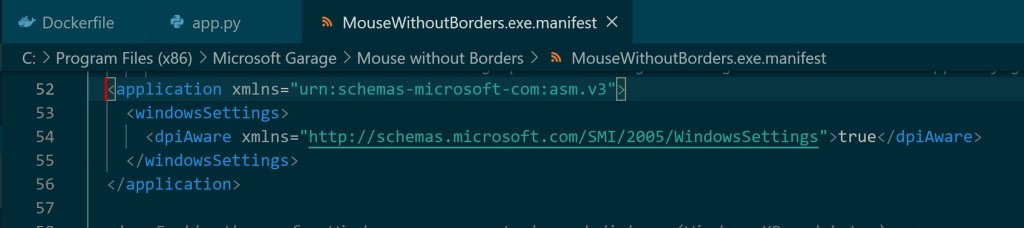
Lucky for me, the section that I needed to add it was already there. It was commented, so I un-commented this, save the file and restart the application. Of course, you need elevated privileges to do this.
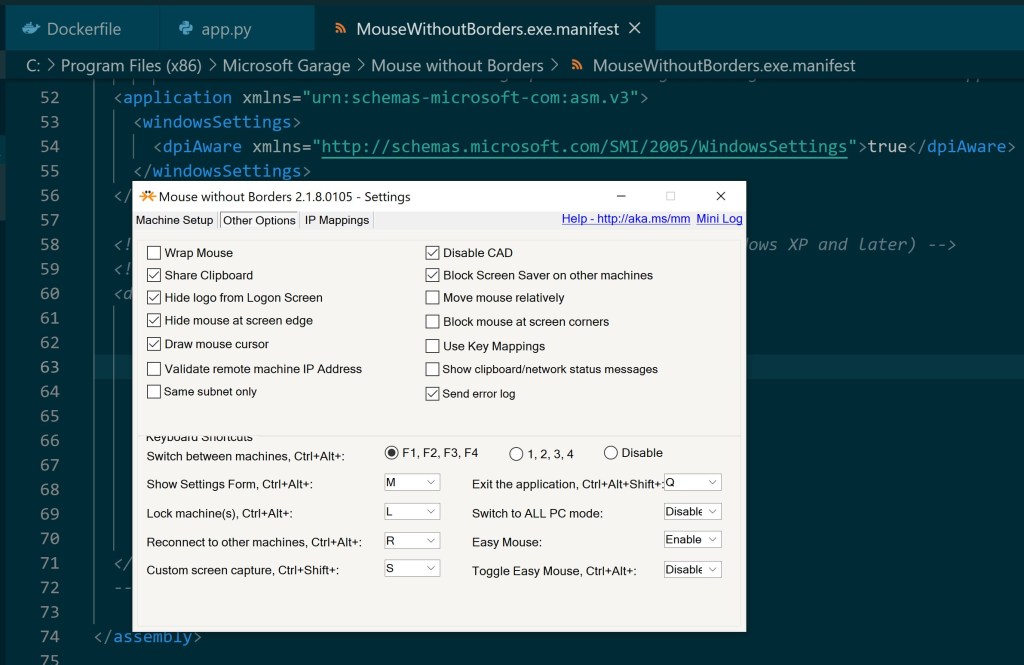
5 seconds later my Settings windows was finally amazing again!
Happy coding!
Greetings @ Burlington
El Bruno
References
Mouse without Borders, https://www.microsoft.com/en-us/garage/profiles/mouse-without-borders/
Download Mouse without Borders, https://www.microsoft.com/en-us/download/details.aspx?id=35460
El Bruno, Mouse without borders, a Must Have App if you work with 2 or more computers https://elbruno.com/2019/10/30/windows10-mouse-without-borders-a-musthave-if-you-work-with-2-or-more-computers/


 El Bruno
Leave a reply to CarolTechieGirl Cancel reply