
Hi !
If you are an advanced Windows user or a basic developer (like me), for sure you know the “path too long” issue. I used to get this error a lot with some MSBuild definitions when downloading or copying files. The error details are something similar to
TF270002: An error occurred copying files from <Path A> to <Path B>. Details: The specified path, file name, or both are too long. The fully qualified file name must be less than 260 characters, and the directory name must be less than 248 characters.
And even if this was 6 years ago, in today’s latest Windows 10 version, we still have the NTFS path issue. This is because the maximum length for a path (file name and its directory route) has been defined by 260 characters. This is what we usually knows as MAX_PATH.
Lucky for us, in the latest version of Windows 10 available via Windows Insider in the Fast Ring, we can change this defined length using some local policies.

The following steps describes how to do this.
- Run [gpedit.msc], this will open the Open Group Policy Editor
- Navigate to [Local Computer Policy >> Computer Configuration >> Administrative Templates >> System >> Filesystem >> NTFS]
- Click [Enable NTFS long paths]
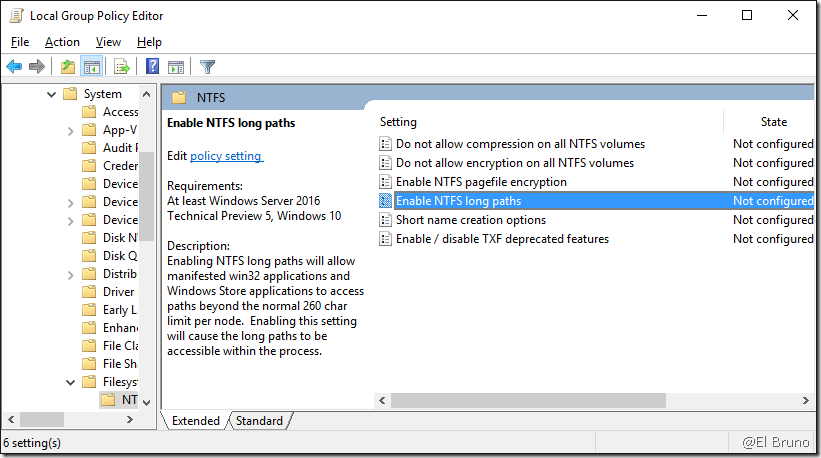
- Enable NTFS long pats

And that’s it! Now we can finally avoid the [MAX_PATH / path too long issue] 
Greetings @ Toronto
-El Bruno
References


 El Bruno
Leave a reply to elbruno Cancel reply