Hello!
Sometime ago I explained how to list the registered Bluetooth devices in a windows SO. Now that there are so many devices that use BLE, it was time to recheck these routines and see if it is possible to improve them.
Before I rewrite code I did a search on Bing and I found a great library for work with Bluetooth, IR, etc. 32feet.net.
The truth is that it completes most of the scenarios for me and also allows me to focus only on the data transmission (Caution:WP8.1 has improved a lot but remains a chestnuts for bluetooth devices).
An example of this is the following lines that list the Bluetooth devices in Windows
1: using System;
2: using InTheHand.Net.Sockets;
3:
4: namespace ConsoleApplication1
5: {
6: class Program
7: {
8: static void Main()
9: {
10: var bluetoothClient = new BluetoothClient();
11: var devices = bluetoothClient.DiscoverDevices();
12: Console.WriteLine("Bluetooth devices");
13: foreach (var device in devices)
14: {
15: var blueToothInfo =
16: string.Format(
17: "- DeviceName: {0}{1} Connected: {2}{1} Address: {3}{1} Last seen: {4}{1} Last used: {5}{1}",
18: device.DeviceName, Environment.NewLine, device.Connected, device.DeviceAddress, device.LastSeen,
19: device.LastUsed);
20:
21: blueToothInfo += string.Format(" Class of device{0} Device: {1}{0} Major Device: {2}{0} Service: {3}",
22: Environment.NewLine, device.ClassOfDevice.Device, device.ClassOfDevice.MajorDevice,
23: device.ClassOfDevice.Service) ;
24: Console.WriteLine(blueToothInfo);
25: Console.WriteLine();
26: }
27: Console.ReadLine();
28: }
29: }
30: }
The app running gives us information like that you show in the following image.

Bluetooth devices
-DeviceName: EV3
Connected: False
Address: 0016534394A7
Last seen: 4/21/2014 3:23:57 PM
Last used: 4/20/2014 8:56:03 PM
Class of device
Device: ToyRobot
Major Device: Toy
Service: None
-DeviceName: Pebble C93D
Connected: False
Address: 0017E963C93D
Last seen: 4/21/2014 3:23:57 PM
Last used: 4/21/2014 2:05:34 PM
Class of device
Device: WearableWristWatch
Major Device: Wearable
Service: ObjectTransfer, Audio, Telephony, Information
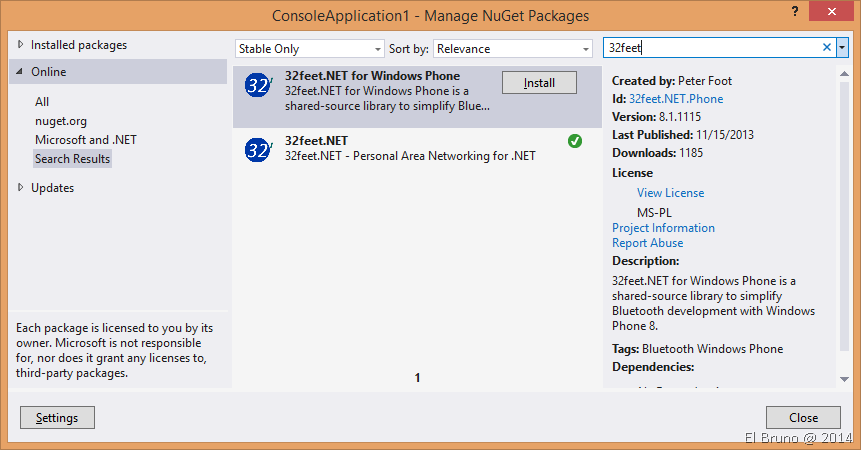
In addition to being an excellent collection of functionality is possible to install it using NuGet and with support for Windows Phone also.
Now I have to refactor some code so that it adapts to 32feet.net and see if everything is still working.
HomePage: http://32feet.codeplex.com/
Note: The people of pebble does not support Windows as a development platform, is certainly a fact that scares 
Saludos @ La Finca
El Bruno
 |
 |
 |
 El Bruno
Leave a reply to [#VS2013] HowTo: Connect to a #Bluetooth device using PIN (thanks #32feet!) | El Bruno Cancel reply