
⚠️ This blog post was created with the help of AI tools. Yes, I used a bit of magic from language models to organize my thoughts and automate the boring parts, but the geeky fun and the 🤖 in C# are 100% mine.
Hi!
If you’re a .NET developer and you want to quickly build an AI-powered chat application with Retrieval-Augmented Generation (RAG) and Image Generation capabilities — this guide is for you!
In less than 10 minutes, and using free services, you’ll be up and running using:
🚀 .NET AI Templates
🧠 Model Catalog Protocol (MCP) via Hugging Face
💬 GenAINet Sample App
📦 GitHub Model Marketplace
Important: GitHub Models and Hugging Face gives you a small daily quota to use and test these models.
Spoiler: if you want to avoid the long reading, just watch this video:
🧰 Tools & Resources
| Resource | Link |
|---|---|
| GenAINet Sample Repo | https://aka.ms/genainet |
| Hugging Face MCP | https://huggingface.co/settings/mcp |
| GitHub AI Models Marketplace | https://github.com/marketplace?type=models |
| .NET AI Templates | https://learn.microsoft.com/en-us/dotnet/ai/quickstarts/ai-templates |
⚙️ Step-by-Step: How to Add Hugging Face MCP to Your .NET AI App
Let’s start!
✅ 1. Create an AI WebApp using .NET Template
Use the official AI template for .NET:
dotnet new aiwebapp -n GenAINetChat
cd GenAINetChat
You’ll get a full working solution with Razor components, backend orchestration, and support for extensions.
📦 2. Add MCP NuGet Package
In your .csproj, add the following reference:
dotnet add package ModelContextProtocol --version 0.3.0-preview.4
This gives you access to the MCP client to interact with Hugging Face or any other compatible MCP server.
🧠 3. Register the MCP Client for Hugging Face
In Program.cs, around line 36, add this block to configure and inject the MCP client:
// Add MCP client to connect to Hugging Face MCP Server
// Register the tools as a singleton so they can be reused across requests
builder.Services.AddKeyedSingleton<IMcpClient>("HuggingFaceMCP", (sp, _) =>
{
   var deploymentName = "gpt-4.1-mini";

   // Read Hugging Face token from configuration
   var hfAccessToken = builder.Configuration["HF_ACCESS_TOKEN"];

   var hfHeaders = new Dictionary<string, string>
   {
       { "Authorization", $"Bearer {hfAccessToken}" }
   };

   var clientTransport = new SseClientTransport(
       new()
       {
           Name = "HF Server",
           Endpoint = new Uri("https://huggingface.co/mcp"),
           AdditionalHeaders = hfHeaders
       });

   var client = McpClientFactory.CreateAsync(clientTransport).GetAwaiter().GetResult();
   return client;
});
🛡️ Tip: Set your Hugging Face token as an environment variable or in your appsettings.Development.json like so:
{
  "HF_ACCESS_TOKEN": "your_hf_token_here"
}
💬 4. Update the Chat Component to Use MCP Tools
Open Pages/Chat.razor and inject the new client:
@code {
    [Inject(Key = "HuggingFaceMCP")]
    public IMcpClient HFMcpClient { get; set; } = default!;
Then update the OnInitialized() method to load the tools:
protected override async void OnInitialized()
{
    messages.Add(new(ChatRole.System, SystemPrompt));

    // Get the tools from Hugging Face MCP
    var tools = await HFMcpClient.ListToolsAsync();

    // Add MCP tools to the chat options and register local functions
    chatOptions.Tools = [.. tools];
    chatOptions.Tools.Add(AIFunctionFactory.Create(SearchAsync));
}
This will automatically load all available tools (including vision, text, and image generation) into your chat app — no hardcoding needed!
🖼️ Final Result: Chat UI with Hugging Face MCP Tools
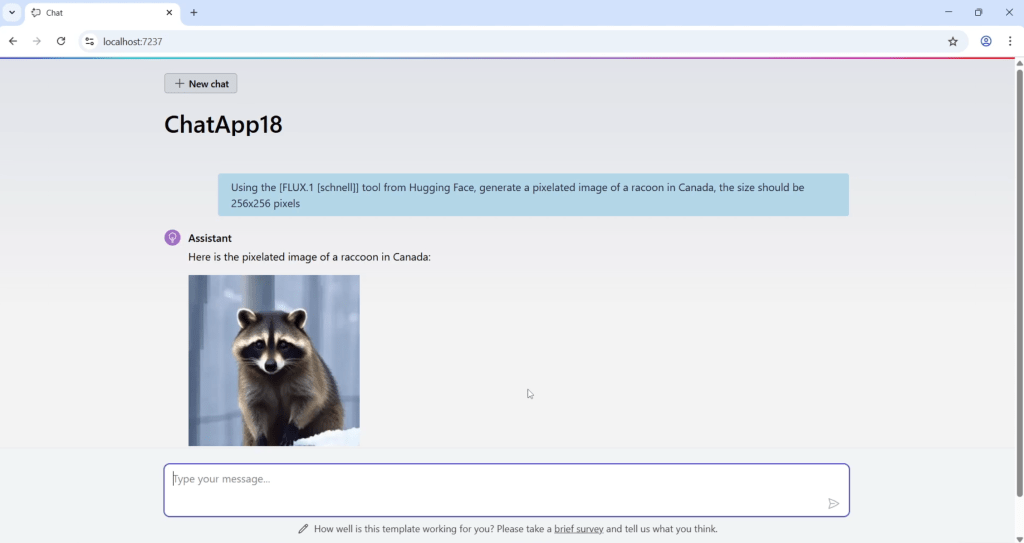
You’ll get a clean, interactive web app where users can:
- Ask questions that use RAG from uploaded files
- Generate images using prompts
- Interact with models hosted via Hugging Face MCP
- Extend functionality with local or remote tools
Here is an example of the chat generating an image:
🔗 Bonus: Try the Full Sample
If you want to skip the setup and just run it, clone the full GenAINet project here:
🙌 Wrap-up
With just a few lines of code, you can turn your .NET app into a powerful, AI-powered assistant powered by the Model Context Protocol, Hugging Face, and GitHub-distributed models.
If you’re exploring what’s next in AI app development with .NET, now is the perfect time to start.
🧪 Try the sample
🧠 Build your own tools
🚀 Deploy and scale in Azure
Happy coding!
Greetings
El Bruno
More posts in my blog ElBruno.com.
More info in https://beacons.ai/elbruno
 El Bruno
Leave a reply to Dew Drop – September 9, 2025 (#4493) – Morning Dew by Alvin Ashcraft Cancel reply