hi !
Early today I hosted a session with an Introduction to Power Automate. It was a fun session, and while I was talking about some flow scenarios, I had a question about copying files from Google Drive to Azure Tables.
I didn’t have the right environment to build an online demo for this, so I created a simple one using OneDrive. Kind of worked ¯_(ツ)_/¯
However, after the session I decided to take a look at the prebuilt templates for this and I found 2 that basically answer the question.
Copy new files to AzureBlob from a OneDrive for Business folder
Copy files from a SharePoint folder to a AzureBlob folder
So, I selected the 1st template, and I created a new flow. Literally 2 minutes doing some configuration until I get something like this.

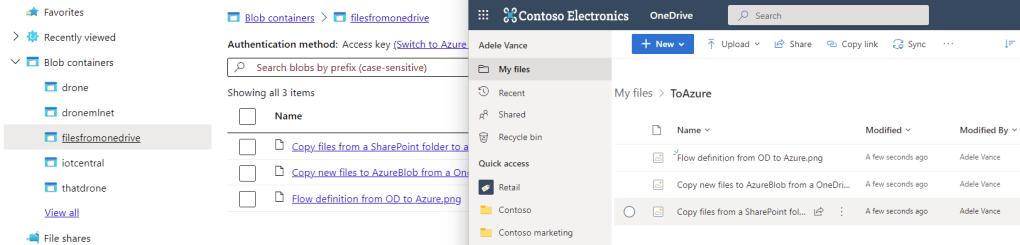
So, time to test this flow, just adding some files to OneDrive. And hey, 5 seconds later the files are copied to Azure Storage !
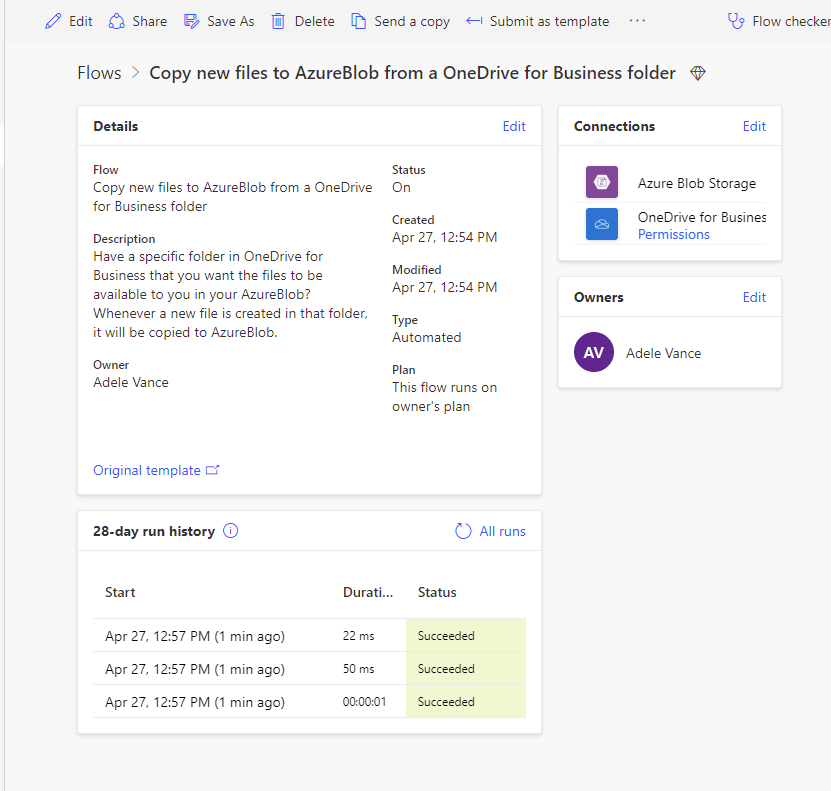
And, double check taking a look at the flow history. We can see the 3 runs, one por each file !
Ok, now I need to spend some time creating a Google Drive account and figure out how to migrate this. Cool material for a new post !
You can check the recording here:
Happy coding!
Greetings
El Bruno
More posts in my blog ElBruno.com.
More info in https://beacons.ai/elbruno

 El Bruno
Leave a reply to Bhargavi Cancel reply