Hi !
In my previous post I wrote
- How to create a custom dataset with images to be used on a Azure Machine Learning Designer project.
- How to use the custom data set and how to train an image classification model.
- How to publish the model to be used as a WebService / HTTP REST endpoint.
Each endpoint provides a set of code samples in C#, Python and R. The code is autogenerated, and because we are working with binay images, the generated code will be huge !!! This is because it will include a Base64().toString() serialization of the file.

Based on the original code, I created a sample code in Python that will read a local file, encode the file and then make the http request.
| import urllib.request | |
| import json | |
| import os | |
| import ssl | |
| import base64 | |
| def allowSelfSignedHttps(allowed): | |
| # bypass the server certificate verification on client side | |
| if allowed and not os.environ.get('PYTHONHTTPSVERIFY', '') and getattr(ssl, '_create_unverified_context', None): | |
| ssl._create_default_https_context = ssl._create_unverified_context | |
| allowSelfSignedHttps(True) # this line is needed if you use self-signed certificate in your scoring service. | |
| # Request data goes here | |
| data = { | |
| "Inputs": { | |
| "WebServiceInput0": | |
| [ | |
| { | |
| 'image': "data:image/png;base64,", | |
| 'id': "0", | |
| 'category': "space_wolf", | |
| }, | |
| ], | |
| }, | |
| "GlobalParameters": { | |
| } | |
| } | |
| # Save string of image file path below | |
| img_filepath = "./test_images/squirrel_01.jpg" | |
| # Create base64 encoded string | |
| with open(img_filepath, "rb") as f: | |
| image_string = base64.b64encode(f.read()).decode("utf-8") | |
| image_data = str(f"""data:image/png;base64,{image_string}""") | |
| data['Inputs']['WebServiceInput0'][0]['image'] = image_data | |
| body = str.encode(json.dumps(data)) | |
| url = 'http://<ENDPOINT IP ADDRESS>:80/api/v1/service/sq06densenetendpoint/score' | |
| api_key = '<API KEY>' # Replace this with the API key for the web service | |
| headers = {'Content-Type':'application/json', 'Authorization':('Bearer '+ api_key)} | |
| req = urllib.request.Request(url, body, headers) | |
| try: | |
| response = urllib.request.urlopen(req) | |
| result = response.read() | |
| print(result) | |
| except urllib.error.HTTPError as error: | |
| print("The request failed with status code: " + str(error.code)) | |
| # Print the headers – they include the requert ID and the timestamp, which are useful for debugging the failure | |
| print(error.info()) | |
| print(json.loads(error.read().decode("utf8", 'ignore'))) |
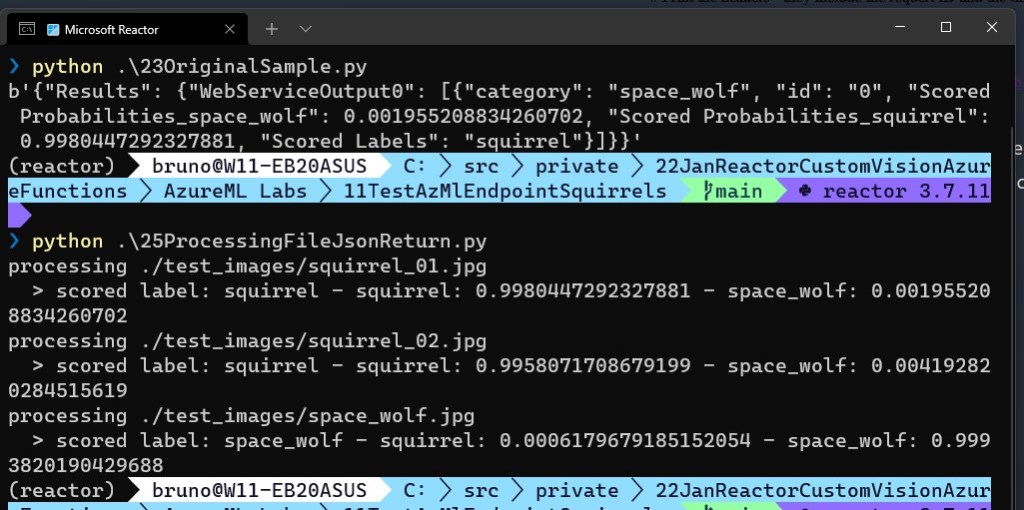
It works almost without a change, and here is a sample output that also includes a call to the next sample, which process the JSON response, this sample may also help!
| import urllib.request | |
| import json | |
| import os | |
| import ssl | |
| import base64 | |
| def displayPredictions(jsonPrediction): | |
| global frame_Width, frame_Heigth, labelColors | |
| jsonObj = json.loads(jsonPrediction) | |
| scored_label = jsonObj['Results']['WebServiceOutput0'][0]['Scored Labels'] | |
| scored_prob_space_wolf = jsonObj['Results']['WebServiceOutput0'][0]['Scored Probabilities_space_wolf'] | |
| scored_prob_squirrel = jsonObj['Results']['WebServiceOutput0'][0]['Scored Probabilities_squirrel'] | |
| print(f" > scored label: {scored_label} – squirrel: {scored_prob_squirrel} – space_wolf: {scored_prob_space_wolf}") | |
| color = (255,255,255) | |
| # # display labels | |
| # start_point_label = (10, 20) | |
| # text = "{}: {:.4f}".format(f"Scored Label: {scored_label}") | |
| # cv2.putText(frame, text, start_point_label, cv2.FONT_HERSHEY_SIMPLEX, 0.5, color, 2) | |
| # return frame | |
| def allowSelfSignedHttps(allowed): | |
| # bypass the server certificate verification on client side | |
| if allowed and not os.environ.get('PYTHONHTTPSVERIFY', '') and getattr(ssl, '_create_unverified_context', None): | |
| ssl._create_default_https_context = ssl._create_unverified_context | |
| def processFile(img_filepath): | |
| # Request data goes here | |
| data = { | |
| "Inputs": { | |
| "WebServiceInput0": | |
| [ | |
| { | |
| 'image': "data:image/png;base64,", | |
| 'id': "0", | |
| 'category': "space_wolf", | |
| }, | |
| ], | |
| }, | |
| "GlobalParameters": { | |
| } | |
| } | |
| # Create base64 encoded string | |
| with open(img_filepath, "rb") as f: | |
| image_string = base64.b64encode(f.read()).decode("utf-8") | |
| image_data = str(f"""data:image/png;base64,{image_string}""") | |
| data['Inputs']['WebServiceInput0'][0]['image'] = image_data | |
| body = str.encode(json.dumps(data)) | |
| url = 'http://< API SERVER >:80/api/v1/service/squirrelimageclassification/score' | |
| api_key = '< API KEY >' # Replace this with the API key for the web service | |
| headers = {'Content-Type':'application/json', 'Authorization':('Bearer '+ api_key)} | |
| req = urllib.request.Request(url, body, headers) | |
| json_result = {} | |
| try: | |
| response = urllib.request.urlopen(req) | |
| result = response.read() | |
| data = json.loads(result) | |
| json_result = json.dumps(data) | |
| except urllib.error.HTTPError as error: | |
| print("The request failed with status code: " + str(error.code)) | |
| print(error.info()) | |
| print(json.loads(error.read().decode("utf8", 'ignore'))) | |
| return json_result | |
| allowSelfSignedHttps(True) # this line is needed if you use self-signed certificate in your scoring service. | |
| # Save string of image file path below | |
| img_filepath = "./test_images/squirrel_01.jpg" | |
| res = processFile(img_filepath) | |
| print(f"processing {img_filepath}") | |
| displayPredictions(res) | |
| img_filepath = "./test_images/squirrel_02.jpg" | |
| res = processFile(img_filepath) | |
| print(f"processing {img_filepath}") | |
| #print(res) | |
| displayPredictions(res) | |
| img_filepath = "./test_images/space_wolf.jpg" | |
| res = processFile(img_filepath) | |
| print(f"processing {img_filepath}") | |
| #print(res) | |
| displayPredictions(res) | |
Tomorrow I’ll show a live webcam real-time analysis using the Azure ML Endpoint to detect Squirrels or Space Wolves!
Happy coding!
Greetings
El Bruno
More posts in my blog ElBruno.com.
More info in https://beacons.ai/elbruno

¿Con ganas de ponerte al día?
En Lemoncode te ofrecemos formación online impartida por profesionales que se baten el cobre en consultoría:
- Si tienes ganas de ponerte al día con Front End (ES6, Typescript, React, Angular, Vuejs…) te recomendamos nuestros Máster Front End: https://lemoncode.net/master-frontend#inicio-banner
- Si te quieres poner al día en Backend (stacks .net y nodejs), te aconsejamos nuestro Bootcamp Backend: https://lemoncode.net/bootcamp-backend#bootcamp-backend/banner
- Y si tienes ganas de meterte con Docker, Kubernetes, CI/CD…, tenemos nuestro Bootcamp Devops: https://lemoncode.net/bootcamp-devops#bootcamp-devops/inicio


Leave a Reply