Hi !
In today’s post I’ll share an scenario about:
Invoke an Azure Function to get JSON data
In my Digital Twin scenario, I got an Azure Function that returns the current state of a Digital Twin door. The response from the function is similar to this one:
{
    "state": 0,
    "desc": "closed",
    "source": "blog"
}
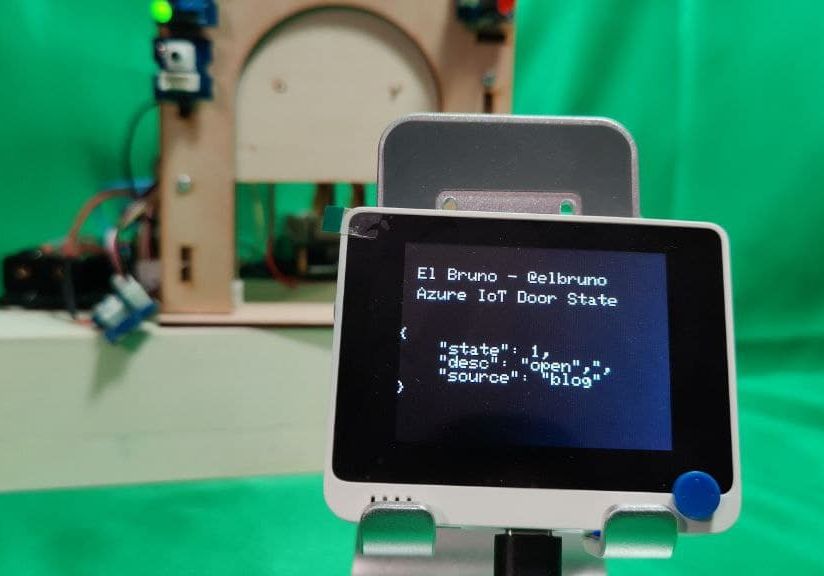
So, once the Wio Terminal has internet access, I can invoke the Azure Function and read the value with the door state. In example, for a door open state:
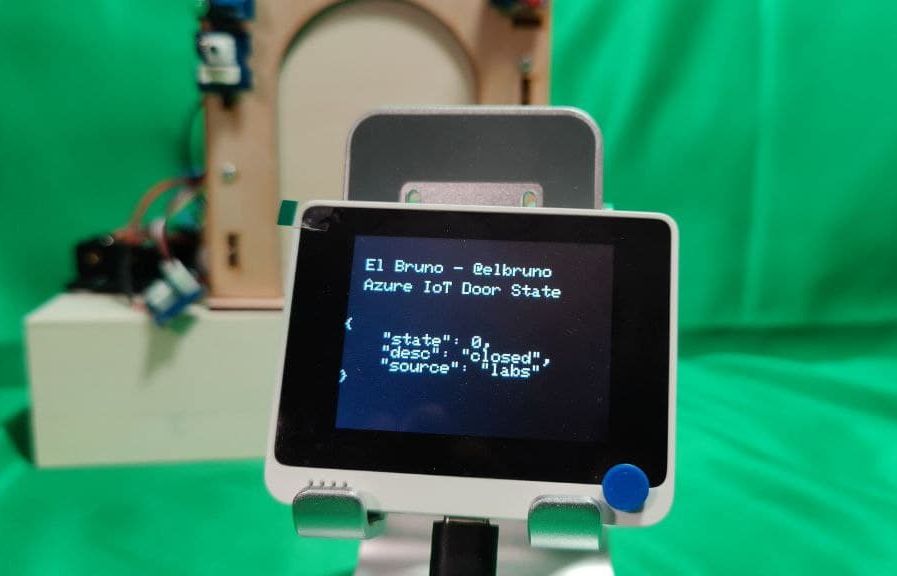
And for the door open:
Important: The sample code is based on the work from Rui Santos, in the article [ESP32 HTTP GET and HTTP POST with Arduino IDE (JSON, URL Encoded, Text)].
I updated the code to work with the specific WiFi and HTTPClient libraries for the Wio Terminal.
Source Code
As usual, the full code is below and some notes
- As mentioned before, this sample uses the Wio Terminal specific libraries for Wifi and HTTPClient libraries .
- The request to the Azure Function for the IoT Door state will be performed every 10 seconds.
- I added a couple of functions at the end of the ino file to display the information on the TFT screen.
- In line 98 the HTTP GET process start. After reading the code for the HTTP Library, I realized that I need to define a timeout (3 seconds) and also invoke the end() function before init the http variable.
Now we are connected, so we can start to interact with Azure resources !
Happy coding!
Greetings
El Bruno
More posts in my blog ElBruno.com.
More info in https://beacons.ai/elbruno
References
- Download Arduino IDE
- Wiki Seeed – Historgram
- Wiki Seeed – loading Images
- Wiki Seeed – Installing the File System Library
- Wiki Seed – Wifi Connectivity

¿Con ganas de ponerte al día?
En Lemoncode te ofrecemos formación online impartida por profesionales que se baten el cobre en consultoría:
- Si tienes ganas de ponerte al día con Front End (ES6, Typescript, React, Angular, Vuejs…) te recomendamos nuestros Máster Front End: https://lemoncode.net/master-frontend#inicio-banner
- Si te quieres poner al día en Backend (stacks .net y nodejs), te aconsejamos nuestro Bootcamp Backend: https://lemoncode.net/bootcamp-backend#bootcamp-backend/banner
- Y si tienes ganas de meterte con Docker, Kubernetes, CI/CD…, tenemos nuestro Bootcamp Devops: https://lemoncode.net/bootcamp-devops#bootcamp-devops/inicio
WioTerminal – Posts to interact with a Digital Twin Door 🚪 with Azure IoT ☁️ and Azure Functions
- Convert and use images on the device
- 1st steps 👣, developer steps
- Buttons and Charts time 📊📉📊
- Connecting to Wifi 📶, display local IP and get ready for Azure ☁️ scenarios
- Getting JSON data from an Azure ☁️ Function
- Parsing JSON data from an Azure ☁️ Function
- Display a Digital Twin Door 🚪 state using XBitmap with Azure IoT ☁️
- Display a countdown progress bar 🚥 for the next Azure IoT ☁️ refresh data call
- Open and close the Digital Twin Door 🚪 using the Wio Terminal Buttons
- Training an 🗣️ audio recognition module. Record 🎙️ audio samples for training
- Training an 🗣️ audio recognition module. Edge Impulse for Arduino step-by-step and optimizations
- Training an 🗣️ audio recognition module. Running the model on the device
- Playing sound on the open and close events from the Digital Twin Door 🚪 (coming soon)
 El Bruno
Leave a comment