
Hi !
Quick post today on how to install and use Neofetch.
Neofetch is a shell script that requires bash 3.2+ to function. By default, it displays an ASCII art of your Distro’s logo. Neofetch supports almost 150 different operating systems. From Linux to Windows.
Installation is super easy
sudo apt install neofetch
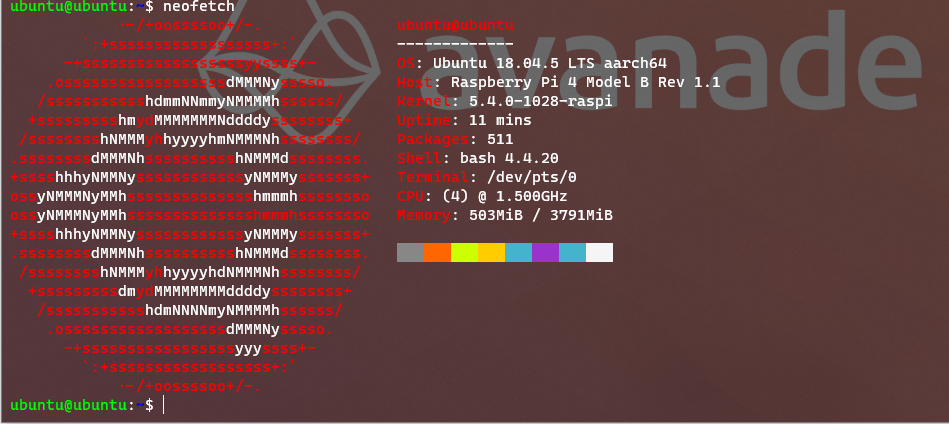
Once installed, run the command to get the OS information. I’m running Raspberry Pi OS, so the information fits the SO.

Running this on a Raspberry Pi with Ubuntu
And let’s also test the Windows version. It’s available as a Python package, so installation is super easy
pip install neofetch-win
And I run this on my local Windows 10, with an explicit option to hide information about the motherboard, cpu, ip and disk

How cool !
Happy coding!
Greetings
El Bruno
More posts in my blog ElBruno.com.
More info in https://beacons.ai/elbruno

¿Con ganas de ponerte al día?
En Lemoncode te ofrecemos formación online impartida por profesionales que se baten el cobre en consultoría:
- Si tienes ganas de ponerte al día con Front End (ES6, Typescript, React, Angular, Vuejs…) te recomendamos nuestros Máster Front End: https://lemoncode.net/master-frontend#inicio-banner
- Si te quieres poner al día en Backend (stacks .net y nodejs), te aconsejamos nuestro Bootcamp Backend: https://lemoncode.net/bootcamp-backend#bootcamp-backend/banner
- Y si tienes ganas de meterte con Docker, Kubernetes, CI/CD…, tenemos nuestro Bootcamp Devops: https://lemoncode.net/bootcamp-devops#bootcamp-devops/inicio
 El Bruno
Leave a comment