Hi !
Azure IoT has a great SDK which includes tons of samples for C# apps, Java apps, and more. However there are some scenarios where you only need to send data from a device using a simple HttpClient, and plain JSON data.
So, for this scenario I created a simple Console app which send information to an Azure IoT Hub with the following source code.

The complete sample is based on my previous posts, but there are a couple of lessons learned to make this work
The authorization included in the header of the HttpRequest must have a special signature named SharedAccessSignature. The best way to deal with this is to use the Event Hubs Signature Generator tool from Sandrino. You type a couple of fields and this will generate the SharedAccessSignature

I’ve used a Json parser online tool to get the correct string to be sent to my IoT Hub.

Finally you need to know the url to post data. This information must use the following format
https://{Event hub compatible end point}/{EventHub compatible name}/publishers/{Device Id}/messages
We get the EventHub information from the settings // messaging section in Azure Portal
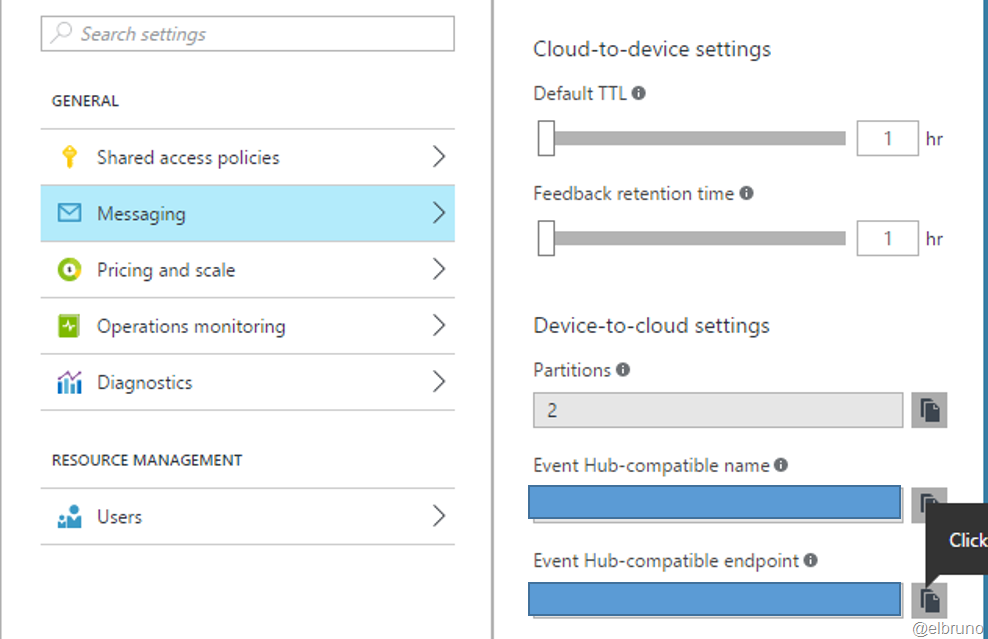
Finally the DeviceId is the one we defined in our previous posts.
GitHub Code https://github.com/elbruno/Blog/tree/master/Azure
Greetings @ Toronto
-El Bruno
References
 El Bruno
Leave a reply to #AZURE – Post data into an #AzureIoTHub using plain text and HttpClient | El Bruno Cancel reply