Hola!
These are the final posts that I will write about Microsoft Band, Windows 10. and Visual Studio 2015 Now is time to send information to the band in dialog form. We have 2 ways to send a notification to the band:
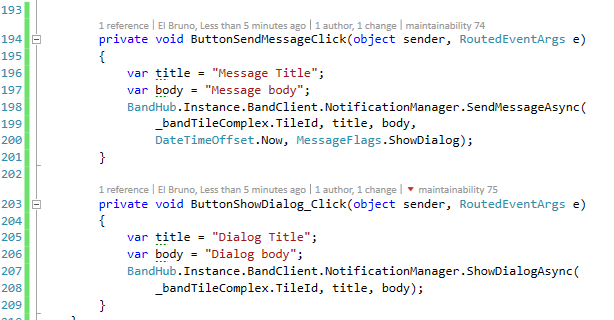
- Using the method SendMessageAsync, we need to define a title and body, and it will be associate to a Custom Band Tile
- Using the ShowDialogAsync method, which shows a direct message in the band
In both cases the code is very simple, for example:
The following video shows where the band receives a notification of type ShowDialogAsync()
Finally, Microsoft Band also us offers the possibility to send vibrations to the Band using NotificationManager. There are different types of vibration, as shown in the following image

GitHub source code: https://github.com/elbruno/Blog/tree/master/MSBand/App1
Saludos @ Madrid
/El Bruno
References
- Microsoft Band Get Started
- Microsoft Band SDK
- Microsoft Band Tiles
- Microsoft Band Experience Design Guidelines
- El Bruno
- How to connect a Microsoft Band to a Windows 10 device
- How to connect to a Band and access sensor information in a Windows 10 app using Visual Studio 2015
- List, add and delete Tiles using an #Windows10 app and Visual Studio 2015
- About Tiles format, and how to create complex ones
- Suscribe to User interaction with Microsoft Band and Visual Studio 2015
- Update Tiles live data with Visual Studio 2015 and Windows 10
 El Bruno
Leave a comment