Hola!
I usually use the PrnScr key to take screenshots. For everything else, I use SnagIt, with Camtasia and IrfanView and that’s almost my complete set of tools.
I get to an article today with some new features in the Windows 10 Snipping Tool. In example: the Delay feature. It allows you to have “some time” before the Snipping Tool is executed, between 1 to 5 seconds.
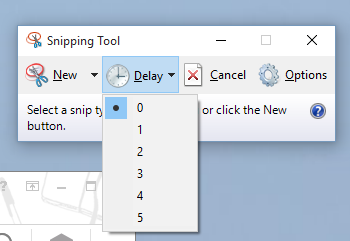
So, we get this extra seconds to prepare our Environment for the screenshot. Where do I find this mostly useful? With popup menus. In example:

Saludos @ Madrid
/El Bruno
References
– SnagIt https://www.techsmith.com/snagit.html
– How to take screen shot in Windows 10 http://www.windowscentral.com/how-take-screenshot-windows-10
 El Bruno
Leave a reply to #WINDOWS10 – HowTo: Use #Xbox app to perform #ScreenRecording | El Bruno Cancel reply