Hello!
Let’s start in the end of the post with the output video
Now a little explanation on how to assemble this. I used the basis of my post about How to control with C# XBoxOne command. Then with a bit of code to control the rocket launcher, I get to connect both devices and the fun starts.
The complete solution includes 3 projects, 1 is responsible for controlling the Rocket Launcher, then the app WPF to coordinate signals of the remote control and the Lance missiles. Finally I have a PCL that is responsible for translating Int32 values from the command in command more basic type: up, down, left or right.
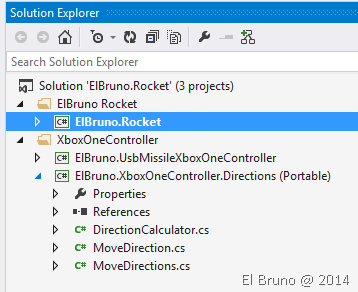
Actually, the work has not been very complicated, the only thing I had to keep in mind is the values that sends the controller. After seeing that the GamePad moves in the range of an Int32, the best thing was to define values for LeftFar > Left > Center > Right > RightFar, with values between – 20000 > – 10000 > 0 > 10000 > 20000. In this way a kind MoveControler helped me to translate these values the position of the joystick on the remote control.
This file contains hidden or bidirectional Unicode text that may be interpreted or compiled differently than what appears below. To review, open the file in an editor that reveals hidden Unicode characters.
Learn more about bidirectional Unicode characters
| public static MoveDirections CalculateDirectionY(float y, int yCoeficient) | |
| { | |
| var locationY = MoveDirections.DownFar; | |
| var currentLocationY = y * yCoeficient; | |
| if (currentLocationY > 20000) | |
| { | |
| locationY = MoveDirections.UpFar; | |
| } | |
| else if (currentLocationY > 10000) | |
| { | |
| locationY = MoveDirections.Up; | |
| } | |
| else if (currentLocationY > -10000) | |
| { | |
| locationY = MoveDirections.Center; | |
| } | |
| else if (currentLocationY > -20000) | |
| { | |
| locationY = MoveDirections.Down; | |
| } | |
| return locationY; | |
| } |
The example is pretty simple, since I use the classes that I have created in previous posts to control the Lance missiles. For example
This file contains hidden or bidirectional Unicode text that may be interpreted or compiled differently than what appears below. To review, open the file in an editor that reveals hidden Unicode characters.
Learn more about bidirectional Unicode characters
| private void ProcessMovements(MoveDirection moveDirection, bool fire) | |
| { | |
| switch (moveDirection.CombinedXy) | |
| { | |
| case MoveDirections.Center: | |
| _rocket.StopMovements(); | |
| break; | |
| case MoveDirections.Left: | |
| case MoveDirections.LeftFar: | |
| _rocket.MoveLeft(); | |
| break; | |
| case MoveDirections.Right: | |
| case MoveDirections.RightFar: | |
| _rocket.MoveRight(); | |
| break; | |
| case MoveDirections.Up: | |
| case MoveDirections.UpFar: | |
| _rocket.MoveUp(); | |
| break; | |
| case MoveDirections.Down: | |
| case MoveDirections.DownFar: | |
| _rocket.MoveDown(); | |
| break; | |
| default: | |
| _rocket.StopMovements(); | |
| break; | |
| } | |
| if (fire) | |
| { | |
| _rocket.FireOnce(); | |
| } | |
| MovementText = string.Format("direction: {0} – fire:{1}", moveDirection.CombinedXy, fire); | |
| } |
In this example I have left out the “corners”, I have to update the class RocketController to support this elegantly 
By the way, the full code can be downloaded from here: http://1drv.ms/1pQDQQx
Important: I deleted the NuGet packages so that the code is not very heavy, please download them again to be able to compile the solution.
References
https://elbruno.com/2014/06/27/coding4fun-xboxone-game-controller-c-fun-time/
Saludos @ Home
El Bruno
 |
 |
 |


 El Bruno
Leave a comment