Hello!
A few days ago, MS team gives the capability to connect XBoxOne controller to a PC. This is a quite simple action: get the controller use the USB cable and… almost ready.
The great Scott Hanselman explains all of this in a post: how to install the drivers and how to configure the controls. When you’ve already done the Setup you can see the connected remote control and then just configure it.
So at this point, you probably think: what can I do with this? The sky is the limit 😉
In this post I will share a couple of lines that show how to obtain an object of the Controller type in C# and then view the properties for the controller. First thing we could do is to see if we have a device of this type connected to our computer, we can do this with a couple of native APIs or this NuGet pckg and the following code.
This file contains hidden or bidirectional Unicode text that may be interpreted or compiled differently than what appears below. To review, open the file in an editor that reveals hidden Unicode characters.
Learn more about bidirectional Unicode characters
| using System.Linq; | |
| using DeviceManagement; | |
| namespace ConsoleApplication2 | |
| { | |
| class DeviceInspection | |
| { | |
| public DeviceInfo GetXBoxController() | |
| { | |
| // you need nuget pkg https://devicemgr.codeplex.com/ | |
| // ClassName: "XB1UsbClass" | |
| // Desc: "Microsoft Xbox One Controller" | |
| var allClasses = DeviceInfoSet.GetAllClassesPresent(); | |
| var devices = allClasses.GetDevices(); | |
| return (from device in devices | |
| where device.ClassName == "XB1UsbClass" | |
| select device).FirstOrDefault(); | |
| } | |
| } | |
| } |
However what is interesting is to see in real-time the values on the remote control. For this I created a 4.5 WPF app and added the following NuGet package: SharpDX.XInput 2.6.2 (link).
Once built the solution, you have to copy the dlls from SharpDx to the run directory and you’ll have “control” on your XBox One command !
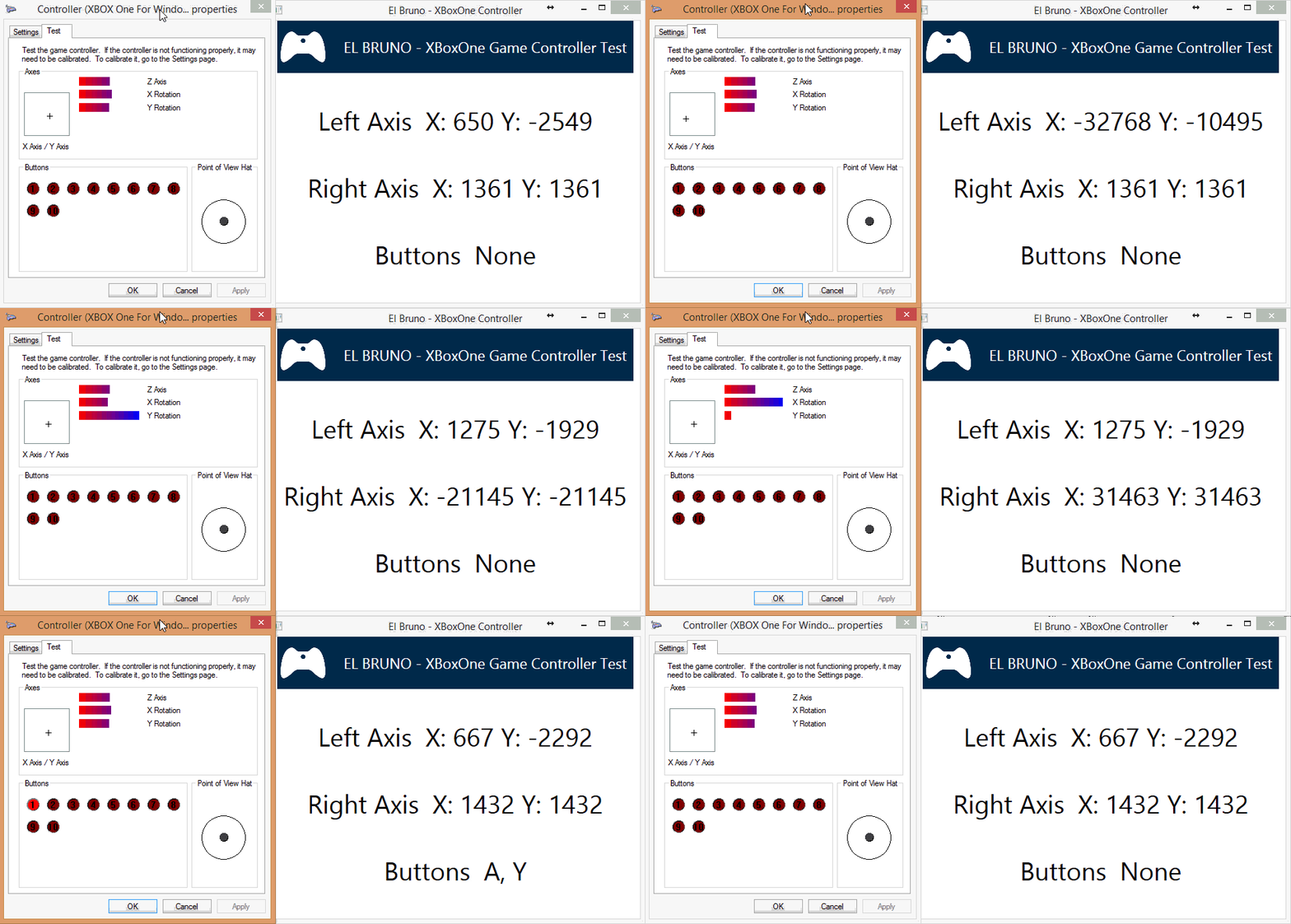
Important: if the app does not work and you encounter this error, I recommend that DirectX reinstalls from this link.
The main view of the WPF app code is the following
This file contains hidden or bidirectional Unicode text that may be interpreted or compiled differently than what appears below. To review, open the file in an editor that reveals hidden Unicode characters.
Learn more about bidirectional Unicode characters
| using System; | |
| using System.ComponentModel; | |
| using System.Runtime.CompilerServices; | |
| using System.Windows; | |
| using System.Windows.Threading; | |
| using SharpDX.XInput; | |
| namespace ElBruno.GameController | |
| { | |
| public partial class MainWindow : INotifyPropertyChanged | |
| { | |
| DispatcherTimer _timer = new DispatcherTimer(); | |
| private string _leftAxis; | |
| private string _rightAxis; | |
| private string _buttons; | |
| private Controller _controller; | |
| public MainWindow() | |
| { | |
| DataContext = this; | |
| Loaded += MainWindow_Loaded; | |
| Closing += MainWindow_Closing; | |
| InitializeComponent(); | |
| _timer = new DispatcherTimer {Interval = TimeSpan.FromMilliseconds(100)}; | |
| _timer.Tick += _timer_Tick; | |
| _timer.Start(); | |
| } | |
| void _timer_Tick(object sender, EventArgs e) | |
| { | |
| DisplayControllerInformation(); | |
| } | |
| void DisplayControllerInformation() | |
| { | |
| var state = _controller.GetState(); | |
| LeftAxis = string.Format("X: {0} Y: {1}", state.Gamepad.LeftThumbX, state.Gamepad.LeftThumbY); | |
| RightAxis = string.Format("X: {0} Y: {1}", state.Gamepad.RightThumbX, state.Gamepad.RightThumbX); | |
| //Buttons = string.Format("A: {0} B: {1} X: {2} Y: {3}", state.Gamepad.Buttons.ToString(), state.Gamepad.LeftThumbY); | |
| Buttons = string.Format("{0}", state.Gamepad.Buttons); | |
| } | |
| void MainWindow_Closing(object sender, CancelEventArgs e) | |
| { | |
| _controller = null; | |
| } | |
| void MainWindow_Loaded(object sender, RoutedEventArgs e) | |
| { | |
| _controller = new Controller(UserIndex.One); | |
| if (_controller.IsConnected) return; | |
| MessageBox.Show("Game Controller is not connected … you know ;)"); | |
| App.Current.Shutdown(); | |
| } | |
| #region Properties | |
| public string LeftAxis | |
| { | |
| get | |
| { | |
| return _leftAxis; | |
| } | |
| set | |
| { | |
| if (value == _leftAxis) return; | |
| _leftAxis = value; | |
| OnPropertyChanged(); | |
| } | |
| } | |
| public string RightAxis | |
| { | |
| get | |
| { | |
| return _rightAxis; | |
| } | |
| set | |
| { | |
| if (value == _rightAxis) return; | |
| _rightAxis = value; | |
| OnPropertyChanged(); | |
| } | |
| } | |
| public string Buttons | |
| { | |
| get | |
| { | |
| return _buttons; | |
| } | |
| set | |
| { | |
| if (value == _buttons) return; | |
| _buttons = value; | |
| OnPropertyChanged(); | |
| } | |
| } | |
| public event PropertyChangedEventHandler PropertyChanged; | |
| protected virtual void OnPropertyChanged([CallerMemberName] string propertyName = null) | |
| { | |
| var handler = PropertyChanged; | |
| if (handler != null) handler(this, new PropertyChangedEventArgs(propertyName)); | |
| } | |
| #endregion | |
| } | |
| } |
References
http://www.hanselman.com/blog/HowToUseAnXboxOneControllerOnYourWindowsPC.aspx
https://devicemgr.codeplex.com/
http://www.microsoft.com/en-us/download/details.aspx?id=35
https://www.nuget.org/packages/SharpDX.XInput/2.6.2
Saludos @ Home
El Bruno
 |
 |
 |


 El Bruno
Leave a reply to elbruno Cancel reply