
⚠️ This blog post was created with the help of AI tools. Yes, I used a bit of magic from language models to organize my thoughts and automate the boring parts, but the geeky fun and the 🤖 in C# are 100% mine.
Hi!
Earlier this year, Andrej Karpathy tweeted about using LLMs as “knowledge compilers” — a mind-bending idea: instead of asking an LLM questions, feed it raw data (papers, code, images) and let it automatically build a structured, navigable knowledge base. No RAG. No vector databases. Just pure understanding compiled into a graph.
Then I saw @socialwithaayan showcase graphify — a Python tool that does exactly this for codebases. It reads your source code, extracts relationships, builds a knowledge graph, and exports it as an interactive visualization, Obsidian vault, Neo4j script, or JSON.
I thought: “This needs to exist in .NET.”
So I built graphify-dotnet.
What is graphify-dotnet?
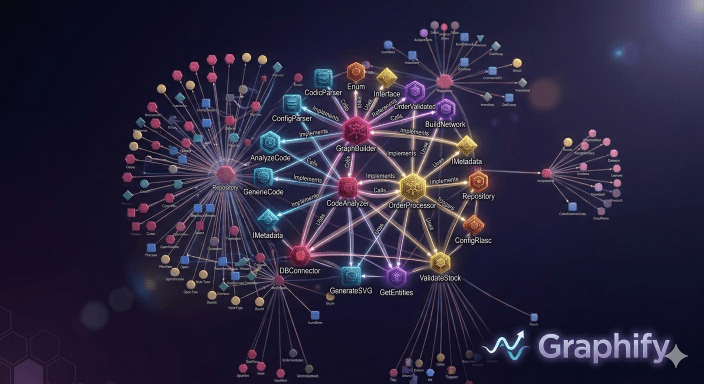
graphify-dotnet is a .NET 10 tool that reads your codebase — all those files scattered across folders, all that implicit structure hidden in class hierarchies and imports — and transforms it into a visual knowledge graph. No more navigating by keyword search. Instead, you see the actual structure: which classes talk to each other, which modules form natural clusters, which functions are the “god nodes” that everything depends on.
It’s a multi-stage pipeline:
┌──────────┐    ┌──────────┐    ┌──────────┐    ┌──────────┐
│  Detect  │ -> │ Extract  │ -> │  Build   │ -> │ Cluster  │
│  Files   │    │ Features │    │  Graph   │    │ (Louvain)│
└──────────┘    └──────────┘    └──────────┘    └──────────┘
                                                     │
                                                     v
┌──────────┐    ┌──────────┐    ┌──────────┐    ┌──────────┐
│  Export  │ <- │  Report  │ <- │ Analyze  │ <- │ Clustered│
│ Formats  │    │Generator │    │  Graph   │    │  Graph   │
└──────────┘    └──────────┘    └──────────┘    └──────────┘
Scan → Extract relationships → Build the graph → Find communities → Analyze structure → Export to multiple formats.
Let’s See It in Action
Here are some real commands you can run right now:
Build a knowledge graph from your project:
dotnet run --project src/Graphify.Cli -- run .
Query the graph for connections:
dotnet run --project src/Graphify.Cli -- query "what connects AuthService to Database?"
Explain a node:
dotnet run --project src/Graphify.Cli -- explain "UserController"
Export to multiple formats:
dotnet run --project src/Graphify.Cli -- export --format html
dotnet run --project src/Graphify.Cli -- export --format neo4j
The HTML export gives you an interactive vis.js graph. Click nodes, search by concept, filter by community. The Neo4j export lets you load the entire graph into a real graph database.
Key Features
- Multi-language parsing: Python, TypeScript, JavaScript, Go, Rust, Java, C#, C++, and more via tree-sitter AST extraction
- Hybrid extraction: Deterministic AST parsing + AI semantic analysis for docs and images
- Graph clustering: Louvain community detection so you can see natural groupings in your architecture
- Confidence tracking: Every relationship tagged as EXTRACTED, INFERRED, or AMBIGUOUS
- Multiple export formats: JSON, HTML, SVG, GraphML, Wiki, Obsidian vault, Neo4j Cypher
- SHA256 caching: Skip unchanged files — incremental updates instead of full rebuilds
- MCP server: Integrate with Claude, Copilot, and other AI assistants
- Multimodal: Handles code, Markdown, PDFs, and images (diagrams, screenshots, whiteboards)
Why This Matters
Most developers navigate codebases by searching: “Find all usages of X.” “Show me the inheritance tree.” We’re stuck with keyword queries because we don’t have a semantic map.
A knowledge graph changes that. Suddenly you see the shape of your system. You spot the core dependencies, the bottlenecks, the modules that should talk but don’t. You understand the architecture at a glance.
And because it’s built from LLM-powered extraction, the graph understands meaning, not just syntax. It sees that your Repository class is about data access. It connects concepts across files. It finds hidden relationships.
Getting Started
Requirements: .NET 10 SDK
git clone https://github.com/elbruno/graphify-dotnet.git
cd graphify-dotnet

dotnet build graphify-dotnet.slnx

dotnet run --project src/Graphify.Cli -- run .
That’s it. Run it on your own codebase and watch as your architecture unfolds.
What’s Coming Next?
The roadmap is ambitious. Based on Morpheus’s research, here’s what’s in the pipeline:
Soon:
- Global dotnet tool: Install once with
dotnet tool install -g graphify, then just rungraphify run .anywhere - Azure OpenAI support: Teams with Azure OpenAI deployments can now use graphify with those modelos
- Ollama / local models: Run entirely offline locally for privacy-sensitive code (healthcare, finance, defense)
- Watch mode: File watcher that increments the graph as you code, no full rebuilds needed
- Roslyn-powered C# extraction: Leverage .NET’s full compilation model for type-safe AST analysis (something the Python version can’t do)
I’m also exploring VS Code integration, Obsidian bidirectional sync, and cross-repository knowledge graphs.
Star the Repo, Try It Out
This is open source, built for the .NET community. Head to GitHub and check it out.
Clone it. Run it on your own projects. Build something with it. The pipeline is extensible — add custom extractors, export formats, or clustering algorithms.
And if you find it useful, star the repo. Help us grow the graphify ecosystem in .NET.
Happy coding!
Greetings
El Bruno
More posts in my blog ElBruno.com.
More info in https://beacons.ai/elbruno
 El Bruno
Leave a comment