⚠️ This blog post was created with the help of AI tools. Yes, I used a bit of magic from language models to organize my thoughts and automate the boring parts, but the geeky fun and the 🤖 in C# are 100% mine.
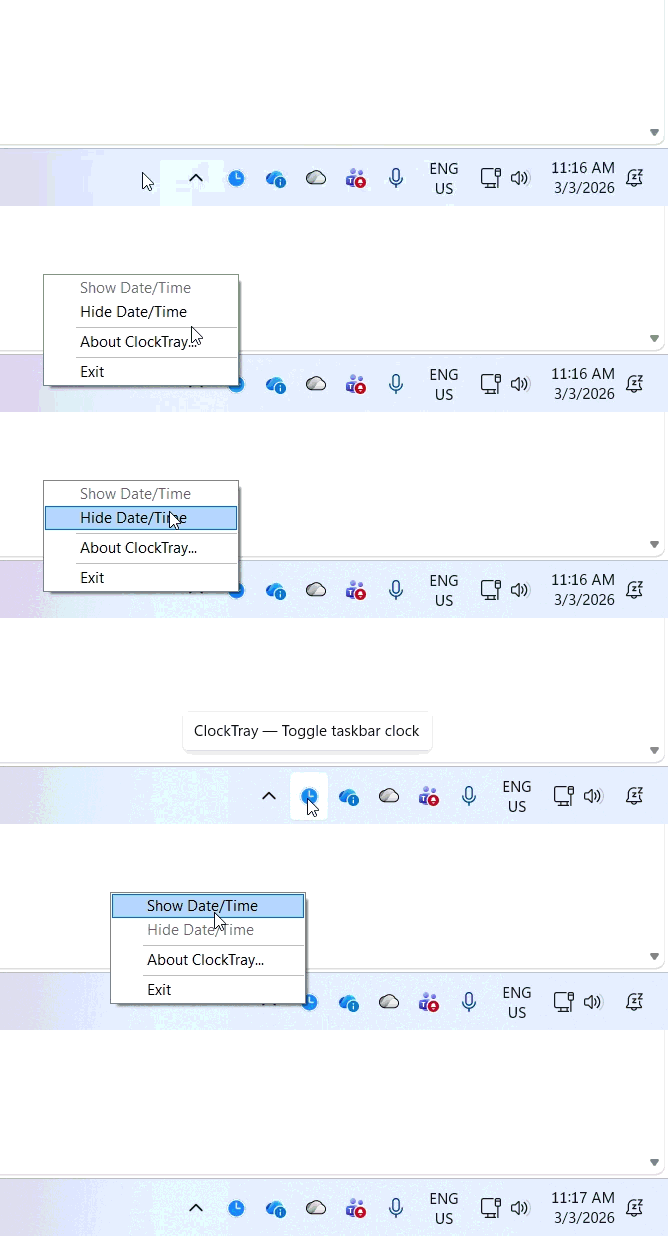
Sometimes you want to see the clock all the time.
Sometimes you want it completely hidden.
Depending on how you work, the Windows clock in the taskbar can either be useful… or distracting. So I built a tiny utility that lets you toggle the Windows clock visibility with a single click.
Meet ClockTray.
The Problem
Windows lets you show or hide the taskbar clock, but the process is not exactly a quick one.
The Idea
ClockTray puts a small utility in your system tray that lets you:
🖱️ Show or hide the Windows clock instantly
⚡ Do it with one click or a keyboard shortcut
🪶 Run a tiny lightweight background tool
Simple. Fast. Done.
Why this is useful (at least for me)
This can be surprisingly handy in a few scenarios:
- 🎥 Recording demos or videos where you don’t want the clock visible
- 🧑💻 Presentations or livestreams where you want a clean taskbar
- 🧠 Focus sessions where removing time helps reduce distractions
- 🖥️ Custom desktop setups where you control exactly what appears on the taskbar
Instead of navigating Windows settings every time, ClockTray gives you a quick toggle.
A tiny .NET utility
ClockTray is intentionally minimal. It’s a small experiment in building a simple Windows tray tool with .NET, designed to do one thing well.
No configuration. No complex UI. Just a quick toggle for your clock.
Open Source
The project is open source and available here:
👉 https://github.com/elbruno/ElBruno.ClockTray
Feel free to explore it, modify it, or use it as inspiration for your own small Windows productivity utilities.
Sometimes the best tools are the ones that do exactly one thing — and do it instantly.
Happy coding!
Greetings
El Bruno
More posts in my blog ElBruno.com.
More info in https://beacons.ai/elbruno
 El Bruno
Leave a comment