⚠️ This blog post was created with the help of AI tools. Yes, I used a bit of magic from language models to organize my thoughts and automate the boring parts, but the geeky fun and the 🤖 in C# are 100% mine.
Hi 👋
What if you could build a real-time voice conversation app in .NET — speech-to-text, text-to-speech, voice activity detection, and LLM responses — all running locally on your machine?
That’s exactly what ElBruno.Realtime does.
🎥 Watch the full video here
Why I Built This
I’ve been building local AI tools for .NET for a while — local embeddings, local TTS with VibeVoice and QwenTTS, and more. But what was missing was the glue: a framework that chains VAD → STT → LLM → TTS into a single, pluggable pipeline.
I wanted something that:
- Follows Microsoft.Extensions.AI patterns (no proprietary abstractions)
- Uses Dependency Injection like any modern .NET app
- Lets you swap any component — Whisper for STT, Kokoro or QwenTTS for TTS, Foundry Local or Ollama for chat
- Auto-downloads models on first run — no manual setup
- Supports both one-shot and real-time streaming conversations
So I built it. 🚀
The Architecture
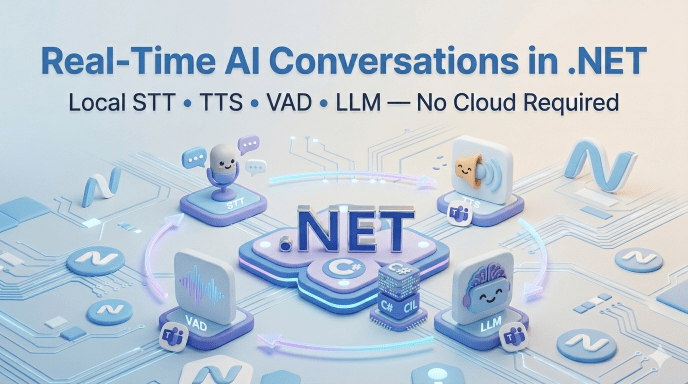
ElBruno.Realtime uses a three-layer architecture:
Your App ↓┌─────────────────────────────────────┐│ RealtimeConversationPipeline │ ← Orchestration Layer│ (Chains VAD → STT → LLM → TTS) │└─────────────────────────────────────┘ ↓ ↓ ↓ ↓ Silero Whisper Ollama Kokoro/Qwen/VibeVoice VAD STT Chat TTS
Every component implements a standard interface — ISpeechToTextClient (from M.E.AI), ITextToSpeechClient, IVoiceActivityDetector, IChatClient — so they’re independently replaceable.
Two processing modes:
ProcessTurnAsync— One-shot: give it a WAV file, get back transcription + AI response + audioConverseAsync— Streaming: pipe live microphone audio, get real-time events asIAsyncEnumerable<ConversationEvent>
NuGet Packages
| Package | What it does |
|---|---|
ElBruno.Realtime | Core pipeline + abstractions |
ElBruno.Realtime.Whisper | Whisper.net STT (GGML models) |
ElBruno.Realtime.SileroVad | Silero VAD via ONNX Runtime |
ElBruno.KokoroTTS.Realtime | Kokoro-82M TTS (~320 MB, fast) |
ElBruno.QwenTTS.Realtime | QwenTTS (~5.5 GB, high quality) |
ElBruno.VibeVoiceTTS.Realtime | VibeVoice TTS (~1.5 GB) |
All models auto-download on first use. No manual steps. 📦
Show Me the Code
Minimal Console App — One-Shot Conversation
This is the simplest possible setup. Record a question, get an AI response with audio:
using Microsoft.Extensions.DependencyInjection;using Microsoft.Extensions.AI;var services = new ServiceCollection();// Wire up the pipelineservices.AddPersonaPlexRealtime(opts =>{ opts.DefaultSystemPrompt = "You are a helpful assistant. Keep responses brief."; opts.DefaultLanguage = "en-US";}).UseWhisperStt("whisper-tiny.en") // 75 MB model, auto-downloaded.UseSileroVad() // ~2 MB model.UseKokoroTts(); // ~320 MB model// Add any IChatClient — here we use Ollamaservices.AddChatClient( new OllamaChatClient(new Uri("http://localhost:11434"), "phi4-mini"));var provider = services.BuildServiceProvider();var conversation = provider.GetRequiredService<IRealtimeConversationClient>();// Process a WAV fileusing var audio = File.OpenRead("question.wav");var turn = await conversation.ProcessTurnAsync(audio);Console.WriteLine($"📝 You said: {turn.UserText}");Console.WriteLine($"🤖 AI replied: {turn.ResponseText}");Console.WriteLine($"⏱️ Processing time: {turn.ProcessingTime.TotalMilliseconds:F0}ms");
That’s it. First run downloads models automatically. After that, everything runs locally.
Real-Time Streaming — Live Microphone
For real-time conversations, ConverseAsync gives you an IAsyncEnumerable<ConversationEvent> that streams events as they happen:
await foreach (var evt in conversation.ConverseAsync( microphoneAudioStream, new ConversationOptions { SystemPrompt = "You are a friendly voice assistant.", SessionId = "user-123", // Per-user conversation history EnableBargeIn = true, // Allow interrupting MaxConversationHistory = 20, })){ switch (evt.Kind) { case ConversationEventKind.SpeechDetected: Console.WriteLine("🎤 Speech detected..."); break; case ConversationEventKind.TranscriptionComplete: Console.WriteLine($"📝 You: {evt.TranscribedText}"); break; case ConversationEventKind.ResponseTextChunk: Console.Write(evt.ResponseText); // Streams token by token break; case ConversationEventKind.ResponseAudioChunk: // Play audio chunk in real-time audioPlayer.EnqueueChunk(evt.ResponseAudio); break; case ConversationEventKind.ResponseComplete: Console.WriteLine("\n✅ Response complete"); break; }}
The pipeline handles everything:
- Silero VAD detects when you start/stop speaking
- Whisper transcribes your speech
- Ollama generates a response (streamed)
- Kokoro/QwenTTS converts the response to audio (streamed)
All async. All streaming. All local.
ASP.NET Core API + SignalR
Want to expose this as a web API? Here’s the setup:
var builder = WebApplication.CreateBuilder(args);builder.Services.AddPersonaPlexRealtime(opts =>{ opts.DefaultSystemPrompt = "You are a helpful assistant.";}).UseWhisperStt("whisper-tiny.en").UseSileroVad().UseKokoroTts();builder.Services.AddChatClient( new OllamaChatClient(new Uri("http://localhost:11434"), "phi4-mini"));builder.Services.AddSignalR();var app = builder.Build();// REST endpoint for one-shot turnsapp.MapPost("/api/conversation/turn", async ( HttpRequest request, IRealtimeConversationClient conversation) =>{ var form = await request.ReadFormAsync(); var audioFile = form.Files["audio"]; using var audioStream = audioFile!.OpenReadStream(); var turn = await conversation.ProcessTurnAsync(audioStream); return Results.Ok(new { userText = turn.UserText, responseText = turn.ResponseText, processingTimeMs = turn.ProcessingTime.TotalMilliseconds, });});app.Run();
And a SignalR hub for real-time streaming:
public class ConversationHub : Hub{ private readonly IRealtimeConversationClient _conversation; public ConversationHub(IRealtimeConversationClient conversation) => _conversation = conversation; public async IAsyncEnumerable<ConversationEventDto> StreamConversation( IAsyncEnumerable<byte[]> audioChunks, string? systemPrompt = null) { await foreach (var evt in _conversation.ConverseAsync( audioChunks, new ConversationOptions { SystemPrompt = systemPrompt })) { yield return new ConversationEventDto { Kind = evt.Kind.ToString(), TranscribedText = evt.TranscribedText, ResponseText = evt.ResponseText, Timestamp = evt.Timestamp, }; } }}
Swap TTS Engines in One Line
One of the things I love about this design — changing the TTS engine is literally one line:
// Option 1: Kokoro — fast, ~320 MB.UseKokoroTts(defaultVoice: "af_heart")// Option 2: QwenTTS — high quality, ~5.5 GB.UseQwenTts()// Option 3: VibeVoice — balanced, ~1.5 GB.UseVibeVoiceTts(defaultVoice: "Carter")
Same goes for STT — switch from tiny to base model for better accuracy:
// Fast (75 MB).UseWhisperStt("whisper-tiny.en")// More accurate (142 MB).UseWhisperStt("whisper-base.en")
Models — All Auto-Downloaded
No manual model management. First run might take a moment to download, after that everything is cached locally:
| Model | Size | Purpose |
|---|---|---|
| Silero VAD v5 | ~2 MB | Detect when you’re speaking |
| Whisper tiny.en | ~75 MB | Fast speech-to-text |
| Whisper base.en | ~142 MB | Accurate speech-to-text |
| Kokoro-82M | ~320 MB | Fast text-to-speech |
| VibeVoice | ~1.5 GB | Balanced text-to-speech |
| QwenTTS | ~5.5 GB | High-quality text-to-speech |
| Phi4-Mini (Ollama) | ~2.7 GB | LLM chat (manual: ollama pull phi4-mini) |
Models are cached at %LOCALAPPDATA%/ElBruno/Realtime/.
Per-User Sessions
The framework includes built-in conversation history with per-user session management:
var turn = await conversation.ProcessTurnAsync( audioStream, new ConversationOptions { SessionId = "user-456", // Each user gets their own history MaxConversationHistory = 50, // Sliding window SystemPrompt = "You remember context from our previous messages.", });
InMemoryConversationSessionStore is the default — or inject your own IConversationSessionStore for Redis, database, etc.
What’s Next
I have a few things on my mind:
- More STT engines (faster-whisper, Azure Speech)
- WebRTC transport for browser-to-server streaming
- .NET Aspire integration sample (scenario-03 is already in progress!)
- Performance benchmarks across TTS engines
- Full support for Foundry Local
Resources
- 📦 GitHub repo: https://github.com/elbruno/ElBruno.Realtime
- 📦 NuGet: ElBruno.Realtime
- 📖 Microsoft.Extensions.AI: Official docs
- 🎙️ Related post: Local AI Voices in .NET — VibeVoice & Qwen TTS
Happy coding!
Greetings
El Bruno
More posts in my blog ElBruno.com.
More info in https://beacons.ai/elbruno
 El Bruno
Leave a comment