⚠️ This blog post was created with the help of AI tools. Yes, I used a bit of magic from language models to organize my thoughts and automate the boring parts, but the geeky fun and the 🤖 in C# are 100% mine.
Hi 👋
If you’ve used ElBruno.LocalEmbeddings for text embeddings, you’re going to love the new image capabilities. I asked several friends about this, and they challenge me to give it a try, so here it is:
ElBruno.LocalEmbeddings.ImageEmbeddings a library brings CLIP-based multimodal embeddings to .NET — fully local.
It is powered by ONNX Runtime, and ready for image search and image RAG workflows. In this post, I’ll show you:
- How to download the required CLIP models
- A tiny “hello image embeddings” sample in C#
- The two image samples included in the repo: ImageRagSimple and ImageRagChat
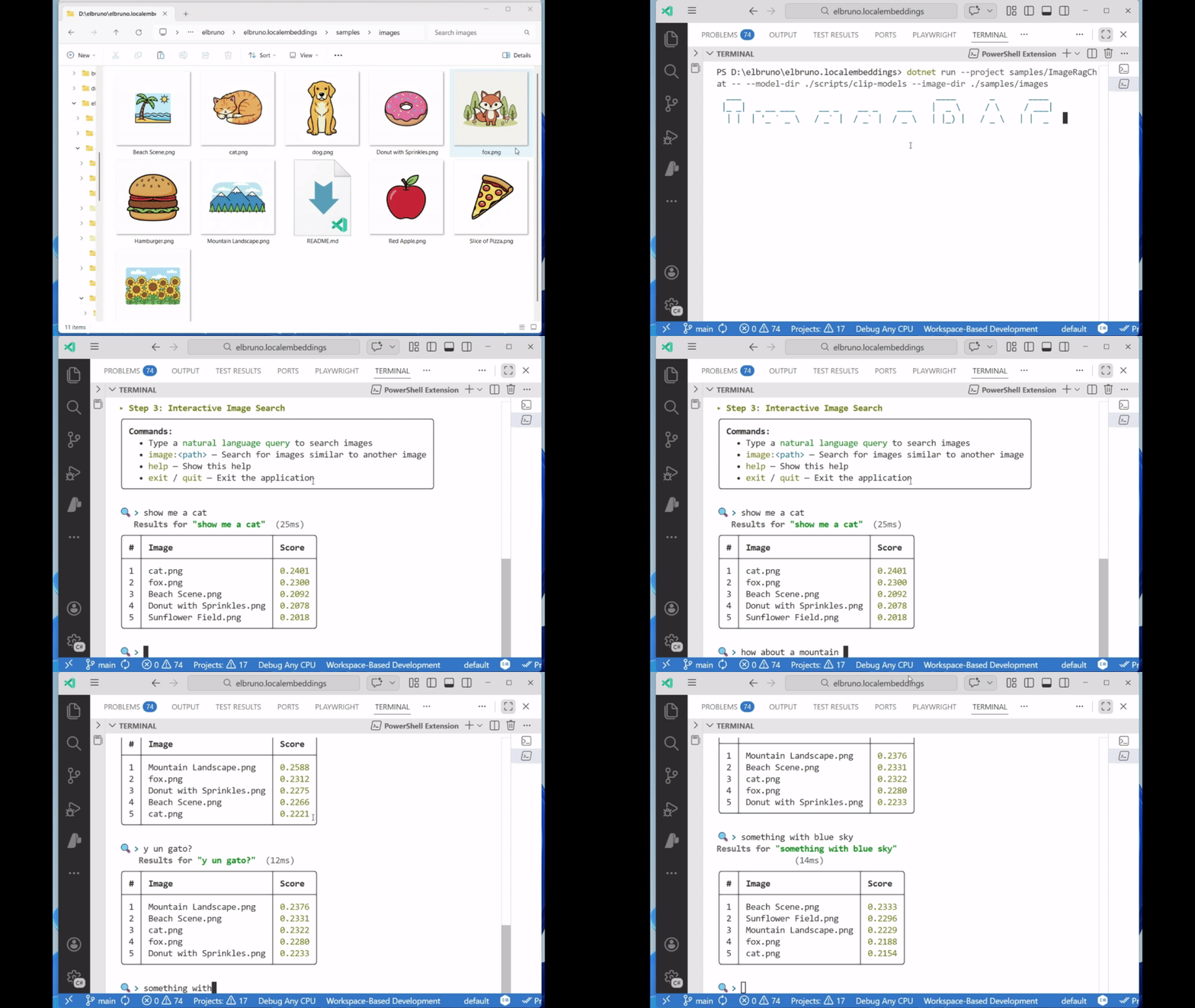
Here is the RAGChat using images as a source:
Let’s dive in! 🚀
Note: Right now, the auto-download feature as part of the library is Work-In-Progress, as these models are big. I’m working on the .NET library that do this (see roadmap), but I think so far with the download scripts we are OK.
📦 The Library: Image Embeddings (CLIP)
The image embedding library is built on top of OpenAI’s CLIP model (Contrastive Language–Image Pretraining). It uses two ONNX models:
- Text encoder → embeds natural language queries
- Vision encoder → embeds images
Both embeddings live in the same vector space, which means text-to-image and image-to-image search works with simple cosine similarity.
⬇️ Download the CLIP Models
CLIP requires four files:
text_model.onnxvision_model.onnxvocab.jsonmerges.txt
We provide scripts that download the correct files from Hugging Face.
Windows (PowerShell)
./scripts/download_clip_models.ps1
Linux / macOS (Bash)
chmod +x scripts/download_clip_models.sh./scripts/download_clip_models.sh
These scripts download the models to:
./scripts/clip-models
✅ Basic Usage — Minimal C# Example
Here’s the simplest possible flow using the new library:
using ElBruno.LocalEmbeddings.ImageEmbeddings;string modelDir = "./scripts/clip-models";string imageDir = "./samples/images";string textModelPath = Path.Combine(modelDir, "text_model.onnx");string visionModelPath = Path.Combine(modelDir, "vision_model.onnx");string vocabPath = Path.Combine(modelDir, "vocab.json");string mergesPath = Path.Combine(modelDir, "merges.txt");using var textEncoder = new ClipTextEncoder(textModelPath, vocabPath, mergesPath);using var imageEncoder = new ClipImageEncoder(visionModelPath);var searchEngine = new ImageSearchEngine(imageEncoder, textEncoder);searchEngine.IndexImages(imageDir);var results = searchEngine.SearchByText("a cat", topK: 3);foreach (var (imagePath, score) in results){ Console.WriteLine($"{Path.GetFileName(imagePath)} → {score:F4}");}
That’s it: index images → run text query → get ranked results.
🧪 Sample 1: ImageRagSimple
ImageRagSimple is the most minimal sample. It demonstrates the core flow:
- Load CLIP text + vision models
- Index all images in a folder
- Run a few hardcoded text queries
This is the best sample to read if you want to understand the library usage with minimal noise.
💬 Sample 2: ImageRagChat
ImageRagChat builds on the same engine but adds a polished CLI experience using Spectre.Console. It supports:
- Live text-to-image search
- Image-to-image search with
image:<path> - A readable, interactive UI
Commands inside the app:
- Type any text → search images
- Type
image: path/to/image.jpg→ image-to-image search - Type
exit→ quit
🧭 Which Sample Should You Start With?
| Sample | Best For | Notes |
|---|---|---|
| ImageRagSimple | Learning the library API | Straight-line demo, no UI |
| ImageRagChat | Interactive exploration | (Better) UX + Chat mode |
🎬 Video Walkthrough (Coming Soon)
Recorded a short video demo that walks through the library and both samples!
📚 Resources
Happy coding!
Greetings
El Bruno
More posts in my blog ElBruno.com.
More info in https://beacons.ai/elbruno
 El Bruno
Leave a comment