⚠️ This blog post was created with the help of AI tools. Yes, I used a bit of magic from language models to organize my thoughts and automate the boring parts, but the geeky fun and the 🤖 in C# are 100% mine.
🎥 Video coming soon!
I’m preparing a short walkthrough video where I’ll run this sample live, explain the design decisions, and show how everything fits together step by step. But hey, it’s christmas time, so I’m taking this easy 😉
When building AI-powered applications, the moment you move beyond a single “chatbot”, things get interesting very quickly.
You start asking questions like:
- How do I split responsibilities across agents?
- How do I avoid hard-coding routing logic?
- How do I keep agent creation simple and consistent?
In this post, I’ll show a clean and practical pattern using the Microsoft Agent Framework (MAF) in .NET that answers all of those questions using two key concepts:
- AgentFactory – to create agents consistently and with minimal boilerplate
- Handoff workflows – to let agents transfer control between each other instead of routing in code
We’ll do this with a small but realistic “Mini Concierge” example.
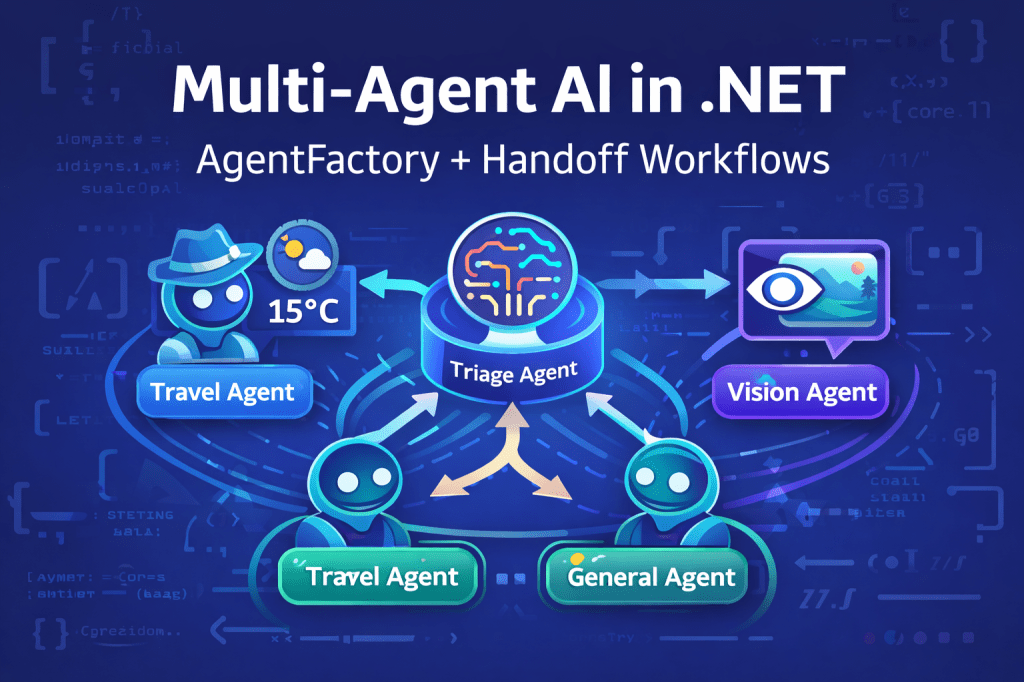
The scenario: a Mini Concierge with specialists
Our app has four agents:
- Triage agent – decides who should handle the request
- General agent – handles normal Q&A
- Travel agent – handles travel questions and can call a weather tool
- Vision agent – analyzes images (multimodal)
The key idea is simple:
The triage agent does not answer questions.
It only decides who should own the task and hands it off.
No if/else.
No routing methods.
No orchestration logic in our app code.
Why AgentFactory matters
Without a factory, agent creation quickly turns into repeated setup code:
- chat client
- tools
- defaults
- configuration
With AgentFactory, we define all shared configuration once, then create as many agents as we want by only changing:
- name
- instructions
In this sample, the factory is the backbone of the entire solution.
You can find the complete code here:
https://github.com/microsoft/Generative-AI-for-beginners-dotnet/tree/main/samples/AgentFx/AgentFx-MultiAgents-Factory-01
Step-by-step overview
1. Shared chat client
We start with a single chat client. In this case, I’m using Ollama running locally, but this could just as easily be Microsoft Foundry or another provider.
IChatClient chatClient = new OllamaApiClient(
    new Uri("http://localhost:11434/"),
    "ministral-3");
2. Tools once, reused everywhere
The travel agent can answer weather questions using a simple tool.
Tools are registered once and reused by all agents created by the factory.
AIFunction[] tools = [
    AIFunctionFactory.Create(GetWeather, "GetWeather")
];
3. Create the AgentFactory
This is the most important line in the whole sample.
var agentFactory = new ChatClientPromptAgentFactory(chatClient, tools);
From here on, every agent is created the same way, with no duplicated wiring.
4. Define agents by intent, not infrastructure
Each agent is defined only by:
- a name
- a role
- clear instructions
For example, the triage agent:
var triageAgent = await agentFactory.CreateAsync(
    promptAgent: new GptComponentMetadata(
        name: "triage_agent",
        instructions: ToInstructions("""
            You are a triage agent for a mini concierge.

            Decide who should own the task, then HANDOFF to exactly ONE agent:
            - travel_agent: travel planning, destinations, weather
            - vision_agent: anything that requires looking at an image
            - general_agent: everything else

            Do not answer the user yourself. Always handoff.
        """)));
The same factory creates the travel, vision, and general agents with different instructions.
Handoff workflows: no routing code
Instead of routing logic in C#, we define handoff rules declaratively using a workflow.
Func<Workflow> workflowFactory = () =>
    AgentWorkflowBuilder.CreateHandoffBuilderWith(triageAgent)
        .WithHandoffs(triageAgent, [travelAgent, visionAgent, generalAgent])
        .WithHandoff(travelAgent, triageAgent)
        .WithHandoff(visionAgent, triageAgent)
        .WithHandoff(generalAgent, triageAgent)
        .Build();
What this means:
- The triage agent can hand off to any specialist
- Specialists can optionally return control to triage
- The runtime manages ownership and execution flow
If you want to dive deeper into this concept, this is the official documentation:
https://learn.microsoft.com/en-us/agent-framework/user-guide/workflows/orchestrations/handoff?pivots=programming-language-csharp
Running the demos
We run three simple demos:
Demo 1 – General Q&A
What is the capital of France?
Output:
[AGENT: triage_agent]
[AGENT: general_agent]
Final Answer: The capital of France is Paris.
Demo 2 – Tool calling
I'm going to Amsterdam tomorrow. What's the weather in celsius?
Output:
[AGENT: triage_agent]
[AGENT: travel_agent]
Final Answer: ...weather response...
Demo 3 – Multimodal vision
What do you see in this image?
Output:
[AGENT: triage_agent]
[AGENT: vision_agent]
Final Answer: ...image analysis...
Notice how:
- The app never decides who answers
- Agent ownership is explicit and visible
- Each response is clean and readable
Why this pattern scales
This approach scales naturally because:
- AgentFactory centralizes creation and configuration
- Handoff workflows remove routing logic from your app
- Adding a new agent is just:
- define instructions
- add a handoff rule
What’s next?
- 🎥 A short video walkthrough of this exact sample (coming soon)
- A follow-up post showing how to:
- persist conversations
- add background responses
- connect this to Microsoft Foundry
If you want to experiment now, grab the code here:
https://github.com/microsoft/Generative-AI-for-beginners-dotnet/tree/main/samples/AgentFx/AgentFx-MultiAgents-Factory-01
And as always—feedback welcome. This pattern is powerful, simple, and very easy to grow with.
Happy coding!
Greetings
El Bruno
More posts in my blog ElBruno.com.
More info in https://beacons.ai/elbruno
 El Bruno
Leave a comment