⚠️ This blog post was created with the help of AI tools. Yes, I used a bit of magic from language models to organize my thoughts and automate the boring parts, but the geeky fun and the 🤖 in C# are 100% mine.
Hi!
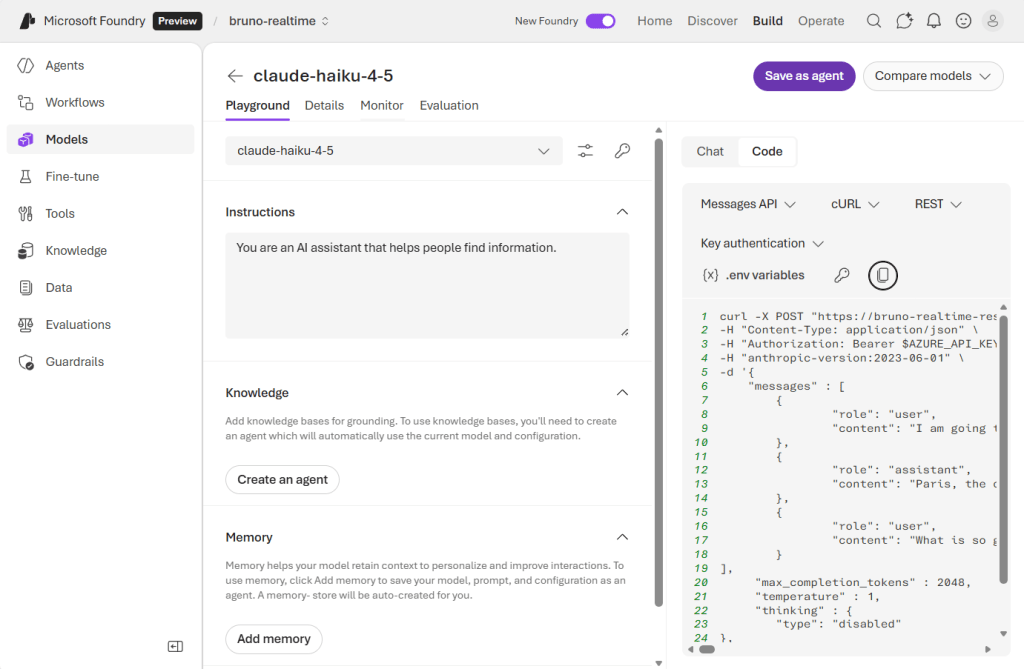
This post demonstrates how to use Anthropic’s Claude models deployed in Microsoft Foundry with the Microsoft.Extensions.AI (MEAI) framework. Since official SDK support for Claude models in MEAI is not yet available, this sample shows a practical approach to bridge the gap between OpenAI’s API format (used by MEAI) and Claude’s native Anthropic API format.
7 min video overview, so you can jump directly to the code:
Claude in Microsoft Foundry, so cool!
Important Note: This is demo/educational code intended to show the integration pattern until official library support for Claude models becomes available. For production scenarios, wait for official SDK support.
The Problem
Microsoft.Extensions.AI provides a unified IChatClient interface that works seamlessly with Azure OpenAI models. However, Claude models in Microsoft Foundry use Anthropic’s native API format, which differs from OpenAI’s format in several key ways:
| Aspect | OpenAI Format | Claude Format |
|---|---|---|
| Authentication | Authorization: Bearer {key} | x-api-key: {key} |
| API Version Header | None required | anthropic-version: 2023-06-01 |
| Max Tokens Field | max_completion_tokens | max_tokens (required) |
| System Messages | In messages array | Separate system parameter |
| Streaming Events | data: [DONE] | event: message_stop |
These differences mean that MEAI’s Azure OpenAI client cannot directly communicate with Claude models without transformation.
The Solution
I created a custom DelegatingHandler that intercepts HTTP requests/responses between MEAI and Claude’s API, transforming the data format in both directions. This allows us to use MEAI’s IChatClient interface while communicating with Claude models.
How it works
- The application creates an
AzureOpenAIClientwith a custom HTTP transport - The
ClaudeToOpenAIMessageHandlerintercepts requests to Claude deployments - It transforms OpenAI-style requests to Claude Messages API format:
- Converts message format and extracts system messages
- Skips empty messages (Claude requires non-empty content)
- Adds required Claude headers (
x-api-key,anthropic-version) - Transforms endpoint URL to Claude’s format
- Streaming responses are transformed back to OpenAI format using SSE (Server-Sent Events)
- All responses maintain OpenAI API compatibility
Architecture Overview
┌─────────────────────────────────────┐
│   Your Application (Program.cs)    │
│                                     │
│  IChatClient chatClient             │
└──────────────┬──────────────────────┘
               │
               │ OpenAI Format
               ▼
┌─────────────────────────────────────┐
│  ClaudeToOpenAIMessageHandler       │
│                                     │
│  ┌─────────────────────────────┐   │
│  │ Request Transformation      │   │
│  │ OpenAI → Claude Format      │   │
│  └─────────────────────────────┘   │
│                                     │
│  ┌─────────────────────────────┐   │
│  │ Response Transformation     │   │
│  │ Claude → OpenAI Format      │   │
│  └─────────────────────────────┘   │
│                                     │
│  ┌─────────────────────────────┐   │
│  │ Streaming Transformation    │   │
│  │ SSE Event Conversion        │   │
│  └─────────────────────────────┘   │
└──────────────┬──────────────────────┘
               │
               │ Claude Format
               ▼
┌─────────────────────────────────────┐
│   Microsoft Foundry                  │
│   (Claude Models API)               │
└─────────────────────────────────────┘
Step-by-Step Implementation
Step 1: Create the Custom Handler Class
The ClaudeToOpenAIMessageHandler extends DelegatingHandler to intercept HTTP traffic:
public class ClaudeToOpenAIMessageHandler : DelegatingHandler
{
    // Constants for Claude API
    private const string ClaudeAnthropicVersion = "2023-06-01";
    private const string ClaudeEventTypeContentDelta = "content_block_delta";
    private const string ClaudeEventTypeMessageStop = "message_stop";
    private const int DefaultMaxTokens = 2048;

    // Required properties
    public required string AzureClaudeDeploymentUrl { get; init; }
    public required string ApiKey { get; init; }
    public required string Model { get; init; }

    protected override async Task<HttpResponseMessage> SendAsync(
        HttpRequestMessage request,
        CancellationToken cancellationToken)
    {
        // Detect if this is a request that needs Claude transformation
        if (IsClaudeRequest(request))
        {
            // Transform and send to Claude API
            return await TransformRequestToClaude(request, cancellationToken);
        }

        // Pass through other requests unchanged
        return await base.SendAsync(request, cancellationToken);
    }
}
Step 2: Transform the Request Body
Convert OpenAI’s JSON format to Claude’s format:
private async Task<HttpRequestMessage> TransformRequestToClaude(
    HttpRequestMessage request,
    CancellationToken cancellationToken)
{
    // Read the original OpenAI-format request
    var originalBody = await request.Content!.ReadAsStringAsync(cancellationToken);
    var openAiRequest = JsonSerializer.Deserialize<JsonElement>(originalBody);

    // Extract messages and convert to Claude format
    var messages = ConvertMessagesToClaudeFormat(openAiRequest);

    // Build Claude request body
    var claudeRequestBody = BuildClaudeRequestBody(openAiRequest, messages);

    // Create new request with Claude endpoint
    var claudeRequest = new HttpRequestMessage(HttpMethod.Post, AzureClaudeDeploymentUrl)
    {
        Content = new StringContent(
            JsonSerializer.Serialize(claudeRequestBody),
            Encoding.UTF8,
            "application/json")
    };

    // Add Claude-specific headers
    ConfigureClaudeRequestHeaders(claudeRequest);

    return claudeRequest;
}
Step 3: Handle Authentication Headers
Claude requires x-api-key instead of Authorization: Bearer:
private void ConfigureClaudeRequestHeaders(HttpRequestMessage claudeRequest)
{
    // Claude uses x-api-key header, not Authorization Bearer
    claudeRequest.Headers.Add("x-api-key", ApiKey);

    // Required API version header
    claudeRequest.Headers.Add("anthropic-version", ClaudeAnthropicVersion);
}
Step 4: Convert Message Format
Extract system messages and format the conversation:
private List<JsonElement> ConvertMessagesToClaudeFormat(JsonElement openAiRequest)
{
    var messages = new List<JsonElement>();

    if (openAiRequest.TryGetProperty("messages", out var messagesArray))
    {
        foreach (var message in messagesArray.EnumerateArray())
        {
            // Extract content
            var content = message.TryGetProperty("content", out var contentProp)
                ? contentProp.GetString() ?? string.Empty
                : string.Empty;

            // Skip empty messages (Claude validates this)
            if (string.IsNullOrWhiteSpace(content))
                continue;

            var role = message.TryGetProperty("role", out var roleProp)
                ? roleProp.GetString() ?? string.Empty
                : string.Empty;

            // Skip system messages (handled separately in Claude)
            if (role == "system")
                continue;

            messages.Add(message);
        }
    }

    return messages;
}
Step 5: Build Claude Request Body
Construct the proper JSON structure with required fields:
private Dictionary<string, object> BuildClaudeRequestBody(
    JsonElement openAiRequest,
    List<JsonElement> messages)
{
    var claudeRequestBody = new Dictionary<string, object>
    {
        ["model"] = Model,
        ["messages"] = messages,
        // Claude requires max_tokens (not max_completion_tokens)
        ["max_tokens"] = openAiRequest.TryGetProperty("max_tokens", out var maxTokens)
            ? maxTokens.GetInt32()
            : DefaultMaxTokens
    };

    // Extract system message if present
    var systemMessage = ExtractSystemMessage(openAiRequest);
    if (!string.IsNullOrWhiteSpace(systemMessage))
    {
        claudeRequestBody["system"] = systemMessage;
    }

    // Handle streaming flag
    if (openAiRequest.TryGetProperty("stream", out var streamProp))
    {
        claudeRequestBody["stream"] = streamProp.GetBoolean();
    }

    return claudeRequestBody;
}
Step 6: Transform Streaming Responses
Convert Claude’s Server-Sent Events (SSE) to OpenAI format using System.IO.Pipelines:
private async Task<HttpResponseMessage> TransformStreamingResponse(
    HttpResponseMessage claudeResponse,
    CancellationToken cancellationToken)
{
    var pipe = new Pipe();
    var writer = pipe.Writer;
    var reader = pipe.Reader;

    // Background task to read Claude's stream and write OpenAI format
    _ = Task.Run(async () =>
    {
        try
        {
            var stream = await claudeResponse.Content.ReadAsStreamAsync(cancellationToken);
            using var streamReader = new StreamReader(stream);

            while (!streamReader.EndOfStream)
            {
                var line = await streamReader.ReadLineAsync(cancellationToken);
                if (string.IsNullOrWhiteSpace(line))
                    continue;

                // Process Claude SSE events
                if (line.StartsWith("event:"))
                {
                    var eventType = line.Substring(6).Trim();

                    // Read the data line
                    var dataLine = await streamReader.ReadLineAsync(cancellationToken);
                    if (dataLine?.StartsWith("data:") == true)
                    {
                        var eventData = dataLine.Substring(5).Trim();

                        // Transform event to OpenAI format
                        var openAiChunk = ProcessClaudeDataEvent(eventType, eventData);
                        if (!string.IsNullOrEmpty(openAiChunk))
                        {
                            var bytes = Encoding.UTF8.GetBytes(openAiChunk);
                            await writer.WriteAsync(bytes, cancellationToken);
                        }
                    }
                }
            }
        }
        finally
        {
            await writer.CompleteAsync();
        }
    }, cancellationToken);

    // Return response with transformed stream
    return new HttpResponseMessage(HttpStatusCode.OK)
    {
        Content = new StreamContent(reader.AsStream())
        {
            Headers = { ContentType = new MediaTypeHeaderValue("text/event-stream") }
        }
    };
}
Step 7: Process Claude Events
Convert individual SSE events to OpenAI format:
private string ProcessClaudeDataEvent(string eventType, string eventData)
{
    switch (eventType)
    {
        case ClaudeEventTypeContentDelta:
            // Extract text from Claude's nested structure
            var claudeEvent = JsonSerializer.Deserialize<JsonElement>(eventData);
            if (claudeEvent.TryGetProperty("delta", out var delta) &&
                delta.TryGetProperty("text", out var text))
            {
                var textContent = text.GetString();

                // Build OpenAI-format chunk
                var openAiChunk = new
                {
                    id = "chatcmpl-" + Guid.NewGuid().ToString(),
                    @object = "chat.completion.chunk",
                    created = DateTimeOffset.UtcNow.ToUnixTimeSeconds(),
                    model = Model,
                    choices = new[]
                    {
                        new
                        {
                            index = 0,
                            delta = new { content = textContent },
                            finish_reason = (string?)null
                        }
                    }
                };

                return "data: " + JsonSerializer.Serialize(openAiChunk) + "\n\n";
            }
            break;

        case ClaudeEventTypeMessageStop:
            // Send completion signal
            var stopChunk = new
            {
                id = "chatcmpl-" + Guid.NewGuid().ToString(),
                @object = "chat.completion.chunk",
                created = DateTimeOffset.UtcNow.ToUnixTimeSeconds(),
                model = Model,
                choices = new[]
                {
                    new
                    {
                        index = 0,
                        delta = new { },
                        finish_reason = "stop"
                    }
                }
            };

            return "data: " + JsonSerializer.Serialize(stopChunk) + "\n\ndata: [DONE]\n\n";
    }

    return string.Empty;
}
Run the app
1. Set Up User Secrets
Store your Microsoft Foundry credentials securely:
# Navigate to the project directory
cd samples/CoreSamples/BasicChat-11FoundryClaude

# Set the secrets
cd samples/CoreSamples/BasicChat-11FoundryClaude
dotnet user-secrets set "endpoint" "https://<your-resource-name>.cognitiveservices.azure.com"
dotnet user-secrets set "endpointClaude" "https://<your-resource-name>.services.ai.azure.com/anthropic/v1/messages"
dotnet user-secrets set "apikey" "<your-api-key>"
dotnet user-secrets set "deploymentName" "claude-haiku-4-5"
2. Create the MEAI Client
Wire up the custom handler with MEAI’s IChatClient:
using Microsoft.Extensions.AI;
using Azure.AI.OpenAI;

// Load configuration
var config = new ConfigurationBuilder()
    .AddUserSecrets<Program>()
    .Build();

var apiKey = config["AZURE_CLAUDE_APIKEY"];
var endpoint = config["AZURE_CLAUDE_ENDPOINT"];
var model = config["AZURE_CLAUDE_MODEL"];

// Create the custom handler
var handler = new ClaudeToOpenAIMessageHandler
{
    AzureClaudeDeploymentUrl = endpoint,
    ApiKey = apiKey,
    Model = model
};

// Wrap in HttpClient for Azure SDK
var httpClient = new HttpClient(handler);

// Create Azure OpenAI client with custom transport
var transport = new HttpClientPipelineTransport(httpClient);
var azureClient = new AzureOpenAIClient(new Uri(endpoint), new(), transport);

// Get IChatClient interface
IChatClient chatClient = azureClient
    .GetChatClient(model)
    .AsIChatClient();
3. Use the Chat Client
Now you can use the standard MEAI interface:
var messages = new List<ChatMessage>();

while (true)
{
    Console.Write("You: ");
    var userInput = Console.ReadLine();
    if (string.IsNullOrWhiteSpace(userInput))
        break;

    messages.Add(new ChatMessage(ChatRole.User, userInput));

    Console.Write("Assistant: ");

    // Stream the response
    await foreach (var chunk in chatClient.CompleteStreamingAsync(messages))
    {
        Console.Write(chunk.Text);
    }

    Console.WriteLine();
}
When to Use This Approach
✅ Good for:
- Learning how API format differences work
- Prototyping with Claude models in Microsoft Foundry
- Understanding MEAI’s extensibility model
- Educational purposes and experimentation
❌ Not recommended for:
- Production applications (wait for official support)
- Everything else!
Conclusion
This sample demonstrates a practical and temporary bridge between Microsoft.Extensions.AI and Claude models in Microsoft Foundry. While it’s functional for learning and prototyping, it’s important to remember this is demo code that fills a gap until official support becomes available.
Resources
Microsoft Documentation
- Using Claude Models in Microsoft Foundry
- Microsoft.Extensions.AI Overview
- Microsoft Foundry Documentation
Anthropic Documentation
Code Repository
- Complete Working Sample – Full implementation with all code files
- Generative AI for Beginners .NET Repository – Main course repository
💡 Tip: Check out the complete working sample to see the full implementation including
ClaudeToOpenAIMessageHandler.cs,Program.cs, and all configuration files.
 El Bruno
Leave a comment