
Hi !
I’ve been using this feature for so long, and now I can’t really remember when it was officially launched. The way it works is super easy, once you copy a content to your clipboard, using CTRL+C, the content is added to the Clipboard ring and you can access later using WIN+V.
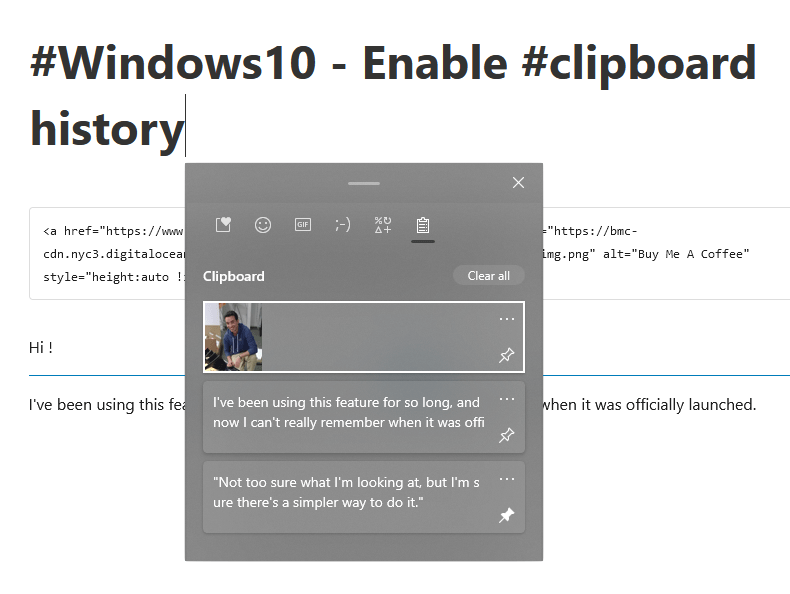
As you can see in the previous image, the Clipboard ring support different types and formats, which is a great bonus. Of course, be extra careful if you store passwords, connection strings, access keys or any sensitive data here.
And finally, to enable this feature just search for [Clipboard] in Windows 10 Settings.

Happy coding!
Greetings
El Bruno
More posts in my blog ElBruno.com.
More info in https://beacons.ai/elbruno

¿Con ganas de ponerte al día?
En Lemoncode te ofrecemos formación online impartida por profesionales que se baten el cobre en consultoría:
- Si tienes ganas de ponerte al día con Front End (ES6, Typescript, React, Angular, Vuejs…) te recomendamos nuestros Máster Front End: https://lemoncode.net/master-frontend#inicio-banner
- Si te quieres poner al día en Backend (stacks .net y nodejs), te aconsejamos nuestro Bootcamp Backend: https://lemoncode.net/bootcamp-backend#bootcamp-backend/banner
- Y si tienes ganas de meterte con Docker, Kubernetes, CI/CD…, tenemos nuestro Bootcamp Devops: https://lemoncode.net/bootcamp-devops#bootcamp-devops/inicio
 El Bruno
Leave a comment