
Hi !
Back in the Microsoft Lync days, we had access to an SDK that allowed us to interact with the Messaging client in a local mode. As of today, there is not similar SDK to interact with Microsoft Teams. So, if I want to know the status of an user in Microsoft Teams, we need to call the Microsoft Graph. And this is not as simple as 2 lines in Microsoft Lync SDK.
Note: I’m fully supporting the Microsoft Graph 👇👇👇

Using the Graph is super easy. I mean, once you understand the entities and elements, is easy to make queries to get Graph information. The tricky part is to get permissions to call the Graph.
Isacc describes the process very well in the [Configuring an Azure Active Directory Application] section of his blog (see references). There are 2 main steps here
- Create and add an application to an Azure AD
- Grant permissions to the new App
Avanade is not as big as Microsoft, however just try to get permissions to create an App into our Azure AD to lab and test, is a colossal task. Tons of internal approvals, security checks, etc. Is not as easy as use a local SDK. That’s a boomer.
We have a Virtual Innovation Center to present and lab ideas, and I have full control there. So, I’m using this environment for labs, while I’m figuring out the best way to trigger this in Avanade.
Again, I need to learn more about this. The latest version of Presence Light does not longer requires Admin Consent, so this is no longer an issue for folks that want to get Presence. It didn’t work for me so, I created the app, and is up and running !
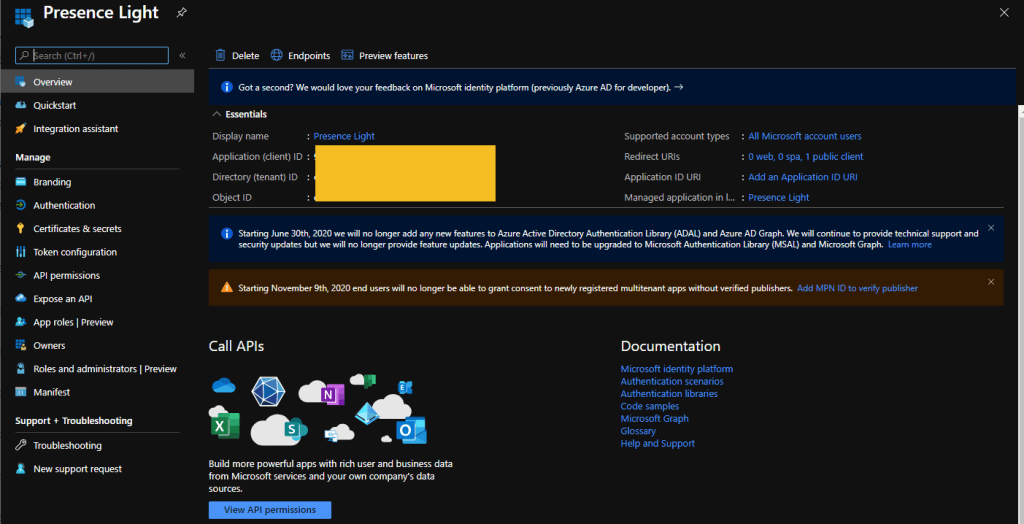
Again, please read Isaac post. He really explains the full process for this.

Happy coding!
Greetings
El Bruno
More posts in my blog ElBruno.com.
More info in https://beacons.ai/elbruno
 El Bruno
Leave a comment