Hi!

In my previous post I created a sample on how to use ImageAI and OpenCV to detect Hololens from a webcam frame (see references). I added some code to the last sample, and I found that the performance was not very good.

python using imageai to detect hololens less than 1 fps

With the previous sample code, I couldn’t process more than 1 frame per second. So, I started to make some improvements and I got this result
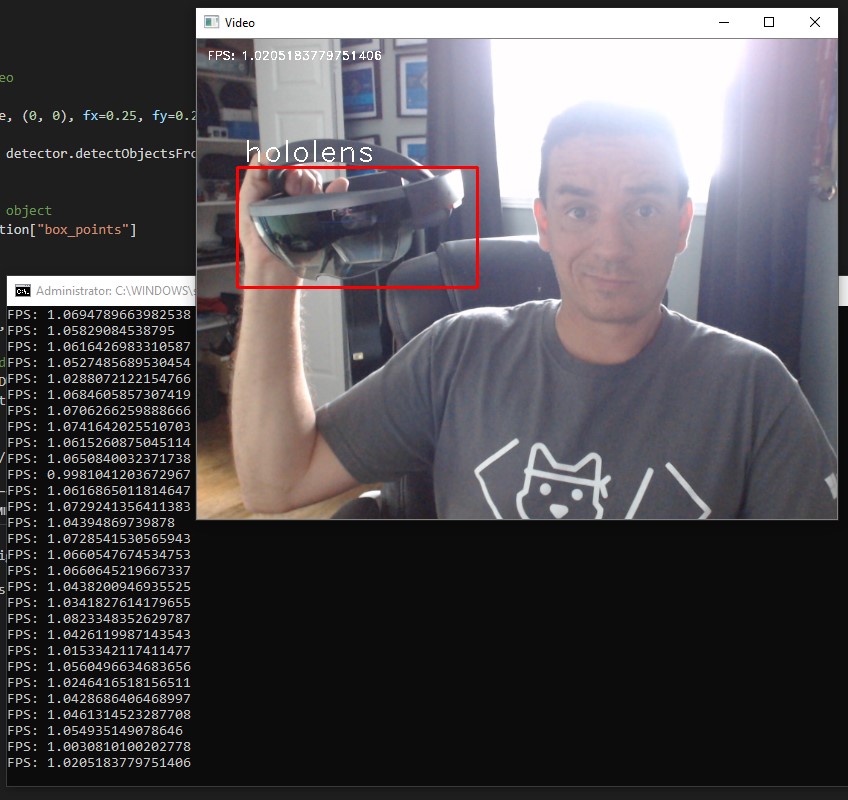
python using imageai to detect hololens little more than 1 fps

Not an amazing one, but still is nice to have more than 1 frame per second analyzed.

# load HL detection model from imageAI
# open camera with openCV, analyze frame by frame
# draw a red frame around the detected object
# display FPS, resize image to 1/4 to improve performance
from imageai.Detection.Custom import CustomObjectDetection
import os
import cv2
import time
detector = CustomObjectDetection()
detector.setModelTypeAsYOLOv3()
detector.setModelPath("hololens-ex-60–loss-2.76.h5")
detector.setJsonPath("detection_config.json")
detector.loadModel()
# init camera
execution_path = os.getcwd()
camera = cv2.VideoCapture(0)
camera.set(cv2.CAP_PROP_FRAME_WIDTH,640)
camera.set(cv2.CAP_PROP_FRAME_HEIGHT,480)
while True:
# FPS process
start_time = time.time()
# Grab a single frame of video
ret, frame = camera.read()
fast_frame = cv2.resize(frame, (0, 0), fx=0.25, fy=0.25)
detected_image, detections = detector.detectObjectsFromImage(input_image=fast_frame, input_type="array", output_type="array")
for detection in detections:
# frame for the detected object
(x1, y1, x2, y2) = detection["box_points"]
x1 *= 4
y1 *= 4
x2 *= 4
y2 *= 4
cv2.rectangle(frame, (x1, y1), (x2, y2), (0, 0, 255), 2)
# Draw a label with the detected object type below the frame
font = cv2.FONT_HERSHEY_DUPLEX
cv2.putText(frame, detection["name"], (x1 + 6, y1 – 6), font, 1.0, (255, 255, 255), 1)
#display FPS
fpsInfo = "FPS: " + str(1.0 / (time.time() – start_time)) # FPS = 1 / time to process loop
print(fpsInfo)
font = cv2.FONT_HERSHEY_DUPLEX
cv2.putText(frame, fpsInfo, (10, 20), font, 0.4, (255, 255, 255), 1)
# Display the resulting image
cv2.imshow('Video', frame)
# Hit 'q' on the keyboard to quit!
if cv2.waitKey(1) & 0xFF == ord('q'):
break
# Release handle to the webcam
video_capture.release()
cv2.destroyAllWindows()

I even remove all the camera preview and still works in less than 1FPS.
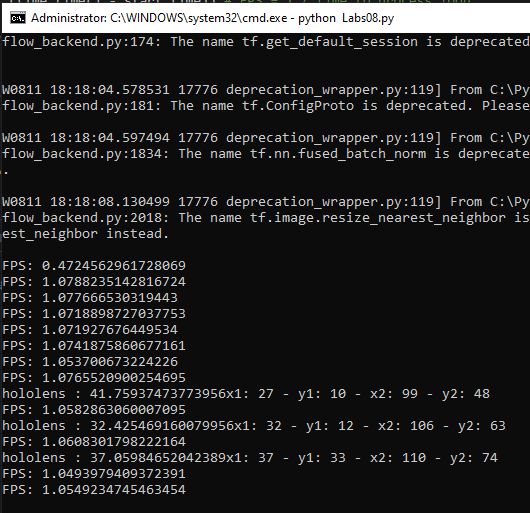
python using imageai to detect hololens no opencv camera preview

So, now it’s time to read and learn of the deep code on ImageAI. Fun times!

Happy coding!

Greetings @ Burlington

El Bruno

References

2 responses to “#Python – Detecting #Hololens in realtime in webcam feed using #ImageAI and #OpenCV with performance improvements”

Leave a comment

Discover more from El Bruno

Subscribe now to keep reading and get access to the full archive.

Continue reading