Hello!
While I have a virus in my stomach that won’t let me be more than 5 minutes at the computer without start feel dizzy, I’m going to rescue a post that I have in draft mode for a while.
This one is to enable or disable the menu with the options of POWER in the Start Screen of Windows 8.1
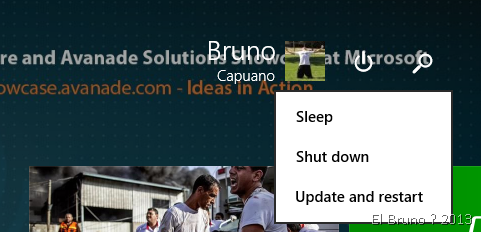
It is quite simple, although I always forget.
In the Windows registry access route
HKEY_CURRENT_USER\Software\Microsoft\Windows\CurrentVersion\ImmersiveShell
And within it, create a Launcher key if it doesn’t exist.
Then within Launcher create a DWORD called Launcher_ShowPowerButtonOnStartScreen and in it put the value 0 or 1 to enable the POWER to disable it.

Done!
Best regards
/El Bruno
 El Bruno
Leave a comment