Hello!
Many times when I talk about robots people think that the easy way to create Skynet is to make a very smart robot, and is reality is the opposite way. The way in which machines will dominate the world is increasingly requiring less help from humans.
If you do not live in a cave, you probable are aware that a few days ago was released the Visual Studio 14 CTP2 (you can also try this in AZURE for free!). This new CTP brings several interesting stuff, for example
- Now you can save and recover the IDE-specific settings. This applies to the tool windows in the IDE and other IDE panels.
- Light Bulb Editor Adornment… This extension displays a popup windows than that try to help to solve problems in your code. We only put the cursor on a line with an error and it will be shown a “bulb” that lists the actions that you can take to solve the problem
- Support Touch. Visual Studio Editor now supports touch gestures for scrolling, pinch-to-zoom, tap and hold context menus, double-tap for selection of Word and line selection by clicking in the margin.
- ALL CAPS. Improved what we had in the CTP1
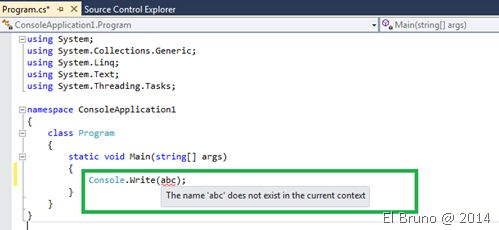
Now, the.Light Bulb Editor Adornment deserves a special description. Out CSharpCorner friend explains it very well (link). In the classic Visual Studio 2013, when we have a syntax error we see something similar to the image below
Now with the bulbs we will see something like this
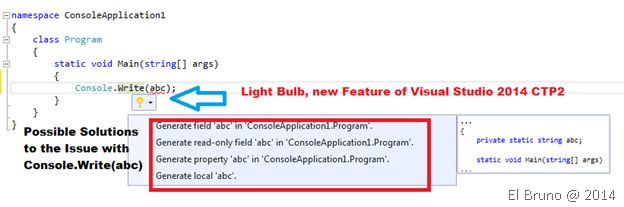
Options, supports, etc.! at any time we will stop thinking and here comes the moment that scary > VISUAL STUDIO began to set only!
Source: http://blogs.msdn.com/b/visualstudio/archive/2014/07/08/visual-studio-14-ctp-2-available.aspx
PD: by the way, if you use ReSharper, this sure you is family time 
Saludos @ Home
El Bruno
 |
 |
 |
 El Bruno
Leave a comment