Hello!
When a Cloud Service app that is working since months stops working without a log trace or error log, you know it’s time to prepare some coffee, long nights are waiting for you. Even more if the exception is sporadic and reproduce the error is not trivial.
In this particular case the error was not an exception, at the end it ended up lost as a bad Http Response. To get to this conclusion, I had to break one of the most important rules in a Dev Team:
I’ve debugged the production environment (well actually I didn’t, but the phrase must scare someone!)
I still remember the headaches that I get, when I get my hands into a production server and see development tools installed in the server. The most extreme one was in a customer and find that the transaction manager service had stopped working because… someone had killed the VisualCafe instance (all the JBoss transaction manager service was being executed with a F5 from VisualCafe, and thus lasted several days!).
In our case, the strange thing is that we get to the 2nd most hated sentence for developers
IT WORKS IN MY LAPTOP !!!
And that’s it, locally with the Azure everything works fine. However in production we find the ghosts and goblins. So to find the solution we have several options, one of them involved IntelliTrace and logs, the other was much more cooler 
The solution was to create a new Cloud Service App in Azure, deploy our solution there (which is easier to say that do, because the number of dependencies involved) and expect to get the exception. (In the original cloud service app there are people working from China, Brazil, USA, France, so make changes to this one is kind of play to be God… ))
Fortunately, in this new environment we also find the exception. And this is the correct moment to Thank to the MICROSOFT’s AZURE Team for the 2nd option in the image below :
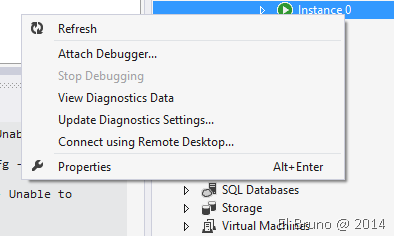
So, we connected in debug mode to a running instance of a website in a Cloud Service App from Azure! This feature was announced some time ago, and this is the type of news that you don’t this are much important until you need them. (Note: Gisela write an amazing article about this, you can read this here)
So after a while diving in the code we get to the exception
{“Could not load file or assembly ‘ Microsoft.WindowsAzure.ServiceRuntime, Version = 2. 3. 0. 0, Culture = neutral, PublicKeyToken = 31bf3856ad364e35′ or one of its dependencies.”} {The system cannot find the file specified. “:” Microsoft.WindowsAzure.ServiceRuntime, Version = 2. 3. 0. 0, Culture = neutral, PublicKeyToken = 31bf3856ad364e35″}
It was a bucket of cold water, since the way we work with AZURE model had not changed in quite some time. After researching and found some people with similar problems (1, 2, 3, and 4), we arrived at a solution that still not convinced me at all.
- Update all projects that use NuGet pkgs from Azure to latest version. This is consistent and is part of we do in each SDK Update.
- Modify the Dll References property “Copy Local = True”, to include them in the deploy package. In this case the dlls were: Microsoft.WindowsAzure.Configuration, Microsoft.WindowsAzure.Diagnostics, Microsoft.WindowsAzure.Storage and… Microsoft.WindowsAzure.ServiceRuntime. the latter is incredible.
- Add a redirection of assemblies in the web.config that correct versions are used. Something like
< assemblyIdentity element name = “Microsoft.WindowsAzure.ServiceRuntime” culture = “neutral” publicKeyToken = “31bf3856ad364e35″ / >”
< bindingRedirect oldVersion = “0.0.0.0-2.3.0. 0″ newVersion =” 2.3.0. 0″ / >
< /dependentAssembly >
While these steps are consistent, the 2nd where we’ve had to include Microsoft.WindowsAzure.ServiceRuntime with local copy = true, gives me something to think. According to my understanding, a Cloud Service App should include these components Out of the Box.
Well, this solution works and now touch me ask the cracks of Azure: @ibonilm or @quiqu3 that I’ve lost along the way.
PS: on the road I can explain also the following error:
Message = Could not load file or assembly ‘ msshrtmi, Version = 2. 3. 0. 0, Culture = neutral, PublicKeyToken = 31bf3856ad364e35′ or one of its dependencies. The system cannot find the file specified.
Source = Microsoft WindowsAzure. ServiceRuntime
FileName = msshrtmi, Version = 2 3 0. 0, Culture = neutral, PublicKeyToken = 31bf3856ad364e35
This is the perfect excuse for a Beer or Tequila…
Update: Thanks to Gisela (@0Gis0) who helped me with the issue!
Saludos @ La Finca
El Bruno
 |
 |
 |
 El Bruno
Leave a comment