Hello!
At last! The OpsHub people are amazing. In addition to having a great product for integrating TFS with other ALM solutions; “OpsHub Integration Manager“; now they offer free of charge, a specific version of this app to migrate content from a Team Foundation Server On Premise to Visual Studio Online.
I still don’t know any client that requested us support for a scenario like this, but I still believe that it is something that increasingly we will do more
Free from work to your IT Department and trust on the capabilities of Visual Studio Online as Alm platform
The following screenshot leaves more than clear the simple which is migration.

Then select our TFS and the endpoint is Visual Studio Online

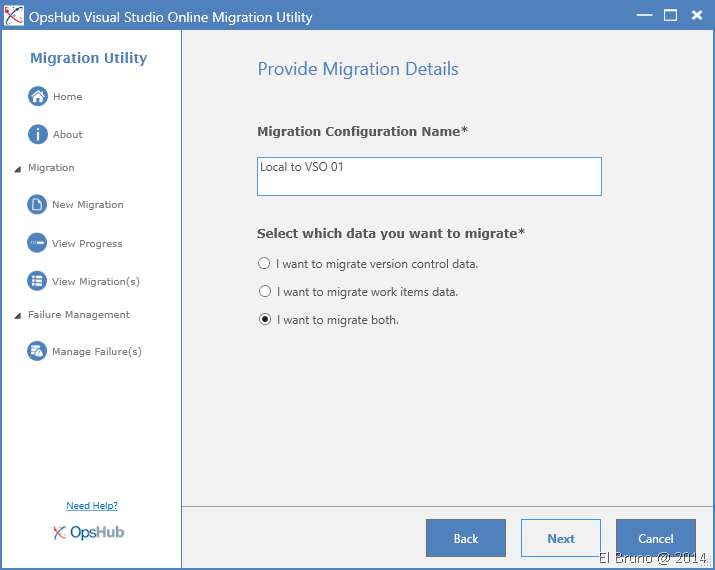
We define the type of migration, Source Control, WorkItem data or both.
We selected the Team Projects to migrate

An important detail: selected once the Team Project within our Visual Studio Online account must have a TP with the same name to continue with the migration. If you thought that it was a good time to put a better name to the Team Project… maybe it isn’t.
The same thing happens if e.g. you want to migrate a project that use the CMMI template to one of SCRUM , or one that uses Team Foundation Version Control to GIT in this case, you will see a message similar to the following
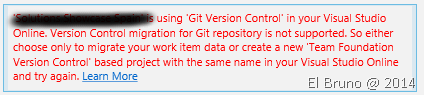
The qee paid version offers OpsHub can help us in this case, although still not be far.
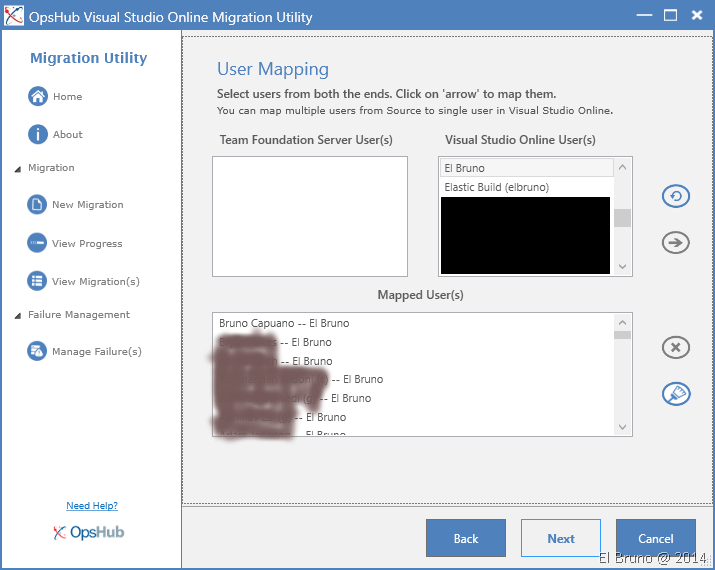
The next step is the mapping of users: AD and Microsoft Accounts. The interface is fairly well, select AD users on the left and then VSO users right.

If, as in the above case you have + 400 users on your Team Project, because the thing can take a while, even more so if you have accounts in AD of users who are no longer valid, or similar cases. One option is to assign these users to a service type VSO account. Remember that when you migrate the historical data will be associated with this account. In addition, if the 400 only users are working 350, you won’t want to pay for 50 users that will not utiillzar service.
And finally we come to the last step where the migration process is launched. While some say that we have no options to filter a little migration, we must remember that the product is free and gives us the ability of total migration, and that is appreciated 

Download: http://visualstudiogallery.msdn.microsoft.com/28a90a17-d00c-4660-b7ae-42d58315ccf2
Saludos @ Home
El Bruno
 |
 |
 |
 El Bruno
Leave a comment