Hi!
When this post is published I’m probvably be travelling from New York to Madrid, so I’ll make this a quick one: : how to configure Unity3D to use Visual Studio 2013 to edit .cs files.
1. Open Unity3D and access the menu Edit // Preferences.
2. Go to the External Tools section
3. As default options we have Mono develop and Visual Studio 2012. Select Browse
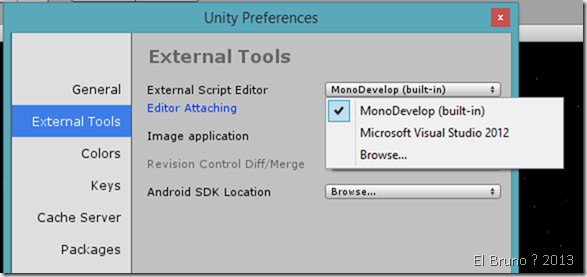
4. Navigate to Visual Studio 2013 devenv file location, usually in “SomeDrive\Program Files (x86)\Microsoft Visual Studio 12.0\Common7\IDE\devenv.exe”
5. Done !
![image_thumb[1]](https://elbruno.com/wp-content/uploads/2014/01/image_thumb11.png "image_thumb[1]")
Saludos @ Somewhere between New York and Madrid
El Bruno
 |
 |
 |
 El Bruno
Leave a comment