
Hi,
in today’s post we will move the angle of the sensor up or down using the SDK APIs.
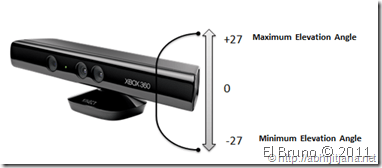
It is initially possible to move the camera up or down a twenty-seventh, and to try them we will from the example of yesterday.
1 We modify our application to allow us to define the angle of inclination of the Kinect using a text box and a button.
2. The Xaml is as the following example
1: <Window x:Class="ElBruno.KinectViewer.MainWindow"
2: xmlns="http://schemas.microsoft.com/winfx/2006/xaml/presentation"
3: xmlns:x="http://schemas.microsoft.com/winfx/2006/xaml"
4: Title="El Bruno - Kinect Viewer" Height="480" Width="740">
5: <Grid>
6: <Grid.RowDefinitions>
7: <RowDefinition Height="40"></RowDefinition>
8: <RowDefinition Height="*"></RowDefinition>
9: <RowDefinition Height="40"></RowDefinition>
10: </Grid.RowDefinitions>
11: <TextBlock Text="Camera Viewer" FontSize="20" HorizontalAlignment="Center"
12: Foreground="Black" Grid.Row="0" />
13: <Image x:Name="CameraViewer" Margin="10,10,10,10"
14: Stretch="Fill" Grid.Row="1" />
15: <StackPanel Orientation="Horizontal" HorizontalAlignment="Center" Grid.Row="2" >
16: <TextBox x:Name="txtAngle" Text="0" FontSize="20" HorizontalAlignment="Center" Foreground="Black" />
17: <Button x:Name="SetCameraAngle" Click="SetCameraAngle_Click" Content="Set Camera Angle" />
18: </StackPanel>
19: </Grid>
20: </Window>
3. Then the implementation of the event click of the button is rather simple
1: private void SetCameraAngleClick(object sender, RoutedEventArgs e)
2: {
3: _kinect.NuiCamera.ElevationAngle = Convert.ToInt32(txtAngle.Text);
4: }
Today I will not put the example to download because it is quite simple to modify. And tomorrow some Audio and Speech if the bird allow me.
Greetings @ Here
The Bruno


 El Bruno
Leave a comment